Last Updated: October 6, 2026
Reading Time: 12 minutes
Post Views: 109
- Quick Answer: WooCommerce vs Shopify
- WooCommerce vs Shopify at a Glance
- Which Platform Fits Your Business Situation?
- WooCommerce vs Shopify: What's the Real Difference?
- 4. Maintenance, Security, and Operational Risk
- 12. Ownership and Control
- When WooCommerce May Make More Sense
- When Shopify May Make More Sense
- When Should You Move From WooCommerce to Shopify?
- When You Should NOT Migrate From WooCommerce
- What Should You Check Before Choosing a Platform?
- WooCommerce vs Shopify: Final Decision Framework
- Final Thoughts
- Frequently Asked Questions
If you’re comparing WooCommerce and Shopify, you’re not just choosing an eCommerce platform. You’re choosing how much of your store’s technology your business will manage, how much control you want, and how easily your operation can scale.
Most businesses start comparing these platforms for one of several reasons:
- They’re launching a new online store.
- Their existing WooCommerce store is becoming harder to maintain.
- Plugin, hosting, or performance issues are increasing.
- They’re spending more on development and maintenance.
- They need more customization than their current platform provides.
- They’re considering moving from WooCommerce to a managed platform.
- They’re planning for future growth and want to avoid rebuilding again later.
So the real question isn’t simply “Which platform has more features?”
It’s:
Which platform fits your business model, technical resources, budget, and growth plans?
This guide compares WooCommerce and Shopify across cost, maintenance, performance, SEO, scalability, customization, integrations, and day-to-day management so you can make a decision based on your actual business situation.
Quick Answer: WooCommerce vs Shopify
Neither platform is universally better. The right choice depends on how your business operates and how much control or technical responsibility you want.
Shopify may fit better if you:
- Want a fully hosted eCommerce platform.
- Have a small or non-technical team.
- Want less responsibility for hosting and infrastructure.
- Prefer predictable platform subscription costs.
- Want to launch and manage a store with less technical overhead.
- Need a platform that can scale without managing the underlying server environment.
WooCommerce may fit better if you:
- Need extensive customization or custom business logic.
- Already rely heavily on WordPress.
- Want greater control over hosting, code, and site architecture.
- Need flexibility across plugins, payment gateways, and integrations.
- Have in-house developers or reliable technical support.
- Want more control over how your eCommerce stack is built and maintained.
The key difference: WooCommerce gives you more control over the underlying technology, while Shopify manages more of the infrastructure for you. That difference affects cost, maintenance, customization, and day-to-day operations.
WooCommerce vs Shopify at a Glance
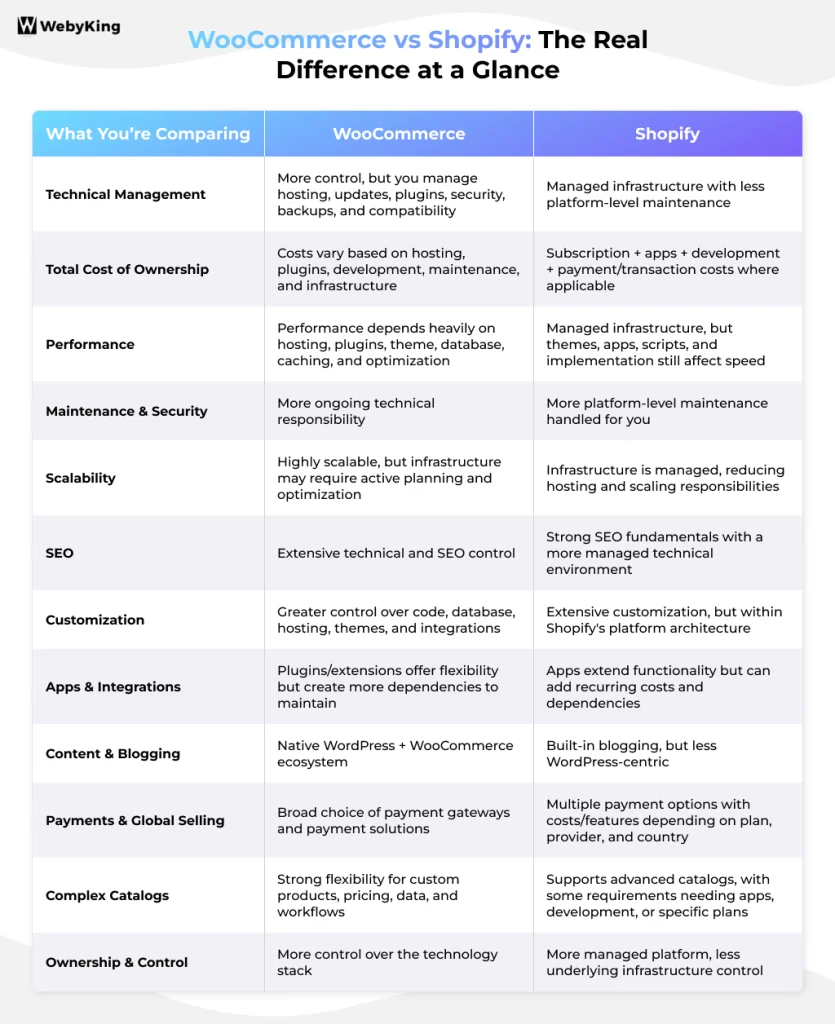
| Factor | WooCommerce | Shopify |
|---|---|---|
| Platform model | Open-source eCommerce platform for WordPress | Hosted commerce platform |
| Hosting | You choose and manage the hosting environment | Hosting is included |
| Ease of management | More technical responsibility | Less infrastructure management |
| Cost structure | Flexible, but depends on hosting, extensions, development, and services | Subscription-based, with additional costs depending on apps, payments, and services |
| Customization | Extensive control over code and architecture | Strong customization, with some platform-level constraints |
| SEO | High technical and content flexibility | Strong SEO fundamentals with less server-level control |
| Performance | Depends heavily on hosting and implementation | Managed infrastructure reduces infrastructure management |
| Maintenance | Updates, plugins, security, backups, and hosting require management | Much of the platform infrastructure is managed by Shopify |
| Scalability | Can scale with appropriate infrastructure and development | Designed to scale without merchant-managed infrastructure |
| WordPress integration | Native | Separate from WordPress |
| Best suited to | Businesses needing control and customization | Businesses prioritizing managed infrastructure and operational simplicity |
Which Platform Fits Your Business Situation?
The best way to compare WooCommerce and Shopify is to start with your situation rather than the feature list.
| Your situation | What to consider |
|---|---|
| You’re launching your first store and don’t have a developer | Shopify can reduce the amount of infrastructure and technical maintenance you need to manage. |
| You already have a WordPress website | WooCommerce may fit naturally because commerce and content remain within the same ecosystem. |
| Your WooCommerce store has frequent plugin or compatibility problems | Shopify can remove much of the WordPress plugin and hosting management burden, although Shopify apps can still introduce their own considerations. |
| You need highly customized business logic | WooCommerce may provide greater control over the underlying code and architecture. |
| Your team has dedicated developers | WooCommerce’s flexibility may be valuable because you have resources to manage it. |
| You want to avoid managing servers | Shopify handles the hosting infrastructure for you. |
| Your store experiences high traffic spikes | Shopify can reduce the need to manage infrastructure capacity yourself; WooCommerce can also handle high traffic when properly engineered. |
| You depend heavily on WordPress publishing and content | WooCommerce keeps your store within the WordPress ecosystem. |
| Your maintenance and development costs keep increasing | Compare the total cost of running your current WooCommerce store with the expected cost of Shopify before deciding to migrate. |
| Your store requires unusual integrations or custom workflows | Compare the exact technical requirements of both platforms rather than choosing based only on general platform features. |
The important point is that platform choice should follow business requirements—not the other way around.
WooCommerce vs Shopify: What's the Real Difference?
At a high level:
WooCommerce gives you control and flexibility, but you take on more responsibility for the technology stack.
Shopify gives you a managed commerce environment, but you work within the capabilities and constraints of its platform.
Neither approach is automatically better.
The better fit depends on whether your business values control or operational simplicity more heavily.
1. Ease of Use and Technical Management
WooCommerce
WooCommerce runs on WordPress, so your store operates within a broader website technology stack.
Depending on your setup, you may need to manage:
- Hosting
- WordPress updates
- WooCommerce updates
- Plugins and extensions
- Theme updates
- Security
- Backups
- Performance
- Compatibility
- Developer support
This gives you considerable flexibility, but it also means there are more technical components to maintain.
Shopify
Shopify is a hosted commerce platform. You don’t have to manage the underlying server infrastructure, and Shopify handles much of the platform-level maintenance and security.
That can reduce the amount of technical work your team needs to handle.
However, Shopify isn’t completely maintenance-free. Themes, apps, integrations, customizations, analytics, and store configuration still require ongoing attention.
Bottom line
Choose based on the amount of technical responsibility your team is prepared to own.
2. Cost: Compare Total Cost of Ownership, Not Just Subscription Price
The cheapest platform on paper isn’t necessarily the cheapest platform to operate.
The better comparison is the Total Cost of Ownership (TCO).
WooCommerce costs can include:
- Hosting
- Premium themes
- Plugins and extensions
- Developer support
- Maintenance
- Security services
- Backups
- Performance optimization
- Custom development
- Payment processing
- Third-party services
WooCommerce itself is free and open source, but the total cost of operating a WooCommerce store depends on the infrastructure and services you choose. WooCommerce currently lists hosting for many stores at roughly $25–$350/month and paid extensions commonly ranging from $29–$299/year, although actual costs vary significantly by store requirements.
Shopify costs can include:
- Shopify subscription
- Apps
- Themes
- Custom development
- Payment processing
- Third-party transaction fees where applicable
- Additional services and integrations
For U.S. stores, Shopify currently lists Basic at $29/month, Grow at $79/month, and Advanced at $299/month when billed yearly. Shopify Plus starts at $2,300/month on a three-year term. Pricing and plan features can vary by country and billing arrangement.
The real cost question
Don’t ask:
“Which platform has the lower monthly price?”
Ask:
“What will it cost my business to run, maintain, develop, and scale this store over the next few years?”
That includes both cash costs and internal time.
If you’re considering Shopify specifically as a replatforming decision, see our guide to WooCommerce to Shopify migration costs to understand the additional expenses involved in moving your store.
3. Performance and Site Speed
WooCommerce performance depends heavily on how the store is built and hosted.
Factors include:
- Hosting quality
- Server resources
- Database optimization
- Theme quality
- Plugin and extension load
- Image optimization
- Caching
- CDN configuration
- Third-party scripts
- Code quality
A well-engineered WooCommerce store can perform extremely well.
Shopify provides managed infrastructure, which removes much of the responsibility for server configuration and infrastructure scaling from the merchant.
However, Shopify stores can still experience performance issues because of themes, apps, JavaScript, images, third-party scripts, and implementation choices.
The important point
Neither platform automatically makes a store fast or slow.
The platform affects the technical environment, but implementation still matters.
4. Maintenance, Security, and Operational Risk
This is one of the biggest practical differences between the platforms.
WooCommerce
You may need to coordinate:
- WordPress updates
- WooCommerce updates
- Plugin updates
- Theme updates
- Security monitoring
- Backups
- Hosting
- Compatibility testing
- Performance maintenance
This isn’t necessarily a problem if you have the resources to manage it.
The problem starts when technical maintenance becomes a recurring business distraction.
Shopify
Shopify manages much of the underlying infrastructure and platform-level maintenance.
That reduces the need for merchants to manage servers, WordPress core updates, or the underlying hosting environment.
However, Shopify apps and customizations still require management.
Business signal
If your team is spending increasing amounts of time:
- fixing technical issues,
- resolving compatibility problems,
- coordinating developers,
- maintaining infrastructure, or
- recovering from avoidable technical failures,
then it’s worth reviewing whether your current platform still fits your operating model.
5. Scalability and Traffic
Both WooCommerce and Shopify can support growing businesses.
The difference is how that growth is managed.
WooCommerce
WooCommerce can scale, but your hosting architecture and technical implementation become increasingly important as traffic, orders, products, integrations, and database activity grow.
Larger stores may need:
- Better hosting
- Database optimization
- Caching
- CDN configuration
- Load balancing
- Infrastructure scaling
- Performance monitoring
- Development support
Shopify
Shopify manages the underlying commerce infrastructure, which means merchants don’t have to design and maintain their own hosting architecture as the store grows.
That can be particularly useful for businesses that want to focus their internal resources on merchandising, marketing, customer experience, and operations rather than infrastructure.
Bottom line
WooCommerce gives you more control over the infrastructure. Shopify gives you less infrastructure responsibility.
6. SEO Capabilities
SEO is often treated as a reason to choose one platform over the other.
The reality is more nuanced.
WooCommerce SEO strengths
WooCommerce benefits from the WordPress ecosystem and provides extensive control over:
- URLs
- Metadata
- Content
- Internal linking
- Structured data
- Site architecture
- Technical SEO
- SEO plugins
- Server configuration
This can be valuable for businesses with advanced SEO requirements and strong technical resources.
Shopify SEO strengths
Shopify provides strong SEO fundamentals, including:
- Editable titles and meta descriptions
- XML sitemap generation
- Canonical handling
- Structured platform architecture
- Redirect management
- Mobile-friendly storefront capabilities
- Managed infrastructure
Shopify also reduces the amount of technical infrastructure work required from the store owner.
Which platform is better for SEO?
Neither platform guarantees better rankings.
Organic performance depends on factors such as:
- Search intent
- Content quality
- Site architecture
- Internal linking
- Technical SEO
- Page experience
- Structured data
- Backlinks
- Product and category optimization
- Competition
- Overall implementation
The key SEO difference
WooCommerce generally provides greater technical control. Shopify generally provides a more managed technical environment.
For many businesses, execution matters more than the platform itself.
7. Customization and Development
This is one area where the platforms’ differences matter most.
WooCommerce
Because WooCommerce is open source and runs on WordPress, developers have extensive control over the codebase, database, hosting environment, plugins, themes, and integrations.
That can make WooCommerce suitable for businesses with:
- Complex product logic
- Custom checkout requirements
- Unique pricing systems
- Specialized integrations
- Custom customer workflows
- Advanced WordPress requirements
Shopify
Shopify supports significant customization through themes, apps, APIs, and Shopify’s development ecosystem.
However, you are still working within Shopify’s platform architecture.
That means some requirements that are straightforward in a self-controlled WooCommerce environment may require different implementation approaches on Shopify.
Bottom line
If your business depends on deep technical customization, compare the exact requirements before choosing a platform.
8. Plugins, Apps, and Integrations
Both platforms have extensive ecosystems, but they work differently.
WooCommerce
You can extend your store through WordPress plugins and WooCommerce extensions.
This gives you considerable flexibility, but each additional component can create another dependency to maintain and test.
Shopify
Shopify uses apps and integrations to extend functionality.
This reduces the need to manage the underlying platform, but apps can add:
- Monthly costs
- JavaScript
- Data dependencies
- Configuration requirements
- Compatibility considerations
What matters
Don’t count the number of available plugins or apps.
Instead, ask:
How many third-party dependencies does my business actually need, and who will maintain them?
9. Content, Blogging, and WordPress Integration
If content marketing is a major part of your acquisition strategy, WordPress can be an important consideration.
WooCommerce operates directly within WordPress, allowing your content and commerce experience to live in the same ecosystem.
Shopify also supports blogging and content publishing, but businesses that already depend heavily on WordPress may prefer keeping their content and commerce infrastructure together.
For businesses where eCommerce is the primary focus and content publishing is secondary, Shopify’s managed commerce environment may be more important than WordPress integration.
10. Payments and Selling Internationally
Payment requirements can influence the total cost and complexity of an eCommerce platform.
WooCommerce allows merchants to choose from a wide range of payment gateways and payment solutions. WooCommerce states that it does not charge an additional platform transaction fee itself; payment providers can still charge their own processing fees.
Shopify also supports multiple payment options, but costs can vary depending on the payment provider, Shopify plan, country, and payment setup. Shopify’s current U.S. pricing shows different third-party provider rates across its plans.
If you’re selling internationally, also consider:
- Multiple currencies
- Taxes and duties
- Local payment methods
- Shipping
- Regional storefront requirements
- International SEO
- Product availability by market
- Localization
Don’t choose a platform based only on the headline subscription price.
11. Product and Catalog Complexity
Your product catalog can significantly affect which platform makes sense.
Consider:
- Number of products
- Product variations
- Custom product options
- Subscription products
- Bundles
- Configurable products
- Inventory locations
- B2B requirements
- Pricing rules
- Custom product data
- ERP or inventory integrations
WooCommerce provides significant flexibility for complex catalog structures and custom functionality.
Shopify also supports large catalogs and advanced commerce requirements, but some complex use cases may need apps, custom development, or specific Shopify plans.
Bottom line
Map your product and operational requirements before choosing the platform.
The platform that handles your current catalog isn’t necessarily the platform that will handle your future business model most efficiently.
12. Ownership and Control
This is one of the fundamental differences between WooCommerce and Shopify.
WooCommerce
You have greater control over:
- Hosting
- Code
- Database
- Plugins
- Themes
- Infrastructure
- Technical architecture
Shopify
You operate within a managed SaaS platform where Shopify controls much of the underlying infrastructure.
That reduces infrastructure responsibility but also means you have less control over the underlying platform architecture.
So the question becomes:
Do you want to manage more of the technology in exchange for greater control, or would you rather let the platform manage more of it?
When WooCommerce May Make More Sense
WooCommerce may be a strong fit if:
- You need extensive customization.
- You already have a WordPress-based business.
- Your content strategy is deeply integrated with WordPress.
- You need greater control over hosting and code.
- Your business has unusual technical requirements.
- You have developers or an agency available to manage the store.
- You need flexible integrations or custom workflows.
WooCommerce is particularly useful when control and flexibility are business requirements rather than optional features.
When Shopify May Make More Sense
Shopify may be a strong fit if:
- You want a managed commerce platform.
- You have limited technical resources.
- You want to reduce infrastructure responsibilities.
- Your team wants to spend more time on sales, marketing, merchandising, and customers.
- You want a predictable platform subscription.
- You want to scale without managing your own hosting architecture.
- Your requirements can be handled within Shopify’s platform and app ecosystem.
Shopify can be particularly useful when operational simplicity is more valuable to your business than complete control over the technology stack.
When Should You Move From WooCommerce to Shopify?
Moving platforms is a major business decision. It should be based on measurable problems rather than platform popularity.
A Shopify migration may be worth evaluating if you’re experiencing several of these issues:
- Frequent plugin or compatibility problems
- Increasing developer dependency
- Rising maintenance costs
- Performance problems that are difficult to resolve
- Hosting limitations
- Recurring technical issues during sales campaigns
- Too much internal time spent managing technology
- Difficulty scaling your current infrastructure
- A growing gap between your business needs and your current WooCommerce setup
The important distinction is this:
Don’t migrate because WooCommerce is “bad.” Consider migrating when the cost and complexity of your current setup no longer make sense for your business.
A migration should evaluate more than the platform itself. You also need to plan for:
- Product data
- Customer data
- Orders
- URLs
- Redirects
- Metadata
- Content
- Images
- Categories and collections
- Integrations
- Analytics
- Tracking
- Checkout
- Payments
- Testing
When You Should NOT Migrate From WooCommerce
Not every WooCommerce problem requires a platform migration.
For example, if your store is slow because of:
- poor hosting,
- an outdated theme,
- excessive plugins,
- unoptimized images,
- inefficient code,
- database issues, or
- poor caching,
then fixing the underlying implementation may be more appropriate than changing platforms.
Likewise, if a single plugin is causing problems, replacing or reconfiguring that plugin may be significantly less disruptive than migrating the entire store.
Before migrating, ask:
Is the platform itself causing the problem, or is the current implementation causing the problem?
That distinction can save significant time, money, and migration risk.
What Should You Check Before Choosing a Platform?
Before committing to WooCommerce or Shopify, evaluate these seven areas:
1. Technical resources
Who will maintain the store?
2. Total cost
What will it cost the store to operate—not just to launch?
3. Customization
What functionality must be custom-built?
4. Product complexity
How complex are your products, pricing, inventory, and checkout?
5. SEO requirements
How much technical and content control does your SEO strategy require?
6. Growth plans
What will the store need to support over the next three to five years?
7. Business priorities
Would your team benefit more from greater control or reduced technical responsibility?
WooCommerce vs Shopify: Final Decision Framework
There is no universal winner.
Shopify may be the better operational fit when:
Managed infrastructure + lower technical responsibility + predictable platform costs are your priorities.
WooCommerce may be the better technical fit when:
Customization + control + WordPress integration + flexible architecture are your priorities.
And if you already have a WooCommerce store, don’t automatically assume that migration is the answer.
Compare:
Current WooCommerce costs + maintenance + development + technical workload
against:
Expected Shopify costs + apps + development + payment costs + migration effort
Then consider the platform’s ability to support your business over the next several years.
The right platform is the one that supports your business requirements without creating unnecessary operational complexity.
Final Thoughts
Choosing between WooCommerce and Shopify comes down to how your business operates and what you need from your eCommerce platform. Shopify may be a better fit if you want managed infrastructure, simpler maintenance, and less technical responsibility. WooCommerce may be a better fit if you need greater control, deeper WordPress integration, and extensive customization.
If you’re already using WooCommerce, don’t migrate simply because Shopify is easier to manage. First evaluate your current costs, technical workload, performance, and business requirements. If those challenges are creating unnecessary complexity or limiting growth, a well-planned migration may be worth considering.
Not Sure Which Platform Fits Your Business?
Compare platforms based on your real needs: cost, scalability, SEO, and operations- before making a decision.
If you’re planning a move to Shopify, ensure your migration is fully aligned with products, data, URLs, and growth goals.
Need clarity? Get a tailored migration assessment from a WebyKing expert.
Frequently Asked Questions
Is Shopify better than WooCommerce?
Neither platform is universally better. Shopify generally reduces infrastructure and maintenance responsibilities, while WooCommerce gives businesses greater control over hosting, code, WordPress, and customization. The right choice depends on your technical resources, business requirements, and operating model.
Is WooCommerce cheaper than Shopify?
WooCommerce has a free core platform, but running a WooCommerce store still involves hosting, extensions, development, maintenance, security, and payment costs. Shopify uses a subscription model and can also involve apps, development, payment processing, and other costs. Compare the total cost of ownership rather than only the platform subscription.
Which platform is easier to manage?
Shopify generally requires less infrastructure management because hosting and the underlying platform are managed for you. WooCommerce gives you more control but requires more responsibility for hosting, updates, plugins, security, and technical maintenance.
Is Shopify better for SEO than WooCommerce?
Not automatically. WooCommerce provides extensive SEO and technical control, while Shopify provides strong SEO fundamentals within a more managed environment. Rankings depend on implementation, content, site architecture, technical SEO, links, performance, and search intent—not simply the platform.
Can I migrate from WooCommerce to Shopify without losing SEO?
A migration can preserve much of your existing SEO value when URLs, 301 redirects, metadata, canonical tags, internal links, XML sitemaps, and other technical SEO elements are properly planned and tested. However, no migration should be treated as completely risk-free, and rankings can fluctuate during the transition.
Why do businesses move from WooCommerce to Shopify?
Businesses may consider moving when technical maintenance, hosting, plugin dependencies, performance issues, development costs, or infrastructure management are creating too much operational complexity. The decision should be based on the business impact of those problems rather than the popularity of either platform.
Can WooCommerce handle a large eCommerce store?
Yes. WooCommerce can support large stores, but the required hosting, architecture, optimization, and development resources depend on the store’s products, traffic, orders, integrations, and functionality. WooCommerce itself notes that larger stores can be supported with appropriate hosting and infrastructure.
Can Shopify handle a large eCommerce store?
Yes. Shopify offers plans and infrastructure designed for growing and high-volume businesses, including Shopify Plus for complex businesses. Exact requirements, integrations, customization, and costs should be evaluated before selecting a plan.
Which platform is better for beginners?
Shopify may be easier for beginners because it provides a hosted environment and reduces the need to manage servers and much of the underlying technical infrastructure. WooCommerce can still be a strong option for beginners who already use WordPress or have access to technical support.
Should I move from WooCommerce to Shopify if my store is slow?
Not necessarily. First, identify whether the problem comes from hosting, plugins, theme code, images, database performance, caching, third-party scripts, or the underlying architecture. If the technical problems are caused by the current implementation, optimization may solve them without requiring a migration.
I'm Ravi Makhija, Founder & CEO of WebyKing. I believe your website should be the hardest-working member of your team, building trust, generating leads, and creating opportunities 24/7. Through web design, development, SEO, and digital strategy, I help businesses build websites that become growth assets-not just digital brochures. Too many businesses invest in websites that look great but fail to deliver real business value.
Business owners deserve digital solutions that are simple, practical, and built around their goals, not unnecessary complexity. After all, your website shouldn't just represent your business; it should help grow it.

Need Help Choosing Between WooCommerce and Shopify for Success?