Last Updated: August 22, 2026
[rt_reading_time label="Reading Time:" postfix="minutes" postfix_singular="minute"]
Post Views: 128
- First: Is Migration Actually What You Need?
- Real-World Scenarios: When Businesses Actually Decide to Migrate
- 17 Signs That Genuinely Require Migration
- Signs That Look Like Migration Triggers But Aren't
- Timing: When Not to Migrate Even If the Signs Are Clear
- The Self-Assessment Framework: Should You Migrate?
- Quick Decision Scorecard
- When the Answer Is Yes: What Comes Next
- Final Thoughts
- Frequently Asked Questions
Website migration is one of the most impactful and disruptive changes a business can make to its online presence. Done at the right moment and for the right reasons, it solves problems that nothing else can. Done prematurely, unnecessarily, or at the wrong time, it creates new problems on top of the old ones.
The question most businesses face isn’t “what is website migration?” It’s something more specific: Is migration actually the right answer for what I’m dealing with?
This guide helps you answer that. It also helps you understand whether your situation requires a full migration, a smaller fix, or a more structured execution approach.
According to the Adobe Commerce Report 2025, 27% of ecommerce companies plan to switch platforms within the next two years, which means this is a decision a large number of businesses are actively facing.
Quick Answer: Should You Migrate Your Website?
If you’re trying to decide whether a website migration is necessary quickly, use this simplified rule:
- Yes – You should migrate if your platform has hard limitations, cannot scale, blocks critical integrations, or creates revenue-impacting issues.
- No – You don’t need migration if your issues are related to design, content quality, SEO strategy, or basic performance optimization.
- Not sure – Keep reading and use the 17 signs below to make a confident decision.
In short: migrate only when your platform is the problem, not your execution.
If your answer leans toward “Yes,” the next step is evaluating how to execute the migration safely and efficiently, especially if it involves SEO, data, or platform-level changes.
First: Is Migration Actually What You Need?
Before treating any sign as a reason to migrate, run it through this filter:
Can this problem be solved without changing the platform, domain, or fundamental architecture of my site?
If yes, migration is not the answer.
Migration carries real risks: SEO disruption, data complexity, cost, and time.
If the answer is yes, the decision shifts from whether to migrate to how to execute it without introducing new risks.
Real-World Scenarios: When Businesses Actually Decide to Migrate
- A growing ecommerce brand hits platform limits and cannot scale internationally
- A content-heavy business is blocked by an outdated CMS
- A high-traffic site suffers performance issues due to infrastructure limits
In each of these cases, the decision wasn’t just about migrating; it was about executing the migration correctly to avoid performance loss or operational disruption.
17 Signs That Genuinely Require Migration
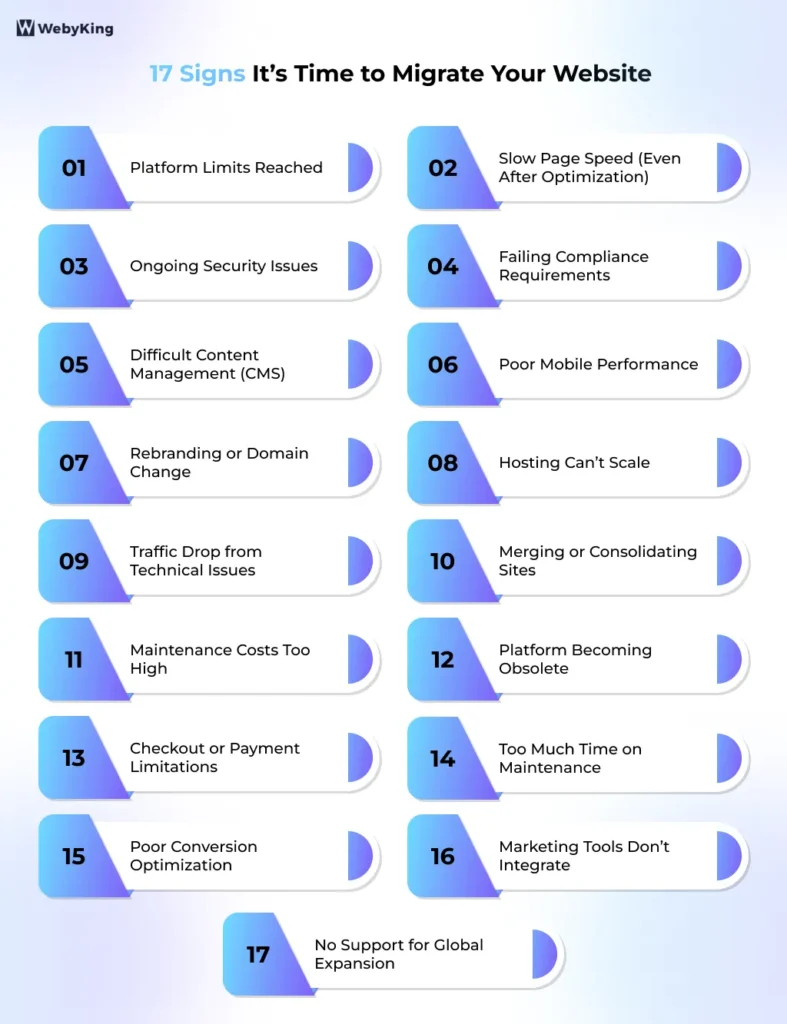
1. Your Platform Has Hard Limits You've Hit
Every website platform has constraints built into its architecture. When your business needs exceed those constraints, and there’s no viable workaround, migration becomes the only realistic solution.
Concrete examples:
- Your ecommerce platform caps product variants, and you’re approaching or exceeding that limit
- Your CMS cannot support your content structure or publishing volume
- Required features (subscriptions, wholesale pricing, regional pricing) aren’t supported
- No reliable third-party apps exist to extend functionality
Diagnostic: If the limitation is architectural and cannot be resolved through plugins, upgrades, or custom development, this is a platform-level constraint → migration required.
Simple takeaway: If your business growth depends on features your platform can’t support, staying will block progress.
2. Your Page Speed Is Consistently Poor Despite Optimization
Site speed directly affects both rankings and conversions. If you’ve already implemented standard optimizations and performance is still poor, the issue may lie deeper.
When this signals migration:
- Core Web Vitals remain poor after optimization
- The hosting infrastructure can’t be meaningfully upgraded
- Platform architecture (e.g., heavy JS rendering) creates performance ceilings
Examples:
- API rate limits are blocking real-time operations
- Heavy JavaScript rendering is slowing page load
- Server response delays due to platform constraints
Diagnostic: If Core Web Vitals and load times remain poor after comprehensive optimization (code, images, caching, CDN), the bottleneck likely exists at the platform or infrastructure level.
Simple takeaway: If performance doesn’t improve after full optimization, further fixes won’t help — you need a platform change.
3. You're Experiencing Chronic Security Vulnerabilities
Security issues that repeat despite following best practices often point to platform-level weaknesses.
Signals:
- The platform is no longer receiving security updates
- Known vulnerabilities cannot be patched without a major rebuild
- The hosting environment lacks modern security capabilities
- Multiple incidents occur despite proper configuration
Diagnostic: If vulnerabilities originate from the platform’s core codebase or lack of ongoing security updates—and cannot be resolved through configuration or patches—this is a platform-level risk → migration required.
Simple takeaway: If security risks come from the platform itself, staying is riskier than migrating.
4. Your Site Fails to Meet Legal Compliance Requirements
If your platform cannot support legal compliance, migration becomes a requirement, not a choice.
When this applies:
- You cannot implement GDPR/CCPA requirements (consent, data access, deletion)
- Accessibility standards (WCAG/ADA) cannot be met due to platform limitations
- Industry regulations (finance, healthcare, legal) cannot be supported
Diagnostic: If compliance gaps stem from platform limitations (e.g., inability to implement consent management, data controls, or accessibility standards), not from configuration, this is a structural constraint → migration required.
Simple takeaway: If your platform prevents legal compliance, staying exposes your business to real legal and financial risk.
5. Your CMS Makes Content Management Genuinely Painful
When routine content updates require developer support, your CMS is creating operational inefficiency.
Common signs:
- Publishing or editing content is slow or complex
- Landing pages require technical intervention
- Scaling content becomes increasingly difficult
Diagnostic: If content workflows cannot be improved without changing the CMS architecture, this is a platform limitation → migration required.
Simple takeaway: If your team needs developers for everyday content updates, your CMS is slowing down growth.
6. Poor Mobile Performance That Is Platform-Specific
Mobile experience directly impacts revenue. If mobile issues stem from platform limitations, they can’t be fixed with surface-level changes.
When this requires migration:
- The platform doesn’t support modern responsive frameworks
- Mobile checkout UX cannot be improved
- Mobile speed is consistently poor due to platform rendering
Diagnostic: If mobile issues stem from platform constraints (e.g., rendering limitations, rigid templates, or checkout UX restrictions) rather than design or styling, this is a structural limitation → migration required.
Simple takeaway: If your mobile experience can’t be improved due to platform limits, it will continue to impact conversions and revenue.
7. You're Rebranding or Changing Your Domain
A domain change or major rebrand often requires structural changes that go beyond a redesign.
Typical scenarios:
- Business name change requiring a new domain
- Merging multiple domains into one
- Rebuilding site architecture to reflect a new brand direction
Diagnostic: If your URLs, domain, or site structure must change in a way that affects how content is organized or accessed, this requires a full structural transition → migration is unavoidable.
Simple takeaway: If your brand identity changes at the domain or structure level, your current setup won’t carry forward as-is.
8. Your Hosting Environment Cannot Scale With Your Traffic
If your infrastructure cannot handle growth, performance and reliability suffer.
Signals:
- Frequent downtime or slowdowns during peak traffic
- Hosting cannot scale with demand
- Infrastructure limitations block performance improvements
Diagnostic: If your infrastructure cannot scale vertically (resources) or horizontally (load distribution) within your current environment, this is a hosting constraint → migration required.
Simple takeaway: If your site slows down or breaks as traffic grows, your infrastructure isn’t built to support scale.
9. Your Organic Traffic Has Declined Due to Technical Limitations
Your organic traffic has declined consistently for 2–3+ months despite ongoing SEO efforts, indicating deeper technical limitations.
Platform-level SEO issues:
- Poor or inflexible URL structure
- Crawlability or indexing problems
- Lack of support for structured data, canonicals, hreflang
Diagnostic: If technical SEO limitations (e.g., URL structure, crawlability, indexing control, structured data, or hreflang support) cannot be resolved within your platform, this is a system constraint → migration required.
Simple takeaway: If your platform blocks SEO improvements, your organic growth will always be capped.
10. You're Merging With Another Business or Consolidating Multiple Sites
Mergers and consolidations require combining multiple systems into one unified structure, which is inherently a migration scenario.
When this becomes unavoidable:
- Sites run on different platforms or CMS systems
- URL structures conflict or overlap
- SEO authority needs to be consolidated into one domain
- Customer, product, or operational data exists across systems
Diagnostic: f combining your sites requires restructuring URLs, platforms, or underlying data systems, this becomes a full migration scenario—not a simple merge.
Simple takeaway: If you’re merging multiple sites, expect a full migration—not a quick consolidation.
11. The Cost of Maintaining Your Current Setup Exceeds the Cost of Migrating
When ongoing costs outweigh migration investment, staying put becomes inefficient.
What to evaluate:
- Platform subscription vs alternative platform cost
- Developer time spent on fixes and maintenance
- Plugin/tool licensing costs
- Revenue loss due to performance or limitations
Diagnostic: If maintenance costs consistently exceed growth investment or increase with complexity, this indicates structural inefficiency → migration required.
Simple takeaway: If most of your budget goes into maintaining the system instead of growing it, your setup is holding you back.
12. Your Existing Platform Vendor Is End-of-Life or Declining
A platform with no future creates long-term risk.
Warning signs:
- Official end-of-life announcement
- No updates, patches, or feature development
- Shrinking developer ecosystem or support
- Integrations becoming unavailable or outdated
Diagnostic: If your platform is declining—lacking updates, support, or ecosystem growth—its long-term viability is compromised, increasing future risk.
Simple takeaway: If your platform is fading, staying on it will only make future migration harder and riskier.
13. Your Checkout, Payment, or Shipping Logic Cannot Be Implemented
Checkout is where revenue is finalized; limitations here directly impact conversions.
Signals:
- Missing key payment methods (Apple Pay, BNPL, etc.)
- Inability to handle regional tax or shipping logic
- Workarounds causing errors or inconsistencies
- Checkout changes require a heavy development effort
Diagnostic: If your platform cannot support required checkout functionality (e.g., payment methods, tax logic, or shipping rules), this directly impacts transactions → migration becomes a high priority.
Simple takeaway: If your checkout can’t support how you sell, you’re losing revenue daily.
14. Your Engineering Team Spends More Time on Maintenance Than Building
When technical debt dominates development time, growth slows.
Indicators:
- Frequent fixes for broken integrations
- Ongoing compatibility issues
- Feature development is constantly delayed
- Maintenance work exceeds new development
Examples:
- Monolithic architecture prevents performance scaling
- Frequent dependency conflicts across plugins/modules
- The legacy codebase is slowing down development cycles
Diagnostic: If 40–50%+ of engineering time is spent on maintenance instead of building new features, the platform is creating technical drag.
Simple takeaway: If your team spends more time fixing than building, your platform is slowing down growth.
15. You Cannot Effectively Optimize for Conversion
If your platform limits your ability to improve conversion rates, your revenue potential is capped.
Platform constraints:
- Inability to run A/B tests on key pages
- Limited personalization capabilities
- Restricted control over product discovery (filters, search, recommendations)
- No support for server-side experimentation
Diagnostic: If identified conversion improvements (A/B testing, personalization, UX changes) cannot be implemented due to platform limitations, this restricts optimization potential.
Simple takeaway: If you can’t act on proven conversion opportunities, your revenue growth is being limited.
16. Your Marketing and Sales Stack Cannot Integrate Properly
Disconnected systems create inefficiencies and data gaps.
Common signals:
- Critical tools (CRM, email, ERP) require workarounds
- APIs are limited or unreliable
- Data flow is incomplete or delayed
- Manual processes are required to sync systems
Examples:
- Limited backend access restricting customization
- API limitations are preventing proper tool integration
- Manual data syncing due to a lack of automation
Diagnostic: If integration issues create ongoing operational friction and cannot be resolved through stable APIs or automation, this indicates a system-level limitation → migration required.
Simple takeaway: If your tools rely on workarounds or manual syncing, your operations won’t scale efficiently.
17. Your Platform Cannot Support International Expansion
Global growth requires capabilities that many platforms can’t fully support.
What this includes:
- True multi-currency transactions (not just display conversion)
- Multi-language content with proper SEO (hreflang)
- Region-specific tax and compliance handling
- Local payment methods
- Market-specific domains or experiences
Diagnostic: If international expansion depends on workarounds rather than native platform capabilities (multi-currency, localization, compliance), the platform becomes a scalability constraint.
Simple takeaway: If global growth isn’t built into your platform, scaling internationally will remain difficult and inefficient.
Signs That Look Like Migration Triggers But Aren't
Equally important: knowing when migration is NOT the answer.
1. Outdated design
A visual redesign can almost always be accomplished through a new theme or template on your existing platform. Unless structural changes are required, this is not a migration scenario.
Because design can be updated without changing your platform or site structure.
2. A single bad performance month
Traffic fluctuations, ranking adjustments, and conversion dips happen on every platform. A pattern over multiple months is a signal; a single bad period is noise.
Because short-term fluctuations are normal and not a structural issue.
3. Frustration with your platform’s interface
Interface frustration is often a usability or training issue rather than a platform limitation.
Usability issues can usually be solved with better workflows or training.
4. Your competitor is on a different platform
Their platform choice reflects their needs, not yours.
Because their business model, scale, and technical setup may be completely different.
5. You’ve heard good things about Platform X
Positive reviews or trends are not valid migration triggers without a real problem to solve.
Because trends and opinions are not reasons to migrate without a clear limitation.
Timing: When Not to Migrate Even If the Signs Are Clear
Even when migration is clearly the right decision, timing matters significantly. These windows should be avoided:
Before or during peak season
Migration always carries a stabilization period of 2–8 weeks, where rankings fluctuate and technical issues surface. A migration that goes live two weeks before Black Friday, a major campaign, or your industry’s peak buying season is a financial risk. Plan migrations during your lowest-traffic period.
During or immediately before a major Google Core Update
Google periodically runs broad core algorithm updates. Launching a major site change when Google is actively re-evaluating sites compounds the normal post-migration ranking fluctuation. Check Google’s confirmed update calendar before setting a launch date.
When your team doesn't have the bandwidth to monitor it
Post-migration monitoring requires daily attention for the first 2 weeks and weekly attention for the following month. If your team is stretched, launching a migration when nobody has bandwidth to watch it is the wrong timing, regardless of how well it’s executed.
When you haven't finished planning
The most reliable predictor of a problematic migration is insufficient preparation. Rushing a migration to meet an arbitrary deadline creates cleanup work that takes longer to fix than the delay would have cost. The website migration checklist exists precisely to prevent this.
The Self-Assessment Framework: Should You Migrate?
Work through these questions before committing to a migration decision:
1. What specific problem are we trying to solve? If you can’t articulate the problem precisely, you can’t evaluate whether migration is the right solution.
2. Can this problem be solved without migrating? List alternative solutions honestly. If a $500 hosting upgrade or a developer fix solves the problem, that’s the right answer.
3. Will the destination platform actually solve the problem? Migration solves platform-specific problems. If your problem is content strategy, team capacity, or marketing execution, migration doesn’t fix those.
4. Have we looked at the true cost? Include platform subscription differences, migration execution costs, team time, and the productivity dip during the learning curve on the new platform. Our full migration cost breakdown covers this in detail.
5. Do we understand the risks? Every migration carries SEO risk, data handling risk, and integration disruption risk. Understanding these before starting, not after, is the right sequence. The website migration risks guide covers what can go wrong and how to prevent it.
6. Is the timing right? Apply the timing filters from the previous section. The right decision at the wrong time can still produce the wrong outcome.
7. Do we have a clear plan? “We’ll figure it out as we go” is not a migration plan. A migration without a documented checklist, redirect map, and post-launch monitoring schedule is a migration with elevated risk.
Quick Decision Scorecard
Go through the 17 signs above and mark each one as Yes or No based on your situation. Then use this framework:
| Score | What It Means | Recommended Action |
|---|---|---|
| 0–2 Yes | Problems are likely fixable without migration | Address specific issues first: hosting upgrade, plugin fix, training, optimization |
| 3–4 Yes | Migration may be warranted | Commission a feasibility study and ROI model; prepare a staged migration plan |
| 5+ Yes | Migration should be prioritized | Begin formal migration planning; secure resources, timeline, and fallback plan |
| Any single catastrophic signal (compliance failure, end-of-life platform, active security breach) | Migrate regardless of total score | Treat as urgent; begin planning immediately with appropriate urgency |
How to Interpret Your Score More Accurately
Not all “Yes” answers carry equal weight.
If your “Yes” includes any of the following, treat migration as a high priority, even if your total score is low:
- Checkout, payment, or revenue-impacting issues
- Security vulnerabilities or compliance failures
- Platform limitations blocking growth or scalability
- Critical integrations that don’t work reliably
A single high-impact issue can justify migration more than multiple minor inconveniences.
Important: The scorecard is a starting filter, not a final verdict. A business with 5 minor signs may need less urgency than a business with 2 severe ones. Weigh each Yes by its business impact; a checkout failure that is costing conversions daily is not equal to a content management inconvenience.
When the Answer Is Yes: What Comes Next
If you’ve worked through these questions and the signs are clear, migration is the right move. The path forward depends on what type of migration you need.
If you’re unsure how to execute this safely, working with an experienced website migration team can help reduce risk and ensure a smoother transition.
Different migration types carry different risk profiles and require different preparation:
- Platform migration (switching CMS or ecommerce platform) is typically the most complex; it involves data transfer, theme rebuild, app replacement, and full SEO redirect mapping
- Domain migration highest SEO risk; every URL change and redirect mapping is a critical success factor
- Hosting migration is typically the lowest risk; URLs usually stay the same, and data transfer is the primary task
- Redesign with structural changes, medium risk; depends on whether URL structure changes
Understanding which type applies to your situation shapes the scope, timeline, and team requirements. The website migration types guide breaks down each type in detail.
Planning a Website Migration Without Risk?
If you’ve identified that your platform is the limitation, the next step isn’t just migrating — it’s doing it without losing traffic, rankings, or revenue.
Our team specializes in SEO-safe website migrations, ensuring your redirects, structure, and performance are handled correctly from day one.
Get a free migration assessment and understand what your migration will actually involve — before you take the risk.
Final Thoughts
Website migration is not about chasing better tools; it’s about removing the limitations that are holding your business back.
The biggest mistake businesses make is migrating too early before identifying whether the platform is truly the problem. The second biggest mistake is waiting too long to operate on a system that restricts growth, performance, or scalability.
If your platform is no longer aligned with where your business is going, migration becomes a growth decision, not just a technical upgrade.
The cost of migrating at the wrong time is high, but the cost of staying stuck on the wrong platform is even higher.
Note: The goal isn’t to migrate. The goal is to move forward without constraints.
Frequently Asked Questions
How do I know if my website problems require migration or just better maintenance?
If your issue comes from your platform’s limitations, you likely need a migration. If it comes from setup or optimization, you don’t.
Platform-level issues include URL structure limits, rendering problems, or security constraints. Implementation issues include plugin conflicts, slow images, or weak content. Always fix the specific issue first before deciding to migrate.
How much organic traffic loss should I expect during migration?
Most well-executed migrations see temporary traffic fluctuations for 2–4 weeks.
With proper 301 redirects and preserved metadata, rankings usually stabilize quickly. Poor execution—like missing redirects or broken links—can cause longer drops, and some losses may be permanent.
Is there a wrong time to migrate a website?
Yes—migrating at the wrong time can increase risk significantly.
Avoid peak business periods, major campaigns, or ongoing Google updates. The best time is during low-traffic periods, with at least 2–3 months available for monitoring and recovery.
How long does website migration take?
Website migration can take anywhere from a few hours to several weeks.
Simple hosting migrations may take hours, while full platform migrations can take 6–14 weeks. The timeline depends on site size, complexity, and integrations. Rushing increases the risk of SEO and performance issues.
Can I migrate just part of my website?
Yes, phased migration is a practical and low-risk approach.
It allows you to move sections gradually, test performance, and fix issues early. This is especially useful for large or complex websites where full migration increases risk.
What should I do first after deciding to migrate my website?
Start by documenting your current SEO and performance baseline.
Export all URLs, record traffic and rankings, and capture Core Web Vitals. This helps measure success and diagnose issues after launch. Then follow a structured migration checklist.
Does website migration always hurt SEO temporarily?
Yes—most migrations cause short-term SEO fluctuations.
Search engines need time to recrawl and process changes. With proper redirects and metadata, recovery usually happens within 2–6 weeks. Poor planning can extend this period significantly.
What are the biggest risks of website migration?
The biggest risks are traffic loss, ranking drops, and technical errors.
These usually result from missing redirects, lost metadata, or broken links. Proper planning and testing can prevent most of these issues.
What types of website migration are there?
Website migration can involve platform, domain, design, structure, or hosting changes.
Each type affects SEO and performance differently. Platform and domain migrations typically have the highest impact and require careful planning.
Is website migration worth it?
Website migration is worth it if your current platform limits growth or performance.
If issues are structural and cannot be fixed through optimization, migration becomes a long-term investment in scalability and efficiency.
Can I migrate my website without losing SEO?
Yes, SEO loss can be minimized with proper execution.
Using 301 redirects, preserving metadata, maintaining structure, and monitoring performance are key. Most SEO issues come from poor execution, not migration itself.
I'm Ravi Makhija, Founder & CEO of WebyKing. I believe your website should be the hardest-working member of your team, building trust, generating leads, and creating opportunities 24/7. Through web design, development, SEO, and digital strategy, I help businesses build websites that become growth assets-not just digital brochures. Too many businesses invest in websites that look great but fail to deliver real business value.
Business owners deserve digital solutions that are simple, practical, and built around their goals, not unnecessary complexity. After all, your website shouldn't just represent your business; it should help grow it.


Need Help Knowing When It’s Time to Migrate Your Website?