Best WordPress Migration Plugins - What Works, What Fails & What to Use

Best WordPress Migration Plugins in 2026: What Works, What Fails & What to Use

Updated on: April 15, 2026 Reading Time: 7 minutes

Migrating a WordPress site often feels straightforward, right up until something breaks.

WordPress migration plugins perform very differently depending on your hosting environment and site size, and that’s where most migration issues begin. This guide walks through what actually works, what tends to fail, and which plugins fit different situations. Here’s something most blogs don’t tell you:

The plugin you choose matters more than the migration itself.

Pick the wrong one, and you’ll likely run into:

  • Timeout errors
  • Broken URLs
  • Missing files
  • Hours of manual fixes

These issues can also impact rankings if not handled properly, especially during URL or domain changes, something covered in detail in this guide on how to migrate a website without harming SEO.

Pick the right one, and the entire process takes less than 15–30 minutes.

This guide is built to help you make that decision confidently.

If you prefer not to risk errors or handle technical steps, professional website migration services can handle the process safely if you want to avoid technical risks altogether.

Top Picks (Quick Decision Guide)

If you don’t want to go through everything, start here:

  • Best Overall: Duplicator → Reliable, flexible, works for most sites
  • Best for Large Sites (5GB+): Migrate Guru → No timeouts, completely free
  • Best for Beginners: All-in-One WP Migration → Simplest experience
  • Best for Backup + Migration: UpdraftPlus → Long-term solution
  • Best for Developers: WP Migrate → Precision control

If you’re unsure, go with Duplicator for most sites or Migrate Guru for large websites. These two cover nearly all real-world scenarios.

How WordPress Migration Plugins Actually Work (Critical to Understand)

Before diving into tools, it helps to understand how migrations actually work behind the scenes, especially if you’re planning to migrate a WordPress site to a new host.

1. Package-Based Migration (Traditional Approach)

  • Compresses your entire site into a single archive file
  • Includes database + media + themes + plugins
  • You upload and extract it on the new server

Strengths:

  • Simple workflow
  • Works offline
  • Great for cloning and staging

Weaknesses:

  • Heavy server resource usage
  • Timeouts on shared hosting
  • Not scalable for large sites

2. Server-to-Server Migration (Modern Approach)

  • Transfers data directly between hosting environments
  • Uses external infrastructure to process migration

Strengths:

  • No timeouts
  • Faster transfers
  • Handles massive databases

Weaknesses:

  • Requires credentials access
  • Less control for developers

Expert Insight:

For anything above 3–5GB, server-to-server migration isn’t just better, it’s usually necessary, especially in more complex scenarios covered in this ecommerce platform migration guide.

Quick Comparison Table (Expanded 2026 Edition)

PluginBest ForFree VersionMax SizeMethodPricing
DuplicatorGeneral usersYes~2GBPackage$49.50/yr
Migrate GuruLarge sitesYes200GBServer-to-serverFree
All-in-One WP MigrationBeginnersYes512MBPackage$69
UpdraftPlusBackup + migrationYesUnlimitedPackage$70/yr
BackupBuddyBackup-first usersNoN/APackage$80
WP MigrateDevelopersYesUnlimitedPush/Pull$99/yr
Jetpack VaultPressJetpack usersNoUnlimitedServer-to-server$9.95/mo
WPvividFree all-in-oneYesUnlimitedPackage$49/yr
BlogVaultAgenciesNoUnlimitedServer-to-server$149/yr
Solid BackupsSecurity usersNoUnlimitedPackage$99/yr
Total UpkeepBudget backup usersNoUnlimitedPackage$2.50/mo
ManageWPRemote managementYesLimitedCloud-basedFreemium

Quick Decision (Based on Your Situation)

  • Under 1GB & beginner: All-in-One WP Migration
  • 1–3GB site: Duplicator
  • 5GB+ or WooCommerce: Migrate Guru
  • Need backups + migration: UpdraftPlus
  • Developer workflow: WP Migrate
  • Zero risk / no time: Consider using professional website migration services instead of doing it yourself

If you’re unsure whether now is the right time to move your site, this guide on when it’s time to consider a website migration can help clarify the decision.

Once you’ve confirmed that a website migration is the right move, the next step is choosing the right plugins to execute it smoothly and avoid costly errors.

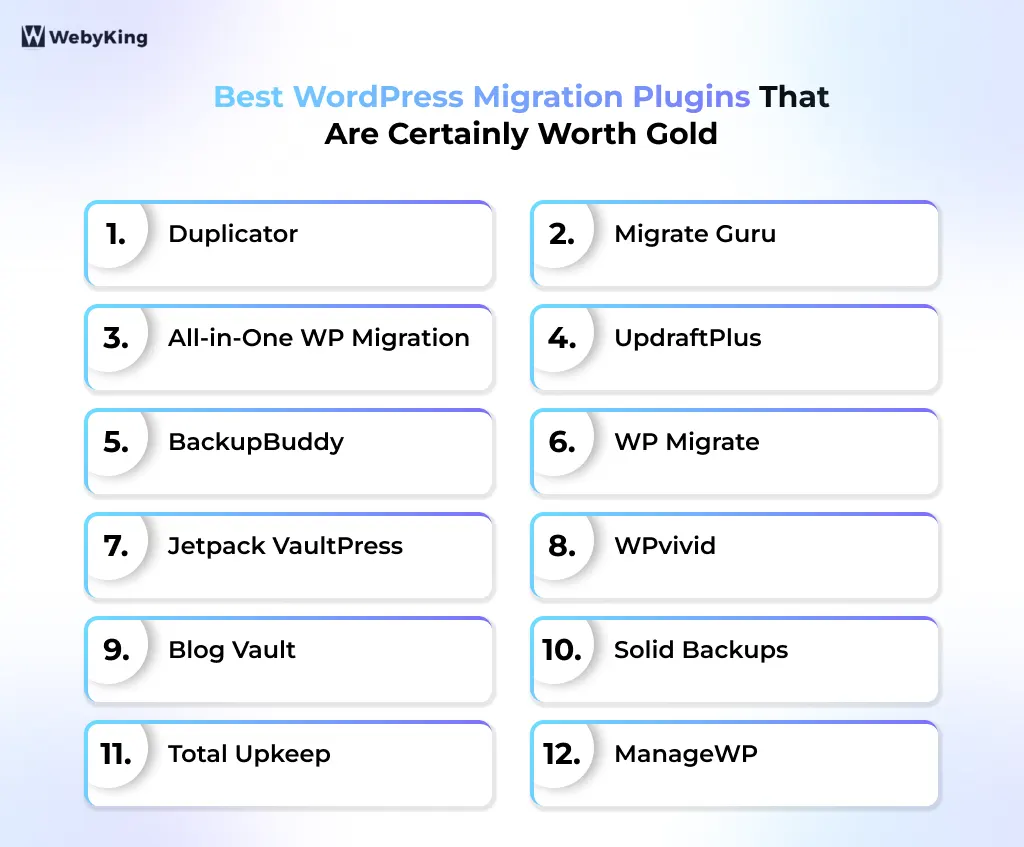
1. Duplicator - Best Overall for Most Sites

Duplicator remains one of the most trusted and widely used WordPress migration plugins, striking a strong balance between usability and flexibility.

Key Features

  • Full-site packaging (database, media, plugins, themes)
  • Standalone installer (no WordPress pre-install required)
  • Automatic URL and path replacement
  • Migration wizard (Pro version)
  • Scheduled backups and restore points
  • Cloud storage integrations (Google Drive, Dropbox, Amazon S3)

What Makes It Stand Out

Duplicator simplifies migration into a two-step process: create a package and run the installer. This makes it highly accessible for beginners while still offering enough control for developers. The ability to deploy a site without pre-installing WordPress is a major advantage.

Limitations

  • Performance issues on low-resource hosting
  • Free version struggles beyond ~2GB sites
  • Multisite support requires Pro

Best For

General users, freelancers, and developers handling small-to-medium sites.

2. Migrate Guru - Best for Large Sites (Free)

Migrate Guru is purpose-built for handling large WordPress sites without the usual server limitations.

Key Features

  • Server-to-server migration (no ZIP files)
  • Handles up to 200GB sites for free
  • Zero downtime migration
  • Built-in hosting integrations (SiteGround, Cloudways, etc.)
  • Automatic URL rewriting
  • No server resource usage during migration

Why It Works Well

Unlike traditional plugins, Migrate Guru uses external servers to process migrations. This eliminates timeouts and makes it one of the most reliable solutions for large or complex websites.

Limitations

  • No backup functionality
  • Requires destination server credentials
  • Limited flexibility for selective migrations

Best For

Large websites, WooCommerce stores, and businesses planning platform-level changes like WooCommerce to Shopify migration.

3. All-in-One WP Migration - Best for Beginners

All-in-One WP Migration plugin focuses on simplicity above everything else.

Key Features

  • Drag-and-drop migration system
  • Export/import via .wpress file
  • Automatic search-and-replace
  • No technical setup required
  • Compatible with most hosting environments
  • Mobile-friendly interface

What Sets It Apart

The entire migration process is reduced to exporting and importing a file. It’s one of the easiest tools available, especially for non-technical users.

Limitations

  • 512MB import limit (free version)
  • Requires paid extension for larger sites
  • Slower performance on large imports

Best For

Beginners, bloggers, and small business owners.

4. UpdraftPlus - Best Backup + Migration Combo

UpdraftPlus is primarily a backup plugin, but its migration capabilities make it a strong all-in-one solution.

Key Features

  • Incremental backups (saves time and storage)
  • Wide cloud storage support (Drive, Dropbox, S3, etc.)
  • Scheduled automated backups
  • Built-in restore system
  • Migration via the UpdraftMigrator add-on
  • Multisite support (premium)

What Makes It Stand Out

Its incremental backup system is a major advantage, especially for large or frequently updated sites. It reduces server load while maintaining reliable backups.

Limitations

  • Migration is not included in the free version
  • Requires a WordPress installation on the destination
  • The interface is slightly outdated

Best For

Users who want long-term backup reliability with occasional migration needs.

5. BackupBuddy - Best for Backup and Restore-First Users

BackupBuddy, A long-standing plugin focused on complete site protection.

Key Features

  • Full-site backups (files + database)
  • Malware scanning and monitoring
  • Scheduled backups
  • Multiple storage options
  • ImportBuddy restoration system
  • Granular backup controls

Why It Works Well

BackupBuddy excels in creating reliable backups that can be used for migration or disaster recovery.

Limitations

  • No free version
  • Struggles with large sites
  • Dated interface

Best For

Users prioritizing backup security with occasional migration needs.

6. WP Migrate - Best for Developers

WP Migrate is built for precision rather than simplicity.

Key Features

  • Push/pull database migrations
  • Serialized data handling (critical for complex sites)
  • Selective table migration
  • Local-to-live workflow support
  • Media migration (Pro version)
  • Developer-friendly interface

What Makes It Stand Out

It allows developers to migrate specific parts of a site rather than everything, making it ideal for controlled environments.

Limitations

  • Not beginner-friendly
  • Full functionality requires the Pro version
  • Not a full-site migration tool by default

Best For

Developers, agencies, and staging workflows.

7. Jetpack VaultPress Backup - Best for Jetpack Users

Jetpack VaultPress is a cloud-based migration and backup solution within the Jetpack ecosystem.

Key Features

  • Real-time backups
  • Cloud-based storage
  • One-click restore functionality
  • Server-to-server migration
  • Activity log tracking
  • Integration with the WordPress.com ecosystem

Why It Works Well

Everything is handled in the cloud, reducing reliance on server resources.

Limitations

  • Paid-only feature
  • More complex setup for beginners
  • Requires the Jetpack ecosystem

Best For

Existing Jetpack users who want an integrated solution.

8. WPvivid Backup Plugin - Best Free All-in-One Solution

WPvivid is a fast-growing plugin offering both backup and migration features for free.

Key Features

  • Full-site migration and backup
  • Automatic scheduled backups
  • Cloud storage support
  • Staging environment creation
  • Incremental backups (Pro)
  • One-click restore

What Sets It Apart

It combines migration, backup, and staging in a single plugin without requiring payment.

Limitations

  • Slower on large sites
  • Interface not as polished

Best For

Budget users need an all-in-one solution.

9. BlogVault - Best Premium Migration Solution

The BlogVault plugin is designed for high-performance and business-critical websites.

Key Features

  • Server-to-server migration
  • Incremental backups
  • WooCommerce optimization
  • Built-in staging environment
  • Real-time sync capabilities
  • Cloud-based dashboard

What Makes It Stand Out

BlogVault focuses on reliability and performance, making it ideal for large-scale operations.

Limitations

  • Expensive
  • Overkill for small sites

Best For

Agencies, enterprises, and mission-critical websites.

10. Total Upkeep - Best Budget Backup Plugin

The Total Upkeep plugin is an affordable option with essential features.

Key Features

  • Automated backups
  • Site restore functionality
  • Pre-update backups
  • Error detection
  • Dashboard monitoring

What Makes It Stand Out

Affordable pricing with essential functionality for small websites.

Limitations

  • Limited migration capabilities
  • Not suitable for large sites

Best For

Small businesses and budget users.

11. ManageWP - Best for Managing Multiple Sites

ManageWP is a cloud-based platform for managing multiple WordPress installations.

Key Features

  • One-click migration
  • Centralized dashboard
  • Remote backups
  • Performance monitoring
  • Security checks
  • Client reporting tools

What Makes It Stand Out

Ideal for managing multiple sites from a single interface.

Limitations

  • Requires account setup
  • Less control over the migration process

Best For

Agencies and developers are managing multiple websites.

12. WP STAGING – Best for Staging-First Migrations

WP STAGING is built for staging environments and also supports site cloning and migration. It’s ideal for testing changes before going live.

Key Features

  • One-click staging site creation
  • Push staging to live (Pro version)
  • Full-site cloning and migration
  • Selective database and file copying
  • Automatic URL rewriting
  • Incremental migration support (Pro)
  • No ZIP file extraction required

What Sets It Apart

WP STAGING follows a staging-first approach, allowing you to clone and test your site before pushing it live. This helps reduce migration risk and downtime.

Limitations

  • Push-to-live requires the Pro version
  • Free version limited to staging only
  • Not optimized for very large sites
  • Cloud migration options are limited

Best For

Developers, agencies, and site owners who want to test migrations in staging before going live.

How to Choose the Right Plugin (Simple Framework)

  • Small site (<1GB): All-in-One WP Migration
  • Medium site (1–3GB): Duplicator or WPvivid
  • Large site (5GB+): Migrate Guru
  • WooCommerce store: Migrate Guru or BlogVault
  • Developer workflow: WP Migrate
  • Backup + migration: UpdraftPlus

Pre-Migration Checklist (Non-Negotiable)

Before running any migration:
  • Take two backups (local + cloud)
  • Ensure PHP memory ≥ 256MB
  • Disable caching plugins
  • Test in staging
  • Lower DNS TTL
Skipping these steps is the fastest way to break your site.

Final Thoughts

Choosing the best WordPress migration plugin in 2026 comes down to matching the tool with your site’s size and complexity. Simple sites can rely on beginner-friendly plugins, but larger or business-critical websites need more reliable, scalable solutions. Many migration issues happen when the wrong tool is used, not because the plugin itself is bad. If you’re unsure or dealing with a high-value site, professional website migration services can help avoid errors and ensure a smooth transition.

At the same time, the right plugin can make the process fast and efficient when used correctly. Tools like Migrate Guru and Duplicator cover most needs, but execution still matters. For a completely risk-free and hands-off experience, especially for large or business-critical websites, working with experts like WebyKing ensures your migration is handled correctly without downtime or data loss.

Frequently Asked Questions

Duplicator is the best overall plugin for most users, while Migrate Guru is the best choice for large websites.
Yes, plugins like Migrate Guru, Duplicator, and WPvivid offer free migration options with some limitations.
Migrate Guru is the best choice for large sites because it uses server-to-server migration and avoids timeout issues.
No, if done correctly. SEO issues only occur if URLs break or if downtime is too long.

Ravi Makhija, the visionary Founder and CEO of WebyKing, is a seasoned digital marketing strategist and web technology expert with over a decade of experience. Under his leadership, WebyKing has evolved into a premier full service web and marketing agency, delivering innovative solutions that drive online success. Ravi’s deep understanding of the digital landscape combined with his passion for cutting-edge technologies empowers him to consistently exceed client expectations and deliver results that matter.

Ravi Makhija

Digitizing Your Business Growth

We don’t just build websites; we craft digital experiences that drive results. Contact us today, and let’s turn your online presence into a powerful marketing tool that grows your business.

Start A Conversation With Us

site logo
WebyKing is a top-rated digital agency that helps you speed up your business growth to achieve maximum ROI.

Our Presence

Expand your business digitally on a global scale! We’re always ready at your service, with dedicated teams in three key international locations.

US flag round

5354 Denny Ave, North Hollywood, Los Angeles, CA 91601, United States.

US flag round

9720 Jones Rd, S210, Houston, TX 77065, United States.

india flag round

The Spire, Office No: 312, Near Ayodhya Chowk BRTS Bus Stop, 150 Feet Ring Road, Rajkot