
Website Migration Checklist: Avoid SEO Loss Before, During & After

Website Migration Checklist: Avoid SEO Loss Before, During & After

Website Migration Checklist FT Image
Updated on: May 12, 2026 Reading Time: 8 minutes

A single missing redirect can wipe out years of SEO overnight.

A website migration is one of the most critical — and risky — changes you can make to your website. Whether you’re switching domains, redesigning your site, moving to a new platform, or restructuring URLs, even small mistakes can have serious consequences.

When handled poorly, a migration can:

  • Erase years of SEO progress
  • Causes sudden drops in traffic and rankings
  • Break key pages, links, and user journeys

In some cases, businesses see 30–70% traffic loss within days simply due to missed redirects or indexing issues.

However, when planned and executed correctly, a website migration becomes a powerful growth opportunity. It allows you to:

  • Improve site performance and Core Web Vitals
  • Clean up outdated or low-value content
  • Strengthen your SEO foundation for long-term growth

This article is designed as a complete, step-by-step website migration checklist covering every phase — before, during, and after launch.

It will help you:

  • Protect your existing rankings and traffic
  • Avoid the most common (and costly) migration mistakes
  • Execute your migration with clarity and confidence

Use this not just as a reference, but as a working checklist — where every step is verified before moving forward.

This checklist covers the essentials — but missing even one critical step can lead to major traffic loss.

Get a pre-migration audit before you start to identify hidden risks.

Quick Website Migration Checklist (Featured Snippet Optimized)

Pre-Migration

  • Backup full website (files, database, media)
  • Crawl and export all URLs
  • Record SEO benchmarks
  • Audit content (keep, improve, remove)
  • Build a complete 301 redirect map
  • Set up and block the staging site
  • Audit staging (SEO, speed, functionality)

Launch Day

  • Implement 301 redirects BEFORE DNS switch
  • Remove noindex tags and staging blocks
  • Update DNS and verify HTTPS
  • Test redirects and functionality
  • Submit XML sitemap
  • Verify analytics and tracking

Post-Migration

  • Monitor traffic daily
  • Fix crawl errors (404, redirect issues)
  • Verify the indexing of key pages
  • Re-audit redirects (day 7 & 30)
  • Update external links

This checklist is based on real migration scenarios and common failure patterns observed across SEO projects.

What Counts as a Website Migration

Before planning your migration, it’s important to understand the different types of website migration and how each one impacts SEO, structure, and risk level.

Migration Type What Changes SEO Risk
Platform / CMS change Backend + URLs High
Domain change Entire URL structure Very High
HTTP → HTTPS Protocol only Low–Medium
Hosting move Server only Low
Site redesign UI + possible structure Medium
URL restructure Paths/slugs High
Subdomain → subfolder URL structure Medium–High

Rule: Higher risk = stricter execution required.

Common Website Migration Examples:

  • Moving from WooCommerce to Shopify (platform migration)
  • Changing your domain during rebranding
  • Restructuring URLs for SEO improvements
  • Migrating from HTTP to HTTPS for security

One Critical Rule to Remember Before You Start

Do NOT migrate:

  • During peak traffic periods
  • During major Google Core Updates

Why?

  • Ranking fluctuations are normal during migration
  • Combining this with algorithm changes = unpredictable losses

Note: Always choose low-traffic windows

This is one of the most common reasons why even well-planned migrations fail.

Phase 1: Pre-Migration Checklist - Most Important Phase (SEO Migration Foundation)

This phase alone determines the success of most migrations — Based on real-world migrations, over 80% of SEO issues originate in the pre-migration phase.

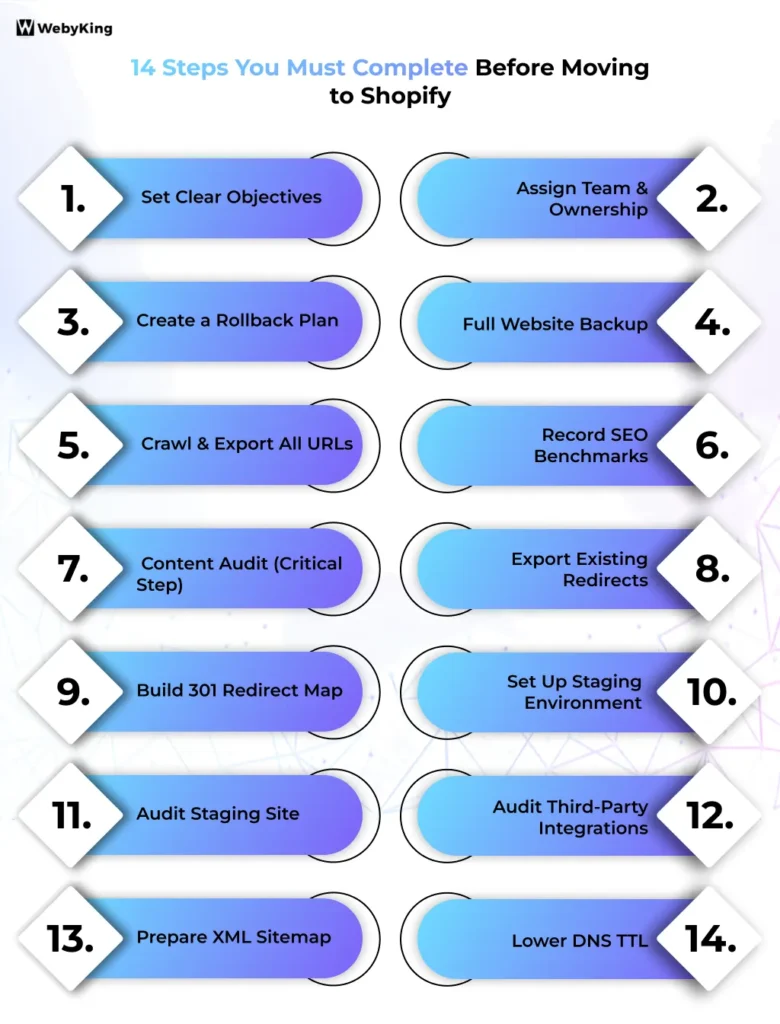
Pre-Migration Checklist - Infographic Image

1. Set Clear Objectives

Define why you’re migrating:

  • Performance improvement?
  • Rebranding?
  • Platform change?

This determines your success metrics.

2. Assign Team & Ownership

Involve:

  • SEO
  • Developers
  • Content team
  • Marketing

Missing ownership = missed steps.

3. Create a Rollback Plan

Define:

  • How to revert
  • Who executes it
  • Recovery time

This is your safety net.

4. Full Website Backup

Backup:

  • Files + database
  • Media (images, PDFs, videos)
  • Plugins/configurations
  • Redirect rules
  • Integrations (CRM, email tools)

Store in local + cloud

5. Crawl & Export All URLs

Use tools like:

  • Screaming Frog
  • Ahrefs
  • Semrush

These tools help ensure your SEO migration checklist is complete and accurate

Collect:

  • URLs
  • Titles/meta descriptions
  • H1s
  • Status codes
  • Internal links
  • Index status

This becomes your master migration file

6. Record SEO Benchmarks

Capture:

  • Organic traffic (12 months)
  • Keyword rankings
  • Indexed pages
  • Core Web Vitals
  • Backlinks
  • Top-performing pages

You can’t measure success without baseline data.

7. Content Audit (Critical Step)

Categorize:

  • Keep → high-performing pages
  • Improve → valuable but weak pages
  • Redirect → pages with backlinks
  • Remove → low-value content

Migration = best cleanup opportunity.

8. Export Existing Redirects

Check:

  • .htaccess
  • CMS settings
  • Server configs

Missing these breaks in existing SEO signals.

9. Build 301 Redirect Map

Format:

  • Old URL → New URL
  • Status column

Rules:

  • No redirect chains
  • Always redirect directly to the final URL

Priority:

  1. Backlink pages
  2. Indexed pages
  3. High-traffic pages
  4. Audit redirect chains before finalizing redirects
  5. Set up analytics & tracking for new site (GA4, GSC)
  6. Validate hreflang tags on staging (if international site)

This is especially critical in SEO-focused migrations where preserving rankings is the top priority.

10. Set Up Staging Environment

Block using:

  • Password protection
  • noindex tag

Prevent duplicate content issues.

11. Audit Staging Site

Check:

  • Titles & meta tags
  • Canonicals
  • Internal links
  • Schema
  • Mobile responsiveness
  • Site speed
  • Forms & checkout

Crawl staging before launch.

12. Audit Third-Party Integrations

Check:

  • Analytics (GA4)
  • Ads pixels
  • CRM tools
  • Email systems
  • Live chat

Most commonly missed step.

13. Prepare XML Sitemap

  • New sitemap (for launch)
  • Old sitemap (for transition)

14. Lower DNS TTL

Set TTL to ~300–600 seconds (24 hours before launch)

Faster DNS propagation.

Phase 2: Launch Day (Or During Migration) Checklist (High Risk Phase)

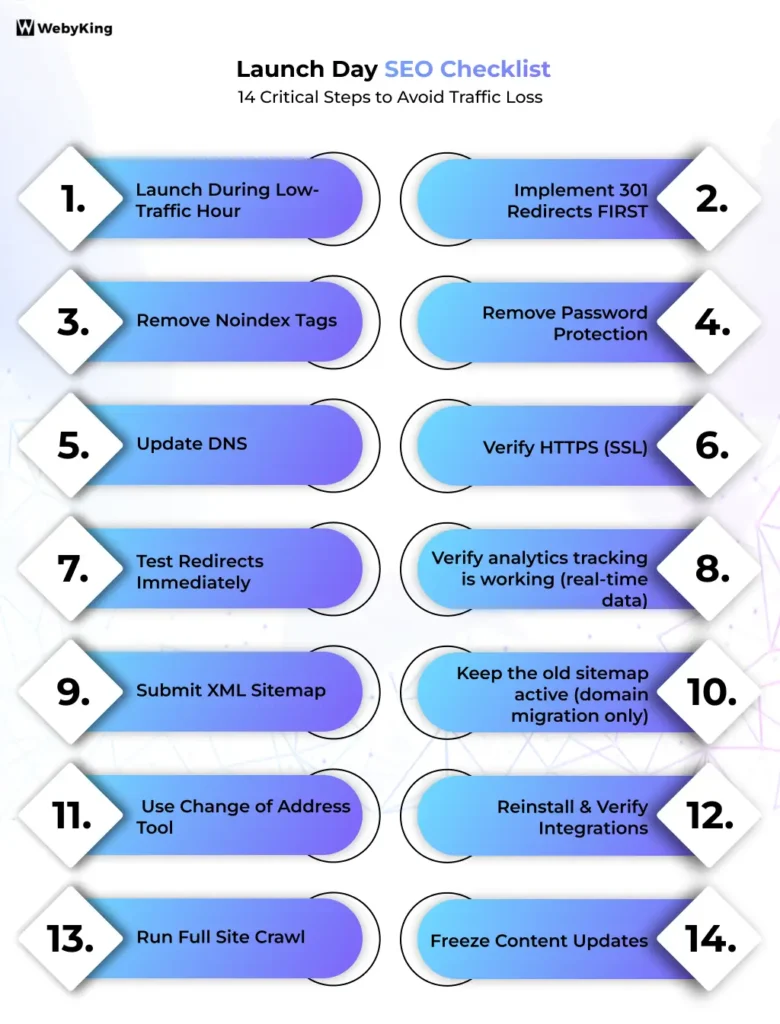
Launch Day (Or During Migration) Checklist - Infographic Image

1. Launch During Low-Traffic Hour

Avoid:

  • Mondays
  • Campaign periods

2. Implement 301 Redirects FIRST

Before DNS switch — not after.

3. Remove Noindex Tags

#1 cause of catastrophic SEO loss.

4. Remove Password Protection

5. Update DNS

6. Verify HTTPS (SSL)

Check:

  • No mixed content errors

7. Test Redirects Immediately

Check:

  • All page types
  • No chains or loops

8. Verify analytics tracking is working (real-time data)

9. Submit XML Sitemap

Via Google Search Console.

10. Keep the old sitemap active (domain migration only)

11. Use Change of Address Tool

(For domain migrations only)

12. Reinstall & Verify Integrations

13. Run Full Site Crawl

Check:

  • 404 errors
  • Missing metadata
  • Broken images

14. Freeze Content Updates

Launch day is the highest-risk phase — real-time mistakes can cause immediate traffic drops.

Having an expert review during launch can prevent critical errors.

Phase 3: Post-Migration Checklist (Where Most Fail)

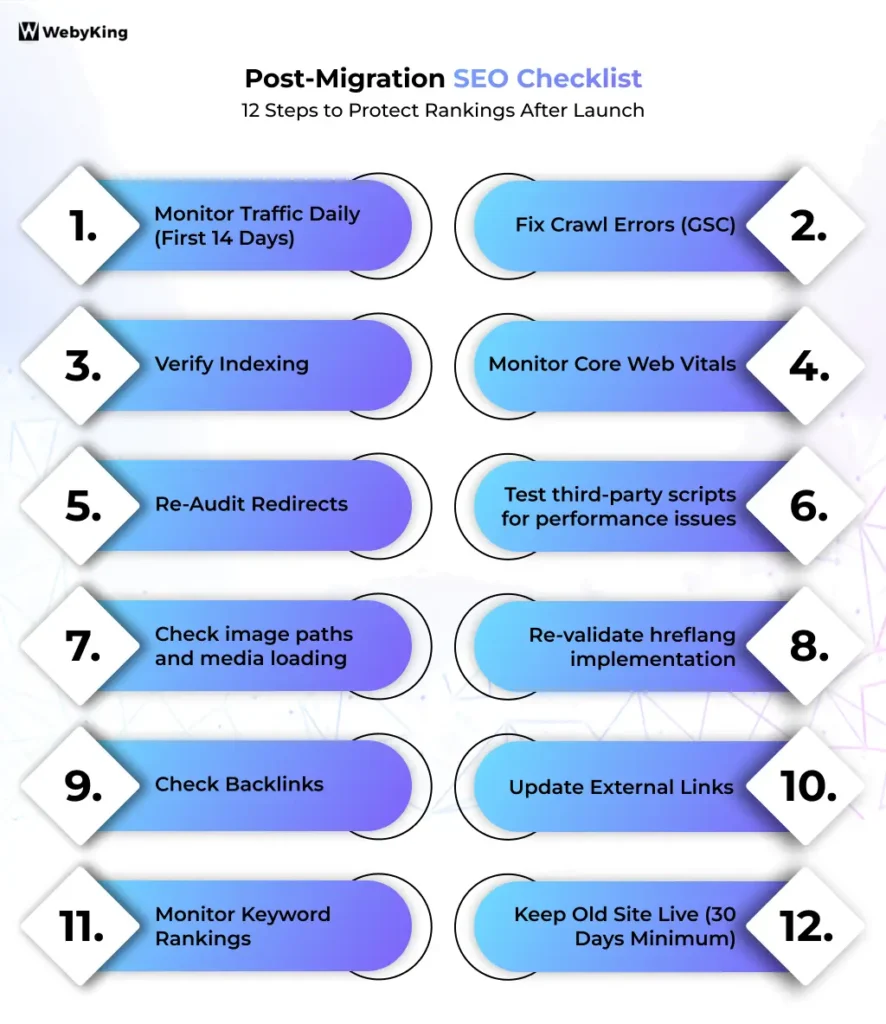
Post-Migration Checklist - Infographic Image

1. Monitor Traffic Daily (First 14 Days)

Expected:

  • Days 1–7 → fluctuations
  • Days 8–30 → stabilization
  • Days 30–90 → full recovery

2. Fix Crawl Errors (GSC)

Focus on:

  • 404 errors
  • Redirect issues
  • Blocked pages

3. Verify Indexing

Check:

  • Key pages indexed
  • Old URLs deindexing

4. Monitor Core Web Vitals

  • LCP
  • CLS
  • INP

5. Re-Audit Redirects

  • Day 7
  • Day 30

6. Test third-party scripts for performance issues

7. Check image paths and media loading

8. Re-validate hreflang implementation

9. Check Backlinks

Ensure:
Correct redirect destination

10. Update External Links

Update:

  • Social profiles
  • Ads
  • Directories

11. Monitor Keyword Rankings

12. Keep Old Site Live (30 Days Minimum)

Temporary fluctuations are normal — but consistent monitoring ensures recovery stays on track.

Common Website Migration Mistakes to Avoid

Most migration failures don’t happen because of complex issues — they happen because of small, avoidable mistakes.

  • Missing 301 redirects
  • Leaving noindex on the live site
  • Redirect chains
  • Broken internal links
  • Missing tracking codes
  • No SEO baseline

Most failures come from small oversights

Want to avoid these mistakes completely? A migration audit can identify risks before they impact your site.

What Most Website Migration Checklists Miss (And Why It Matters)

Some of the steps in the checklist above are commonly overlooked during migrations. These aren’t minor details; they are often the root cause of traffic loss, tracking issues, and slow recovery after launch.

Redirect Chain Audits (Not Just Setup)

Setting up redirects is only the first step. Many teams forget to audit them for chains.

A redirect chain looks like:
Old URL → Old URL → New URL

Each additional step weakens link equity and slows down crawling.

Always ensure every old URL redirects directly to its final destination.

Analytics Property & Tracking Migration

A domain or platform migration can break tracking completely if not handled correctly.

Common issues include:

  • Missing or duplicate tracking codes
  • Incorrect Google Analytics 4 setup
  • Lost historical data connections
  • Unverified new domain in Google
  • Search Console

Always verify that all tracking tools are firing correctly on the new site.

Third-Party Script Performance Issues

Reinstalling scripts is not enough — you also need to test their impact.

After migration:

  • Scripts may load more slowly
  • Tags may fire incorrectly
  • Page speed may degrade

Run performance tests and check browser console errors after launch.

Hreflang Validation (For International Sites)

If your site targets multiple countries or languages, hreflang tags must be revalidated after migration.

URL changes often break:

  • Language targeting
  • Regional indexing
  • International rankings

Even small hreflang errors can cause major visibility loss in global markets.

Image Paths & Media Issues

Images that worked on staging often break after going live due to path differences.

Common problems:

  • Broken image URLs
  • Missing alt text
  • Incorrect file paths

Crawl your site specifically for media issues after launch.

Old Sitemap Resubmission

Most guides tell you to submit the new sitemap — but forget about the old one.

For domain migrations:

  • Keep the old sitemap active in Google Search Console
  • Maintain it for 30–60 days

This helps search engines discover and process redirects faster.

These are advanced factors often overlooked — but they play a major role in post-migration recovery and performance.

Real-World Insight

  • Poor migrations can drop traffic by 30–70% overnight
  • Well-executed migrations recover within 2–8 weeks
  • Most failures come from:
    • missing redirects
    • indexing issues
    • tracking gaps

For example, an eCommerce site lost over 50% of its organic traffic due to missing redirect mappings — and took months to recover.

DIY vs Professional Website Migration: Which Should You Choose?

A DIY migration can work for small, low-risk websites — but as complexity increases, so does the chance of costly mistakes.

Choose DIY if:

  • Your site is small with limited pages
  • No major URL or domain changes
  • Low dependency on SEO traffic

Choose a Professional if:

  • You’re migrating platforms (e.g., WooCommerce to Shopify)
  • Changing domain or restructuring URLs
  • Your site depends heavily on organic traffic
  • You have complex integrations or international SEO setup

Even a small error — like a missing redirect or tracking issue — can lead to significant traffic loss.

For high-impact migrations, a pre-migration audit helps identify risks early and protects your SEO performance.

Final Takeaway

A website migration is not just a technical task — it’s a high-risk SEO process that requires careful planning, precise execution, and consistent monitoring. Most issues don’t come from major mistakes, but from small oversights like missing redirects, broken tracking, or indexing errors. Following a structured checklist across all three phases helps you protect your rankings and avoid unnecessary traffic loss.

If your migration involves complex changes — such as a domain switch, platform migration, or large-scale restructuring — it’s worth considering a professional website migration service. A structured checklist reduces risk — but expertise ensures nothing gets missed.

Planning a Website Migration? Don’t Risk Your SEO

Even a small mistake — like a missing redirect or tracking issue — can lead to significant traffic loss.

If your migration involves complex changes like domain shifts, platform migrations, or large SEO footprints, a pre-migration audit can help you avoid costly errors.

Request a pre-migration audit and identify hidden risks before they impact your rankings.

Frequently Asked Questions:
A website migration checklist is a step-by-step process used to safely move a website without losing SEO rankings, traffic, or data. It covers pre-migration planning, launch execution, and post-migration monitoring to ensure a smooth transition.
A website migration typically takes a few days to several weeks, depending on complexity. Simple migrations like hosting changes are faster, while domain or platform migrations require more time for planning, testing, and post-launch monitoring.
Yes, a website migration can temporarily impact SEO rankings and traffic. However, with proper planning, correct 301 redirects, and careful monitoring, most websites recover within a few weeks to a few months.
The most important step in a website migration is creating and implementing a complete 301 redirect map. This ensures that all old URLs correctly point to new URLs, preserving SEO value and preventing traffic loss.
A 301 redirect is a permanent redirect from one URL to another. It is important because it transfers SEO value, ensures users reach the correct page, and prevents broken links after a website migration.
The best time to migrate a website is during low-traffic periods and outside major marketing campaigns or Google updates. This minimizes the impact of temporary ranking fluctuations and reduces business risk.

Immediately after migration, check:

  • Traffic and keyword rankings
  • Crawl errors (404s and redirect issues)
  • Indexing status in Google Search Console
  • Analytics and tracking functionality
A website migration is successful when traffic stabilizes, key pages are indexed correctly, and no major crawl or tracking errors appear. Most websites recover within 30 to 90 days if the migration is executed properly.
If a website migration is done incorrectly, it can lead to traffic loss, ranking drops, broken pages, and indexing issues. In severe cases, websites can lose 30–70% of their organic traffic due to missing redirects or technical errors.
The most common mistakes include missing 301 redirects, leaving noindex tags on live pages, broken internal links, and incorrect analytics setup. These small errors are the primary cause of SEO and traffic loss after migration.
Yes, you should keep your old website live for at least 30 days after migration. This ensures redirects are working correctly and allows time to identify and fix any issues.
For complex migrations such as domain changes or platform shifts, hiring a professional is recommended. Experts help reduce risks, ensure proper implementation, and protect your SEO performance.

Ravi Makhija, the visionary Founder and CEO of WebyKing, is a seasoned digital marketing strategist and web technology expert with over a decade of experience. Under his leadership, WebyKing has evolved into a premier full service web and marketing agency, delivering innovative solutions that drive online success. Ravi’s deep understanding of the digital landscape combined with his passion for cutting-edge technologies empowers him to consistently exceed client expectations and deliver results that matter.

Ravi Makhija

Digitizing Your Business Growth

We don’t just build websites; we craft digital experiences that drive results. Contact us today, and let’s turn your online presence into a powerful marketing tool that grows your business.

Start A Conversation With Us

site logo
WebyKing is a top-rated digital agency that helps you speed up your business growth to achieve maximum ROI.

Our Presence

Expand your business digitally on a global scale! We’re always ready at your service, with dedicated teams in three key international locations.

US flag round

5354 Denny Ave, North Hollywood, Los Angeles, CA 91601, United States.

US flag round

9720 Jones Rd, S210, Houston, TX 77065, United States.

india flag round

The Spire, Office No: 312, Near Ayodhya Chowk BRTS Bus Stop, 150 Feet Ring Road, Rajkot