Last Updated: July 29, 2026
Reading Time: 10 minutes
Post Views: 425
Table of Contents
- What Happens If You Don’t Maintain Your WordPress Website?
- Common Problems Found on Poorly Maintained WordPress Websites
- Common Maintenance Issues Businesses Often Overlook
- Why Are Emergency WordPress Fixes More Expensive Than Ongoing Maintenance?
- What Does WordPress Maintenance Include?
- WordPress Maintenance vs Managed Hosting
- What Happens During a Typical WordPress Maintenance Visit?
- What Factors Affect WordPress Maintenance Costs?
- Why Do Some WordPress Maintenance Plans Cost $50 While Others Cost $500+?
- What Do WordPress Maintenance Plans Cost?
- How Much Should a Small Business Budget for WordPress Maintenance?
- DIY vs Freelancer vs Agency: What Should You Choose?
- How Do I Know If a WordPress Maintenance Quote Is Fair?
- How to Evaluate a Maintenance Quote
- How to Choose the Right WordPress Maintenance Plan?
- What Services Are Usually Not Included in WordPress Maintenance Plans?
- WordPress Support vs WordPress Maintenance
- Tips to Reduce WordPress Maintenance Costs
- Questions to Ask Before Choosing a WordPress Maintenance Provider
- How Does the Cost of Maintenance Compare to the Cost of Website Problems?
- Key Takeaways
- Final Thoughts
- FAQs on WordPress Maintenance Cost
WordPress maintenance costs typically range from $50 to $500+ per month, depending on your website’s size, complexity, and support requirements.
Some plans only cover updates and backups, while others include security monitoring, performance optimization, uptime monitoring, and technical support. Understanding what influences pricing can help you choose the right level of maintenance without overspending.
However, cost is only one part of the decision.
Most website owners want to understand:
- What is included in WordPress maintenance?
- Why do prices vary so much?
- Is maintenance really necessary?
- What happens if I skip it?
This guide explains WordPress maintenance costs, what affects pricing, and how to choose the right approach for your website.
The table below provides a quick overview of typical WordPress maintenance costs based on website type and complexity.
| Website Type | Typical Monthly Cost |
| Personal Blog | $0–$50 |
| Small Business Website | $75–$150 |
| Lead Generation Website | $100–$250 |
| WooCommerce Store | $150–$500+ |
| Custom WordPress Website | $250–$1,000+ |
If you’re looking for the short answer, these are the most important points to know before choosing a maintenance plan:
What Happens If You Don’t Maintain Your WordPress Website?
Ignoring WordPress maintenance can lead to security, performance, and reliability issues that may affect your website, customers, and revenue.
| Issue | Impact |
| Outdated plugins | Security vulnerabilities |
| No backups | Data loss |
| Plugin conflicts | Broken features |
| Downtime | Lost leads and sales |
| Slow performance | Poor user experience |
| Malware attacks | Expensive recovery |
Some people see maintenance as just another line item they can cut from their budget. But neglecting your WordPress website’s upkeep can lead to bigger problems – ones that cost much more than any maintenance plan.
Here’s what you risk without regular care:
- Security issues: Sites that aren’t updated are an easy target for hackers. A breach can lead to stolen data, blacklisted websites, and expensive cleanups.
- Downtime: Without proper monitoring, your website may crash or go offline without you even noticing, resulting in lost visitors, leads, and sales.
- Sluggish Performance: Broken features and slow-loading pages frustrate users and push your site down in search results.
- Lost Data: No regular backups? One wrong move or malicious attack could wipe out your site’s content and customer data.
Common Problems Found on Poorly Maintained WordPress Websites
The issues we encounter most frequently include:
- Plugin conflicts after updates
- Malware infections from outdated software
- Broken contact forms
- Failed backups
- Slow page load speeds
- WooCommerce checkout errors
- Website downtime caused by hosting or plugin issues
Most of these problems can be identified and resolved early through proactive maintenance and monitoring.
Common Maintenance Issues Businesses Often Overlook
Many website owners assume WordPress maintenance only involves updates. In practice, some of the most expensive website problems are caused by issues that routine updates alone cannot prevent.
Common examples include:
- Backup failures that go unnoticed until recovery is needed
- Broken forms prevent leads from reaching the business
- WooCommerce checkout errors affecting sales
- Plugin conflicts after major updates
- Expired SSL certificates
- Security vulnerabilities caused by abandoned plugins
These issues often remain unnoticed until they begin affecting leads, sales, or customer experience.
Why Are Emergency WordPress Fixes More Expensive Than Ongoing Maintenance?
| Issue | Emergency Cost Risk |
| Plugin conflict | High |
| Website crash | High |
| Malware infection | Very High |
| Failed update | High |
| Database corruption | Very High |
Many businesses choose monthly maintenance because predictable costs are often lower than the expense of emergency repairs and downtime.
What Does WordPress Maintenance Include?
WordPress maintenance typically includes updates, backups, security monitoring, performance checks, uptime monitoring, and ongoing technical support designed to keep a website secure and functioning properly.
While specific services vary by provider, most maintenance plans include updates, backups, security monitoring, performance optimization, uptime monitoring, and technical support.
Updates
Regular WordPress core, plugin, and theme updates help maintain compatibility, improve functionality, and address known security vulnerabilities.
Security
Security monitoring, malware scanning, and preventive measures help protect your website from attacks, unauthorized access, and data breaches. Security monitoring often includes tools such as Wordfence, malware scanning, firewall protection, and login security measures.
Backups
Routine backups ensure your website can be restored quickly if an update fails, data is lost, or a security incident occurs.
Performance
Performance optimization helps maintain fast page loading speeds, improve user experience, and reduce potential issues that affect website functionality. Performance improvements may involve caching, image optimization, CDN services, and platforms such as Cloudflare.
These tasks help keep a website secure, fast, and reliable.
WordPress Maintenance vs Managed Hosting
| Managed Hosting | Maintenance |
| Server uptime | Plugin updates |
| Server security | WordPress security |
| Infrastructure backups | Website backups |
| Performance environment | Website monitoring |
Managed hosting helps maintain the server environment, while WordPress maintenance focuses on the website itself. Most businesses benefit from having both.
What Happens During a Typical WordPress Maintenance Visit?
A typical maintenance visit involves reviewing website health, applying updates, testing functionality, verifying backups, and addressing potential security or performance issues before they affect users.
Monthly maintenance tasks
- WordPress core updates
- Plugin updates
- Theme updates
- Backup testing
- Security scans
- Performance checks
- Uptime monitoring
- Plugin conflict testing
- Broken functionality review
The exact tasks performed may vary depending on the website’s complexity, functionality, and maintenance plan.
If you’re evaluating what should be included in a maintenance routine, our comprehensive website maintenance checklist provides a more detailed breakdown of the tasks typically performed during ongoing WordPress maintenance.
What Factors Affect WordPress Maintenance Costs?
WordPress maintenance costs vary based on your website’s complexity, support needs, and level of ongoing management. The following factors have the biggest impact on pricing.
Many of these same factors also influence the cost of WordPress website design, including custom functionality, integrations, ecommerce features, and website complexity.
Website Size and Complexity
Larger websites with more pages, custom functionality, or ecommerce features typically require more maintenance and testing.
Cost Impact: Higher complexity usually increases maintenance costs.
Website Traffic
High-traffic websites often require additional monitoring, security measures, and performance optimization.
Cost Impact: More traffic generally leads to higher maintenance costs.
Number of Plugins and Themes
Each plugin and theme requires updates, compatibility checks, and ongoing management.
Cost Impact: More plugins and themes can increase maintenance requirements.
Custom Features and Integrations
Custom-coded functionality and third-party integrations often require additional testing and support.
Cost Impact: Custom features typically increase maintenance costs.
Security Requirements
Websites handling customer data, payments, or sensitive information often require enhanced security monitoring and protection.
Cost Impact: Stronger security requirements usually result in higher costs.
Frequency of Updates
Websites that regularly publish content, add features, or make changes require more frequent maintenance.
Cost Impact: More updates generally mean more ongoing maintenance work.
Support Requirements
Some websites only need occasional assistance, while others require priority support and faster response times.
Cost Impact: Higher support levels typically increase pricing.
Compliance and International Requirements
Websites that must meet compliance standards or serve multiple regions often require additional monitoring and management.
Cost Impact: Additional compliance and international requirements can increase maintenance costs.
Hosting Environment
Websites hosted on low-cost or poorly configured servers often require additional troubleshooting and performance optimization.
Cost Impact: Hosting quality can influence the amount of maintenance and support required.
What Has the Biggest Impact on WordPress Maintenance Costs?
While many factors influence pricing, some affect maintenance costs more than others.
Websites with WooCommerce functionality, custom integrations, advanced security requirements, frequent updates, and priority support needs typically cost more to maintain than standard informational websites. Likewise, websites running dozens of plugins or custom-coded features often require additional testing and monitoring to prevent compatibility issues.
In most cases, website complexity, ecommerce functionality, security requirements, and support expectations have a greater impact on maintenance costs than website size alone.
Why Do Some WordPress Maintenance Plans Cost $50 While Others Cost $500+?
If you’ve requested quotes from multiple providers, you’ve probably noticed that WordPress maintenance prices can vary dramatically. One provider may charge $50 per month, while another may charge $500 or more.
The difference is usually not the website itself but the level of monitoring, support, security, testing, and response times included in the plan.
Understanding what drives these pricing differences can help you compare providers more accurately and avoid paying for services you don’t need.
| Cost Factor | Impact on Pricing |
| Number of plugins | Higher |
| WooCommerce functionality | Higher |
| Custom-coded features | Higher |
| Website traffic | Higher |
| Support hours included | Higher |
| Emergency response times | Higher |
| Security requirements | Higher |
| Compliance requirements | Higher |
- $50 plans often include only updates and backups
- $150–$300 plans usually include monitoring and support.
- $500+ plans often include WooCommerce support, custom development, emergency response, and advanced security.
The right maintenance plan isn’t necessarily the cheapest or most expensive—it’s the one that provides the level of protection, support, and reliability your website needs.
What Do WordPress Maintenance Plans Cost?
Typically, the WordPress website maintenance cost ranges from $1,000 to $5,000+ per year, depending on your website complexity and the services included.
For a basic site with occasional updates and security checks, you might only spend around $80–$150/month. But if you’re running a busy eCommerce store or need ongoing development and support, expect costs to go higher.
WordPress Maintenance Cost Breakdown
| Maintenance Type | Monthly Cost | Suitable For |
| DIY Maintenance | $0 – $50 | Personal blogs |
| Freelancer | $50 – $150 | Small business websites |
| Agency (Standard) | $150 – $300 | Growing businesses |
| Agency (Advanced) | $300 – $500+ | WooCommerce & high-traffic websites |
These costs vary based on website complexity and support level.
How Much Should a Small Business Budget for WordPress Maintenance?
Most small businesses spend between $75 and $200 per month on WordPress maintenance, depending on the complexity of their website and support requirements. Businesses that rely heavily on lead generation, online bookings, or ecommerce functionality often benefit from more proactive maintenance plans that include monitoring and technical support.
For most small business websites, the biggest maintenance cost drivers are not the number of pages on the website but the complexity of functionality behind the scenes. Ecommerce features, third-party integrations, membership systems, booking tools, and custom development typically require more ongoing maintenance than a standard informational website.
The actual maintenance requirements of a website often have more impact on cost than the number of pages. A five-page website with complex booking integrations may require more ongoing maintenance than a 50-page informational website.
DIY vs Freelancer vs Agency: What Should You Choose?
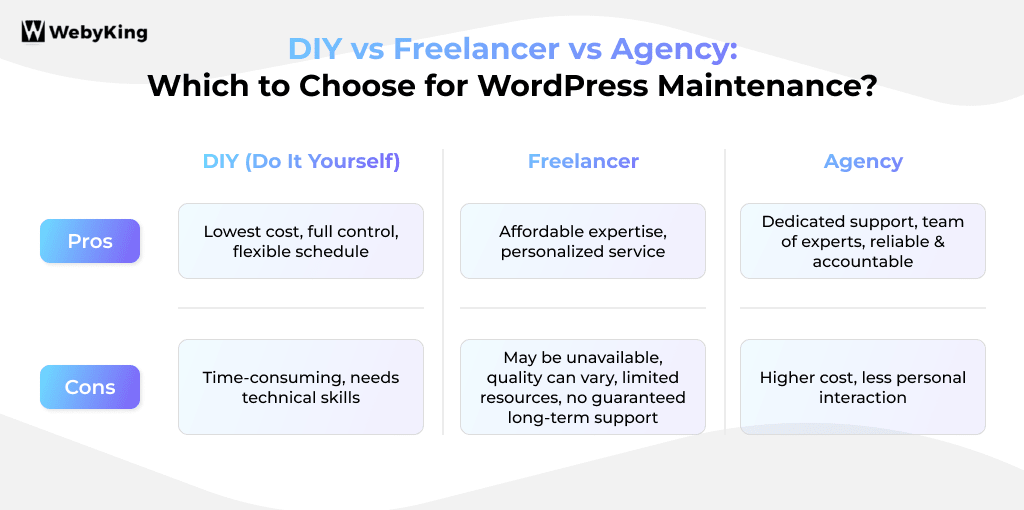
| Option | Cost | Best For | Risk Level |
| DIY | Low | Small websites | High |
| Freelancer | Medium | Growing sites | Medium |
| Agency | High | Business-critical sites | Low |
DIY (Do It Yourself)
Best for personal blogs and small websites with minimal complexity. While it can reduce costs, it requires ongoing time, technical knowledge, and responsibility for troubleshooting issues.
Hiring a Freelancer
A suitable middle ground for growing businesses that need expert support without the cost of a full agency. Quality and availability can vary significantly between providers.
Working with An Agency
Typically, the best option for business-critical websites, WooCommerce stores, and websites that require ongoing monitoring, support, security, and performance optimization.
How Do I Know If a WordPress Maintenance Quote Is Fair?
Check:
- What’s included?
- Number of support hours?
- Emergency support?
- Backup frequency?
- Security monitoring?
- Response times?
| Monthly Fee | What Should Be Included |
| $50–$100 | Basic updates and backups |
| $100–$300 | Monitoring and support |
| $300–$500+ | Advanced support and proactive maintenance |
How to Evaluate a Maintenance Quote
Quick Evaluation Checklist
- Backup frequency
- Security monitoring
- Response times
- Emergency support availability
- Plugin update management
- Uptime monitoring
- Support hours included
A lower monthly fee may provide less protection if critical services are excluded.
How to Choose the Right WordPress Maintenance Plan?
When evaluating maintenance plans, consider:
- Website size and complexity
- Traffic levels
- Security requirements
- Frequency of updates
- Support expectations
- Budget
The right plan should provide the level of protection, monitoring, and support your website needs without paying for services you are unlikely to use. When evaluating a WordPress maintenance service, compare factors such as support availability, security monitoring, backup frequency, and response times rather than focusing solely on the monthly price.
You Can Also Read: How to Choose the Best Website Maintenance Provider
What Services Are Usually Not Included in WordPress Maintenance Plans?
| Usually Included | Usually Not Included |
| Updates | Website redesign |
| Backups | Content writing |
| Security monitoring | SEO campaigns |
| Performance checks | New feature development |
| Uptime monitoring | Large custom integrations |
WordPress Support vs WordPress Maintenance
| WordPress Maintenance | WordPress Support |
| Updates | Troubleshooting |
| Security monitoring | Technical assistance |
| Backups | Website changes |
| Performance checks | Problem resolution |
| Uptime monitoring | On-demand help |
Maintenance focuses on preventing issues before they occur, while support focuses on resolving issues after they happen. Some providers include both, while others offer them separately.
Tips to Reduce WordPress Maintenance Costs
- Choose a well-coded, regularly maintained WordPress theme.
- Remove unnecessary plugins and unused website features.
- Automate routine tasks such as backups and security scans where appropriate.
- Keep WordPress, plugins, and themes updated consistently.
- Compare maintenance plans based on included services, not price alone.
- Address minor issues early before they become expensive repairs.
Reducing maintenance costs should never come at the expense of website security, reliability, or performance.
Questions to Ask Before Choosing a WordPress Maintenance Provider
- What services are included in the plan?
- How frequently are backups performed and tested?
- Is emergency support included?
- Are premium plugin licenses included?
- What response times can I expect for support requests?
Quick Maintenance Plan Evaluation Checklist
- Website updates included in the maintenance plan
- Backup frequency confirmed and documented
- Security monitoring included and actively managed
- Uptime monitoring included with alert notifications
- Emergency support available for critical issues
- Response times clearly defined in the agreement
- Support hours specified and aligned with business needs
- Premium plugin license costs clearly clarified
- Backup restoration testing included and performed regularly
How Does the Cost of Maintenance Compare to the Cost of Website Problems?
| Website Issue | Potential Business Impact |
| Website downtime | Lost leads and sales |
| Malware infection | Recovery and cleanup costs |
| Failed updates | Emergency developer fees |
| Data loss | Lost customer information |
| WooCommerce checkout issues | Lost revenue |
For businesses that rely on their website for lead generation, bookings, or eCommerce sales, even a short period of downtime can cost more than several months of preventative maintenance.
Which Type of WordPress Maintenance Plan Is Right for You?
| If Your Website Is… | Recommended Approach |
| Personal Blog | DIY or Basic Plan |
| Small Business Website | Standard Maintenance Plan |
| Lead Generation Website | Monitoring + Support Plan |
| WooCommerce Store | Advanced Maintenance Plan |
| Mission-Critical Website | Fully Managed Maintenance |
Choosing the right maintenance plan depends less on website size and more on how important the website is to your business operations.
Key Takeaways
- Most businesses spend $75–$250 per month on WordPress maintenance, depending on their website’s complexity and support needs.
- Regular maintenance helps prevent security issues, downtime, performance problems, and expensive emergency repairs.
- WooCommerce stores and websites with custom functionality typically require more comprehensive maintenance plans.
- Compare maintenance providers based on the services included, response times, and monitoring—not just the monthly price.
- Choosing the right maintenance plan protects your website and can reduce long-term maintenance costs.
Final Thoughts
For most small businesses, WordPress maintenance costs range from $75–$250 per month and help reduce security risks, downtime, and unexpected repair expenses.
Businesses that depend on lead generation, ecommerce sales, bookings, or customer accounts often benefit from more proactive maintenance plans that include monitoring, technical support, and ongoing performance management.
Evaluating maintenance plans based on included services, monitoring capabilities, backup practices, and response times will help you make a more informed decision.
FAQs on WordPress Maintenance Cost
How much does WordPress Maintenance cost per Month?
WordPress maintenance costs typically range from $50 to $500+ per month, depending on your website’s size, complexity, and support requirements. Small business websites often spend between $75 and $150 per month, while WooCommerce stores and custom WordPress websites usually require larger maintenance budgets due to additional security, monitoring, and support needs.
Can I Do WordPress Maintenance Myself?
Yes, many website owners manage basic maintenance tasks such as updates, backups, and security checks themselves. However, businesses that rely on their website for leads, bookings, or online sales often choose professional maintenance services to reduce security risks, prevent downtime, and ensure problems are identified before they affect website performance.
What's Included in a Typical WordPress Maintenance Package?
Most WordPress maintenance packages include core updates, plugin and theme updates, backups, security monitoring, malware scanning, and performance checks. Some plans also include uptime monitoring, technical support, troubleshooting, and limited development assistance.
What happens if I don’t maintain my WordPress site regularly?
Neglecting maintenance can lead to security breaches, slower performance, outdated software, and even website downtime. Over time, these issues can damage your brand’s credibility and lead to higher costs for emergency fixes.
What Is the Difference Between WordPress Maintenance and WordPress Support?
WordPress maintenance focuses on preventing issues through updates, backups, security monitoring, and performance checks. WordPress support focuses on resolving issues, such as troubleshooting errors, fixing website problems, and providing technical assistance. Maintenance is proactive, while support is reactive.
Does WooCommerce Increase WordPress Maintenance Costs?
Yes, WooCommerce websites typically cost more to maintain than standard WordPress websites. Because online stores handle products, payments, customer accounts, and order processing, they often require additional monitoring, security checks, compatibility testing, and performance optimization. The more products, plugins, and integrations your store uses, the more maintenance it generally requires. As a result, WooCommerce maintenance plans are often priced higher than plans for basic business websites or blogs.
I Was Quoted $200/Month for WordPress Maintenance. Is That Reasonable?
In many cases, yes. A $200 monthly maintenance plan is often considered reasonable for a business website that requires regular updates, backups, security monitoring, performance checks, and technical support. However, the value depends on what is included. Review factors such as support hours, response times, security services, backup frequency, and monitoring before comparing providers based on price alone.
What Services Are Usually Excluded from WordPress Maintenance Plans?
Most WordPress maintenance plans focus on keeping your website secure, updated, and performing well. Services that are commonly excluded include website redesigns, custom feature development, content creation, SEO campaigns, and large-scale website changes. Because maintenance plans vary by provider, always review what is included and excluded before signing up.
Is Monthly Maintenance Cheaper Than Paying for WordPress Fixes as Needed?
For many businesses, monthly maintenance is often more cost-effective in the long run. Regular updates, security monitoring, backups, and performance checks can help identify issues before they become expensive problems. While pay-as-needed support may seem cheaper initially, emergency repairs, malware cleanup, website recovery, and downtime can quickly cost more than ongoing maintenance.
How Many Hours of WordPress Maintenance Are Needed Each Month?
Most small business websites require between 1 and 4 hours of maintenance per month. Websites with eCommerce functionality, custom integrations, or higher traffic levels often require additional time for updates, testing, security monitoring, and troubleshooting.
I'm Ravi Makhija, Founder & CEO of WebyKing. I believe your website should be the hardest-working member of your team, building trust, generating leads, and creating opportunities 24/7. Through web design, development, SEO, and digital strategy, I help businesses build websites that become growth assets-not just digital brochures. Too many businesses invest in websites that look great but fail to deliver real business value.
Business owners deserve digital solutions that are simple, practical, and built around their goals, not unnecessary complexity. After all, your website shouldn't just represent your business; it should help grow it.


Get In Touch