
Last Updated: November 6, 2026
Reading Time: 8 minutes
Post Views: 63
If you’ve ever tried copying a few hundred products from Wix to Shopify by hand, you know how quickly it turns into a weekend project. Each product needs its variants, prices, SKUs, and images rebuilt. Customer records and order history are a separate job on top of that.
A Wix to Shopify migration app can take a lot of that work off your plate. Depending on the tool, it connects to your Wix store or reads your Wix export files, maps the fields to Shopify, and imports the records it supports.
The catch is that these tools don’t all move the same information. Shopify’s free importer, for example, handles products and customers but not orders. Other tools cover orders, reviews, or blog content, and some are built for just one job.
Below, we compare seven tools by what they do, the data they support, how they charge, and where they fall short.
7 Best Wix to Shopify Migration Apps Comparison
| Migration app or tool | Main functionality | Supported data or purpose | Pricing model | Best for |
|---|---|---|---|---|
| Shopify Store Migration | CSV-based store import | Products and customers | Free | Basic store imports |
| Cart2Cart | Automated Wix migration | Products, customers, orders, images, and other supported data | Free to install; additional charges | Direct Wix store migration |
| LitExtension | Automated store migration | Products, customers, orders, categories, reviews, and other supported data | Free demo; paid migration | Broader data migration |
| Next-Cart | Automated and managed migration | Products, customers, orders, blog posts, CMS pages, and more | Free demo; quote based on requirements | Store and website content migration |
| MigrationPro | Automated migration | Products, customers, orders, and optional SEO-related services | Free demo; one-time pricing | Automated migration with add-ons |
| Matrixify | Bulk data import and export | Products, customers, orders, pages, blogs, redirects, and more | Free demo; paid plans | Custom data imports and bulk updates |
| EZ Importer | Order import | Historical orders and draft orders through CSV | Free to install; usage-based pricing | Historical order migration |
1. Shopify Store Migration: Best Free Option for Basic Imports
Shopify Store Migration is Shopify’s own free app. It’s the official option to consider if you want to transfer basic product and customer information without paying for a third-party service.
The app works with CSV files exported from Wix. You export your store data, upload the files to the Store Migration app without reformatting them, and review the import report after processing.
What can it migrate?
- Product information
- Product images, which are pulled from your Wix store, so keep it live until the import is done
- Customer records
Key features:
- Free to use
- Imports Wix product and customer CSV files as they are
- Provides an import report to identify records with issues
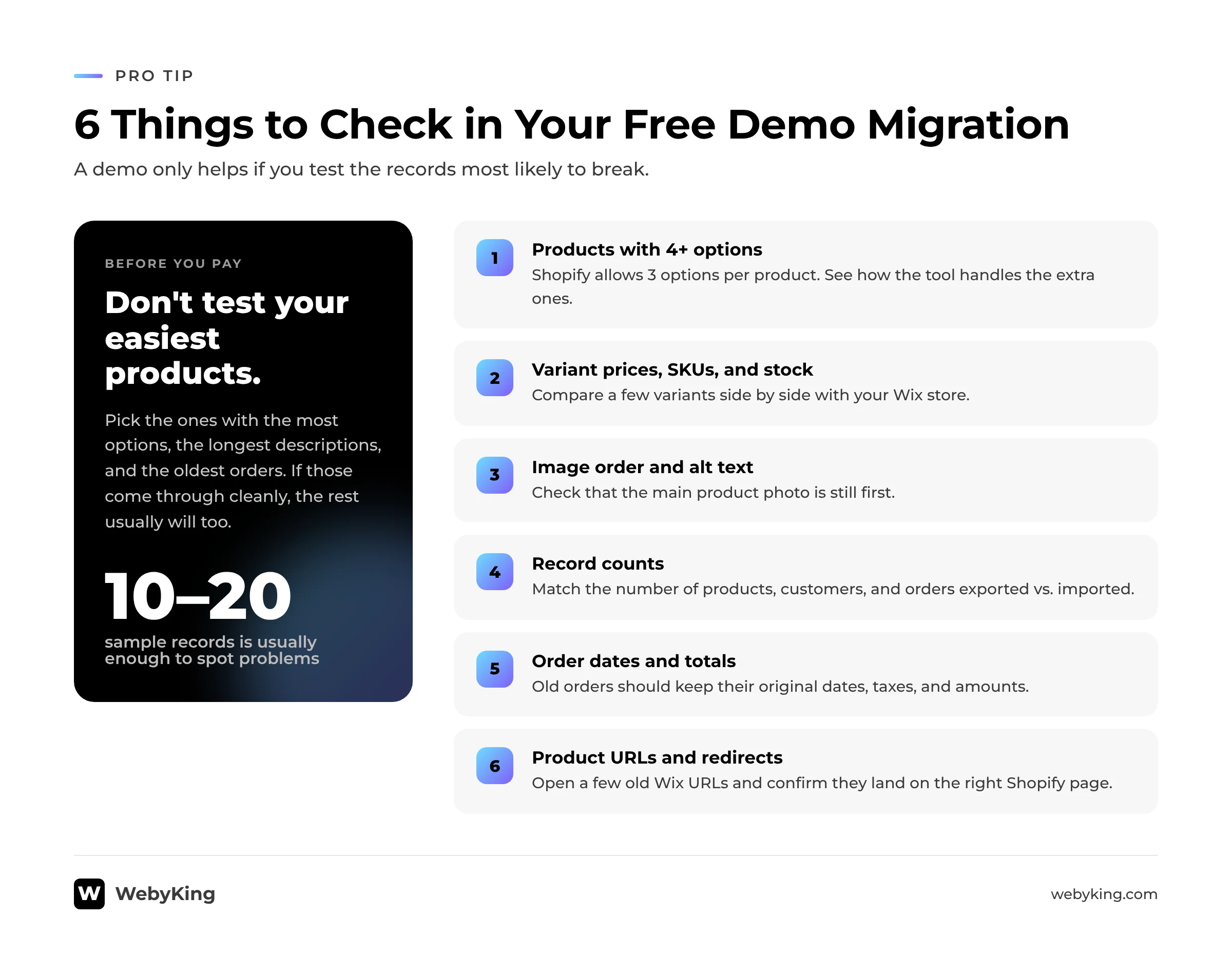
Limitations: It doesn’t import order history. Wix allows up to six product options, while Shopify allows three, so products with more than three options import without their variants and need to be rebuilt. Imported products are saved as drafts, and Wix collections come over as product tags. Shopify’s own Wix migration guide suggests third-party apps for orders.
Pricing: Free.
2. Cart2Cart: Best for Automated Wix Store Data Migration
Cart2Cart offers a dedicated Wix Data Import app for Shopify. It is designed to transfer supported store information without requiring you to manually recreate every product and customer record.
You connect your Wix and Shopify stores, select the data you want to migrate, and review the demo results before proceeding with the full transfer. Both stores stay live during the process.
What can it migrate?
- Products
- Customers
- Orders
- Product images
- Discounts
- Inventory
- Metafields
- Reviews
Key features:
- Automated data mapping
- Guided, no-code setup
- Demo testing before you commit
- Product, price, inventory, and order sync options
- Scheduled data import and export
- Professional support
Pricing: Free to install. Migration charges depend on store size, the data you move, and the options you select.
3. LitExtension: Best for Testing a Migration Before Committing
LitExtension provides ecommerce migration services for multiple platforms, including Wix and Shopify.
One useful feature is its free demo migration. You can transfer a limited selection of store data and inspect how it appears in Shopify before proceeding with the complete migration.
What can it migrate?
Depending on the source platform and migration configuration, supported data can include:
- Products
- Product categories
- Product variants
- Customers
- Orders
- Reviews
- Coupons
- Metafields
Key features:
- Free demo migration
- Automated data transfer
- Data mapping options
- SEO data and URL migration options
- 301 redirect options
- Post-migration support
- Options for additional migration requirements
Pricing: Free to install. A demo is available for up to 20 products, 20 orders, and 20 customers. Full migration pricing depends on the number of records and selected services.
4. Next-Cart: Best for Migrating Store Data and Website Content
Next-Cart is relevant if your project involves more than transferring products and customer records.
Along with ecommerce data, it supports blog posts and pages. That’s useful if your Wix website has an active blog or important informational pages you don’t want to rebuild by hand.
What can it migrate?
- Products and categories
- Customers
- Orders
- Coupons
- Reviews
- Blog posts
- Pages
- SEO metadata and URLs
- Custom fields and metafields
Key features:
- Free plan for testing your migration
- URL redirects included
- Unlimited re-migrations
- Option to migrate recent data added after the first run
- Multilingual data support
Pricing: The free plan covers up to 50 each of products, customers, orders, blog posts, and pages. Paid plans start at $150 per 30 days for up to 10,000 records of each type.
5. MigrationPro: Best for Automated Migration With One-Time Pricing
MigrationPro offers an automated Wix-to-Shopify migration with a free demo. You select the data you want to transfer and review the results before running the full migration.
It’s worth considering if you’d rather pay once for the records you move than take on a monthly plan.
What can it migrate?
- Products
- Customers
- Orders
- Collections
- Images
- URLs and 301 redirects
Key features:
- Free demo migration
- Guided, automated migration workflow
- Live migration progress
- 301 redirect setup
- Field mapping
- Additional migration services
Pricing: One-time pricing based on the records you transfer, with no subscription fees. A free demo is available, and optional services are priced separately.
6. Matrixify: Best for Custom CSV Imports and Bulk Data Management
Matrixify is a Shopify data import and export tool. It helps merchants manage store information in bulk using Excel, CSV, and Google Sheets files.
It is not a direct Wix connector, but it is useful when you have already exported and prepared your Wix data and need more control over how information is imported into Shopify
What can it import or manage?
- Products and collections
- Customers
- Orders and draft orders
- Discounts
- Pages and blog posts
- URL redirects
- Metafields and metaobjects
- Navigation menus
- Other supported Shopify data
Key features:
- Excel and CSV imports
- Google Sheets support
- Bulk data updates
- Data exports
- Import and export reports
- Large-file support
- Scheduled tasks
Pricing:
Demo / Free
Basic $20 per 30 days
Big $50 per 30 days
Enterprise $200 per 30 days
Each plan limits how much data one import or export job can process. For example, the Basic plan handles up to 5,000 products per job.
7. EZ Importer: Best for Importing Historical Orders
EZ Importer is a Shopify app designed to import orders and draft orders through CSV files.
It can be useful when you have already transferred your products and customers but still need to bring historical order records into Shopify.
What can it import?
- Orders
- Draft orders
- Multiple order line items
- Customer information associated with orders
- Transactions
- Taxes
- Order metafields
Key features:
- CSV-based order imports
- Custom column mapping
- Bulk order processing
- Import templates
- Options to delete and re-import previous imports
Pricing: Free to install, with paid usage starting at $25 for 100 imports. The app also provides 25 free credits to start.
Which Wix to Shopify Migration App Is Right for Your Store?
The best option depends on the size of your store, the information you need to transfer, and how much of the migration you want to manage yourself.
| Your requirement | Tool to consider |
|---|---|
| Import basic products and customers for free | Shopify Store Migration |
| Automate a direct Wix store data transfer | Cart2Cart |
| Test a sample migration before paying | LitExtension |
| Transfer ecommerce data and website content | Next-Cart |
| Automate migration with optional additional services | MigrationPro |
| Handle custom CSV imports and bulk updates | Matrixify |
| Import historical orders | EZ Importer |
For a small Wix store with a straightforward product catalog, Shopify’s free importer may be enough.
For a larger store with product variants, customer records, historical orders, and website content, compare Cart2Cart, LitExtension, Next-Cart, and MigrationPro. Run a demo before deciding which provider to use.
If your requirements are limited to custom data imports or historical orders, Matrixify and EZ Importer may help with those specific tasks.
Pro Tip: Do not choose a migration app only because it supports the highest number of data types. Test the records that are most important to your business. A tool that transfers your products correctly but misses variant information, order details, or important URLs may create more work after migration.
How Can WebyKing Help With Your Wix to Shopify Migration?
A migration app can transfer supported data, but it does not handle the complete process of moving an ecommerce website.
Your new Shopify store also needs to be designed, configured, tested, and prepared for launch.
WebyKing helps businesses plan and execute website and ecommerce migrations, including the work that goes beyond a basic data import.
Depending on your store’s requirements, the migration process can include:
- Migration planning: Identify the products, customers, orders, pages, and functionality that need to move from Wix to Shopify.
- Data migration: Plan and manage the transfer of supported store information.
- Store design: Recreate your storefront using a suitable Shopify theme or custom design.
- SEO migration: Review important URLs, metadata, internal links, and redirect requirements.
- Integration setup: Identify Shopify alternatives for the Wix apps and features your business currently uses.
- Testing and launch: Check products, variants, navigation, checkout, forms, and important pages before launch.
The right migration approach depends on your existing store. A small catalog may need a straightforward transfer. A store with custom functionality, extensive content, and complex product structures needs more planning, which also shapes your overall Wix to Shopify migration cost.
Planning to move your store from Wix to Shopify? Explore WebyKing’s website migration services to discuss the requirements of your migration.
Final Thoughts
Choosing the right Wix to Shopify migration app is not about finding the tool with the longest feature list. It is about finding one that can transfer the information your store actually needs.
Shopify Store Migration is a practical free starting point for basic product and customer imports. Cart2Cart, LitExtension, Next-Cart, and MigrationPro are worth comparing for more extensive migration requirements. Matrixify and EZ Importer can help with specific data-import tasks.
Before committing to a full migration, test your important products, customers, orders, and content. Then review what still needs to be rebuilt or configured in Shopify. Our step-by-step Wix to Shopify migration guide walks through that full process.
A carefully planned migration helps you move platforms without overlooking the store data, website content, and SEO details that matter to your business.
Frequently Asked Questions
1. What is the best Wix to Shopify migration app?
Yes. Shopify offers a free Store Migration app for eligible stores. It can help transfer products and customers, but it does not handle every type of store data. Check its current limitations before relying on it for your complete migration.
2. Is there a free Wix to Shopify migration app?
Yes. Shopify’s Store Migration app is free and imports supported product and customer CSV files from Wix. However, it does not transfer every part of your website, so historical orders, reviews, blog posts, and other information may require additional tools or manual work.
3. Can I migrate Wix products, customers, and orders to Shopify?
Yes. Several migration solutions support transferring products, customers, and orders from Wix to Shopify. Cart2Cart, LitExtension, Next-Cart, and MigrationPro offer direct migration options. Confirm the exact data coverage and test a sample before completing the full transfer.
4. Can I migrate Wix blog posts to Shopify using an app?
Some migration solutions, including Next-Cart, list blog posts and CMS pages among their supported Wix-to-Shopify data types. However, transferring content does not automatically recreate the original Wix design. Review the imported text, images, formatting, internal links, and SEO details.
5. Will a Wix to Shopify migration app preserve my SEO rankings?
No migration app can guarantee that your existing search rankings will remain unchanged. You can reduce the risk of losing organic traffic by mapping important URLs, setting up relevant 301 redirects, reviewing metadata, preserving useful content, and checking the new website after launch.
6. Can I migrate historical Wix orders to Shopify?
Yes. Dedicated migration solutions such as Cart2Cart, LitExtension, Next-Cart, and MigrationPro offer order migration options. EZ Importer can also import historical orders from prepared CSV files. Check order dates, line items, customer details, taxes, and transaction information before completing the import.
7. Do Wix to Shopify migration apps transfer website design?
Generally, migration apps transfer supported store data and content rather than the complete visual design and functionality of your Wix website. You will usually need to select and customize a Shopify theme or rebuild specific sections to match your existing storefront.
8. Can I migrate my Wix store without taking it offline?
Some migration providers offer processes designed to keep your existing Wix store live while data is transferred. However, you should still plan a final data synchronization and launch process to account for changes made to your Wix store during migration. Confirm the provider’s process before starting.
I'm Ravi Makhija, Founder & CEO of WebyKing. I believe your website should be the hardest-working member of your team, building trust, generating leads, and creating opportunities 24/7. Through web design, development, SEO, and digital strategy, I help businesses build websites that become growth assets-not just digital brochures. Too many businesses invest in websites that look great but fail to deliver real business value.
Business owners deserve digital solutions that are simple, practical, and built around their goals, not unnecessary complexity. After all, your website shouldn't just represent your business; it should help grow it.

Get In Touch