


Quick Summary
The honest answer depends on which path you take.
There are more real options now than there used to be. AI can write and deploy real code from a sentence. No-code platforms have gotten powerful enough to replace what used to require a developer. Headless architecture gets you custom-site performance without building everything from scratch. Traditional CMS platforms are still the default, and still a good one.
Each path has a different timeline. Picking the wrong one for your situation is the most common way projects run long.
This guide covers:
The newest category. Often called “vibe coding.” These tools generate real, working code from a plain-language description. Not a template you fill in.
Timeline: minutes to a few hours for something to live.
The honest caveat: these tools make a lot of decisions for you. A simple site or MVP can be genuinely done fast. Anything with specific custom logic, a particular booking flow, tight brand requirements, usually needs real editing afterward. That editing time is where the speed advantage quietly disappears.
Established page builders that added serious AI capability without changing what they fundamentally are: visual, drag-and-drop tools.
For a fuller rundown of these and other small business platforms, see our roundup of the best website options for small businesses, which covers Wix, Framer, Webflow, and a dozen others side by side.
Timeline: a simple site in a few hours to a few days. A fuller multi-page site, one to two weeks.
The ceiling is real. You’re working inside what the platform allows. That’s usually plenty for a marketing site or portfolio. It’s genuinely limiting for complex custom functionality.
WordPress, paired with a visual builder like Elementor or Divi, is still the most widely used approach on the web. The plugin ecosystem covers almost anything: booking systems, membership areas, full ecommerce through WooCommerce.
Timeline: 2 to 8 weeks, depending on complexity and whether you’re using pre-built kits or designing from scratch.
The trade-off versus a pure no-code platform: you own more of the stack. Hosting, security, updates. More control, but more ongoing responsibility too.
WordPress isn’t the only CMS worth knowing, either. Our Craft CMS vs. WordPress comparison covers when a different platform makes more sense. And if Shopify is more your speed for a hosted, ecommerce-first build, our step-by-step guide to building a Shopify website walks through that path directly.
The modern custom path. You get performance and flexibility without building absolutely everything from zero.
How it works:
The result tends to be genuinely fast and highly customizable. The cost: you need developers who know this stack.
Timeline: 6 to 12 weeks with an experienced developer or small team. Slower to start than a page builder. The performance ceiling is much higher, and it scales well as content and traffic grow.
If ecommerce is part of the plan, headless architecture is increasingly the default for larger stores. Our breakdown of headless commerce statistics has the numbers on why that shift is happening.
Hand-built with a framework like React, Laravel, or Node. No platform constraints at all.
This is where unique workflows, proprietary functionality, or integrations that don’t fit any existing platform end up.
Worth naming: AI coding assistants like Cursor and GitHub Copilot are meaningfully speeding this path up for professional developers. They don’t replace the need for programming knowledge. But for a developer who already knows what they’re building, they cut real time off implementation.
Timeline: 3 to 6 months or more. No real upper ceiling on complexity. Enterprise builds and genuinely unique platforms live here.
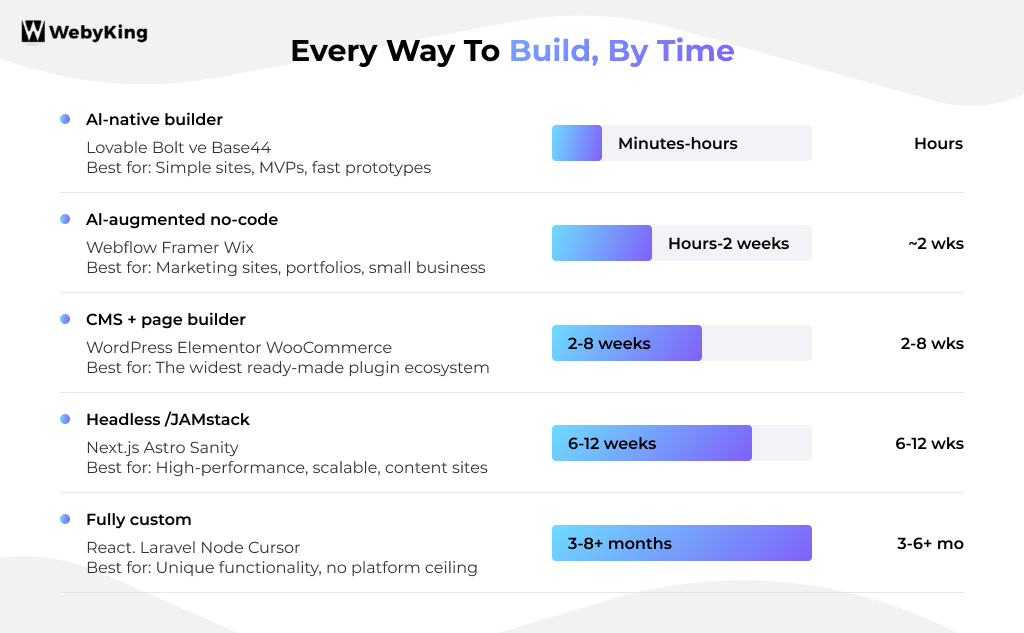
| Approach | Tools | Timeline | Best for |
| AI-native builder | Lovable, Bolt, v0, Base44 | Minutes to hours | Simple sites, MVPs, fast prototypes |
| AI-Augmented no-code | Webflow, Framer, Wix | Hours to 2 weeks | Marketing sites, portfolios, small-business |
| CMS + page builder | WordPress + Elementor/Divi/WooCommerce | 2 to 8 weeks | Widest plugin ecosystem |
| Headless / JAMstack | Next.js or Astro + Contentful/Sanity | 6 to 12 weeks | High-performance, scalable, content-heavy sites |
| Fully custom | React, Laravel, Node, often with Cursor or Copilot | 3 to 6+ months | Unique functionality, no platform ceiling |
Choosing a technology is one decision. Choosing who operates it is a separate one. This applies across every option above.
Weighing this decision in more depth? Our guide on whether to hire someone to build your website and our full website cost breakdown both go further into the trade-offs than this section can.
Tools and timelines get most of the attention. A fast build on the wrong strategy just gets you to a bad outcome faster.
Plan for these from day one, not after launch:
Content strategy. Not just “what pages do we need.” What you’ll actually say, and how often you’ll add to it. Sites with a real content plan consistently outperform ones where content was an afterthought. More on this below.
SEO foundations. Page structure, keyword targeting, internal linking, clean URLs, proper heading hierarchy. Build these in from the start. Retrofitting SEO onto a finished site is possible, but always more expensive.
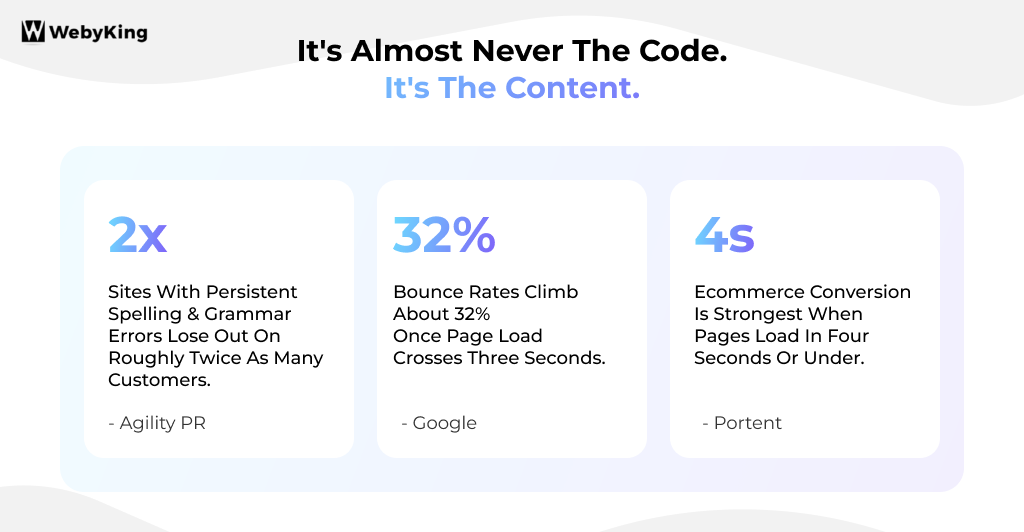
Performance. Portent found ecommerce conversion rates are strongest when pages load in four seconds or under. Google’s own data shows bounce rates jump by roughly 32 percent once load time crosses three seconds. This directly affects whether the traffic you eventually earn actually converts.
Accessibility. Beyond being the right thing to build, accessible sites reach more people and increasingly factor into search visibility. Budget real time for it. Don’t treat it as a last-minute audit.
Security and maintenance. Someone needs to own ongoing updates, backups, and monitoring, whatever platform you choose. This is where DIY builds quietly fall behind. Not at launch. Eighteen months in.
Analytics from day one. You can’t tell if any of the above is working without tracking set up before launch.
Ask any team that’s shipped a lot of these what causes delays. The answer is consistent across every technology above: it’s not design, and it’s usually not development. It’s content.
Design and development can move forward on placeholder text and stock images. The site can’t actually launch on placeholder text.
Writing real copy is exactly the kind of task that’s easy to push to next week when it’s competing with running the actual business. It’s the one task no tool on this page, AI or otherwise, fully solves for you.
It’s worth taking seriously for a concrete reason. Agility PR found businesses with persistent spelling and grammar errors on their site lose out on roughly twice as many customers as competitors who get the basics right.
Late content is a timeline problem. Rushed content is a revenue problem that outlasts the launch date by a lot longer.
Other common causes of delay:
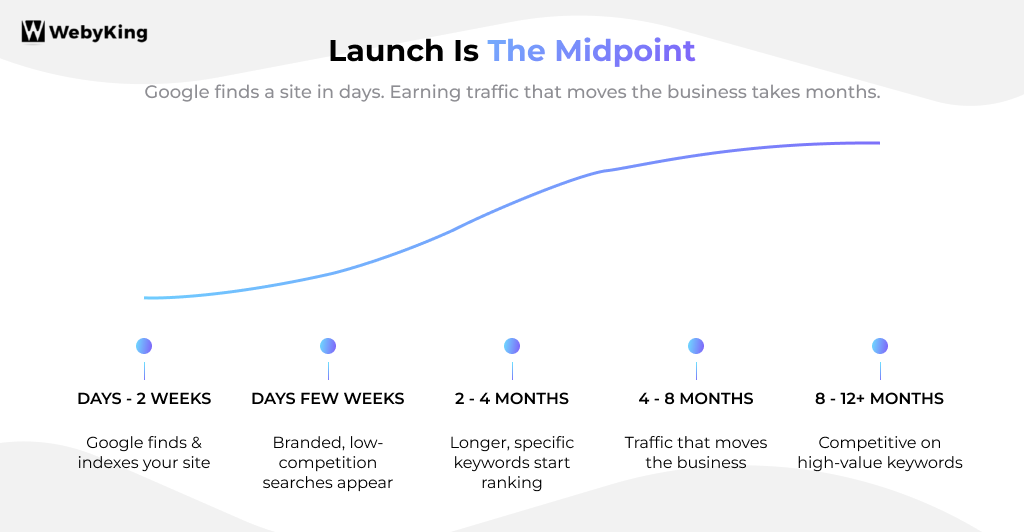
| What happens | When |
| Google finds and indexes your site | Days to 2 weeks |
| Branded and low-competition searches show up | Days to a few weeks |
| Longer, more specific keywords start ranking | 2 to 4 months |
| Traffic that actually matters to the business | 4 to 8 months |
| Competitive on high-value keywords | 6 to 12+ months |
Indexing and ranking are different things. Google can find a new site within days. Ranking well against competitors who’ve been at it for years takes longer. Not from any penalty. Trust in search is earned gradually.
There’s a longer pattern worth knowing too. Orbit Media puts the average website’s working lifespan at around two years and seven months before it’s redesigned or abandoned.
The sites that die early almost always share the same story: no updates, stale content, nobody watching whether it still works.
The build gets all the attention going in. The two and a half years after launch is where the actual return on that build gets decided. That’s true whether it was built with Lovable in an afternoon or by an agency over four months.
There are more real paths to a live website in 2026 than ever. The right one depends on your specific scope, not a generic number.
What doesn’t change across any of them: content readiness decides whether you hit your timeline. What happens in the months after launch decides whether the build was worth it in the first place.
If you’d rather talk through which of these paths fits your project than guess from a general guide, get in touch and we’ll map out a realistic plan. Tools, timeline, and what happens after launch.
Minutes with an AI-native builder to 6 months or more for fully custom development, depending on which path fits your scope. Most standard business sites land between 4 and 8 weeks.
An AI-native builder like Lovable, Bolt, or v0. Live in minutes to hours. The trade-off is customization: the more specific your needs, the more editing time afterward.
No-code platforms like Webflow and Framer handle most marketing sites, portfolios, and small business needs well. Custom development is worth it when you need functionality that doesn’t exist on any platform.
Content, consistently, across every path in this guide. Design and development can move without it. Launch can’t.
Indexed within days to two weeks. Meaningful traffic usually takes 4 to 8 months. Competitive keywords, 6 to 12+ months, depending heavily on whether you keep publishing after launch.
I'm Ravi Makhija, Founder & CEO of WebyKing. I believe your website should be the hardest-working member of your team, building trust, generating leads, and creating opportunities 24/7. Through web design, development, SEO, and digital strategy, I help businesses build websites that become growth assets-not just digital brochures. Too many businesses invest in websites that look great but fail to deliver real business value.
Business owners deserve digital solutions that are simple, practical, and built around their goals, not unnecessary complexity. After all, your website shouldn't just represent your business; it should help grow it.

Let’s turn your ideas into impact—reach outYears of Experience and let’s build something exceptional together.
Customer
Retention Ratio
Certified Professionals
Projects
Years of Experience







TRUSTED BY 100+ CLIENTS, WITH OVER 100 PROJECTS SUCCESSFULLY DELIVERED AS A FULL-SERVICE WEB AGENCY
TRUSTED BY 100+ CLIENTS, WITH OVER 100 PROJECTS SUCCESSFULLY DELIVERED AS A FULL-SERVICE WEB AGENCY
TRUSTED BY 100+ CLIENTS, WITH OVER 100 PROJECTS SUCCESSFULLY DELIVERED AS A FULL-SERVICE WEB AGENCY
We don’t just build websites; we craft digital experiences that drive results. Contact us today, and let’s turn your online presence into a powerful marketing tool that grows your business.
Web Design By Industry
Digital Marketing
eCommerce Web Design
SEO Services
Lead Gen By Industry
Migration By Platform
PPC By Industry
Maintenance By Platform
Our Presence
Expand your business digitally on a global scale! We’re always ready at your service, with dedicated teams in three key international locations.

5354 Denny Ave, North Hollywood, Los Angeles, CA 91601, United States.
9720 Jones Rd, S210, Houston, TX 77065, United States.

The Spire, Office No: 312, Near Ayodhya Chowk BRTS Bus Stop, 150 Feet Ring Road, Rajkot
Get a realistic timeline based on your specific goals, not a generic estimate.
We’ll get back to you shortly.