Last Updated: October 28, 2026
Reading Time: 13 minutes
Post Views: 6
- How Do BigCommerce to Shopify Migration Apps Work?
- What BigCommerce Data Can Migration Apps Move to Shopify?
- What BigCommerce Data Doesn't Transfer Cleanly to Shopify?
- What Should You Check After Using a BigCommerce to Shopify Migration App?
- Which BigCommerce to Shopify Migration Apps Should You Compare?
- What Does Your Product Catalog Look Like?
- What Can BigCommerce to Shopify Migration Apps Not Handle?
- Should You Use Migration Apps or Hire a BigCommerce to Shopify Expert?
- How Do You Test a BigCommerce to Shopify Migration Before Launch?
- What Do BigCommerce to Shopify Migration Apps Cost?
- How Can You Reduce Unnecessary Migration Costs?
- Final Thoughts
- What Are the Most Common Questions About BigCommerce to Shopify Migration Apps?
Quick Summary
- BigCommerce to Shopify migration apps can automate much of the data transfer.
- Products, customers, orders, images, and other data can often be migrated, depending on the app and plan.
- BigCommerce modifier options, custom fields, complex product structures, and some integrations may need additional work.
- Shopify allows up to 2,048 variants per product but supports only three variant options per product.
- BigCommerce URLs usually change when moving to Shopify, so important URLs need redirects.
- Customer passwords cannot be transferred directly to Shopify.
- A test migration should include your most complicated products, not just simple products.
- The best migration app depends on your store’s data structure, integrations, SEO requirements, and level of customization.
Most BigCommerce to Shopify migration apps can move products, customers, orders, and other store data from one platform to the other.
But moving the data is only one part of the migration.
The bigger question is whether your BigCommerce data will work properly in Shopify after the transfer.
For example, BigCommerce supports product modifier options such as text fields, file uploads, and checkboxes. Shopify handles these differently. BigCommerce also uses category structures and URL formats that don’t map directly to Shopify.
That means an app can successfully transfer your products while still leaving you with work to do.
If you’re planning a BigCommerce to Shopify migration, this guide explains how migration apps work, what they can and cannot move, which options are worth comparing, and what you should test before launch.
How Do BigCommerce to Shopify Migration Apps Work?
Migration apps generally use one of two approaches.
API-connected migration apps
These apps connect your BigCommerce store with Shopify and transfer data through the platforms’ APIs.
You typically select the data you want to move, run a test or demo migration, review the results, and then perform the full migration.
This approach can save time because you don’t have to manually export and prepare every record.
It can be a good option when your BigCommerce store has a large catalog and relatively standard product data.
File-based migration apps
File-based tools use exported data, usually spreadsheets or CSV files.
You export your BigCommerce data, clean or restructure it, and then import it into Shopify using the required format.
This takes more preparation, but it gives you greater control over the data before it reaches your new store.
Shopify also provides its own CSV import options for certain types of data. You can review Shopify’s official migration documentation before deciding which approach makes sense for your store.
What BigCommerce Data Can Migration Apps Move to Shopify?
The exact coverage varies by migration apps, but common migration data includes:
| Data | What can usually be moved |
|---|---|
| Products | Titles, descriptions, prices, SKUs, images, and product information. |
| Variants | Variant names, values, SKUs, prices, and inventory information. |
| Customers | Names, email addresses, addresses, and other supported customer data. |
| Orders | Historical orders and associated order information. |
| Categories | Category information that can be mapped to Shopify collections. |
| Pages | Store pages and their content. |
| Blog posts | Blog content, depending on the migration app. |
| Images | Product and content images. |
| Custom data | Data that can be mapped to Shopify metafields. |
| Reviews | May require a separate review migration process. |
| Discounts | Support varies by app. |
| SEO data | Some tools support metadata or URL information, but redirects often require separate setup. |
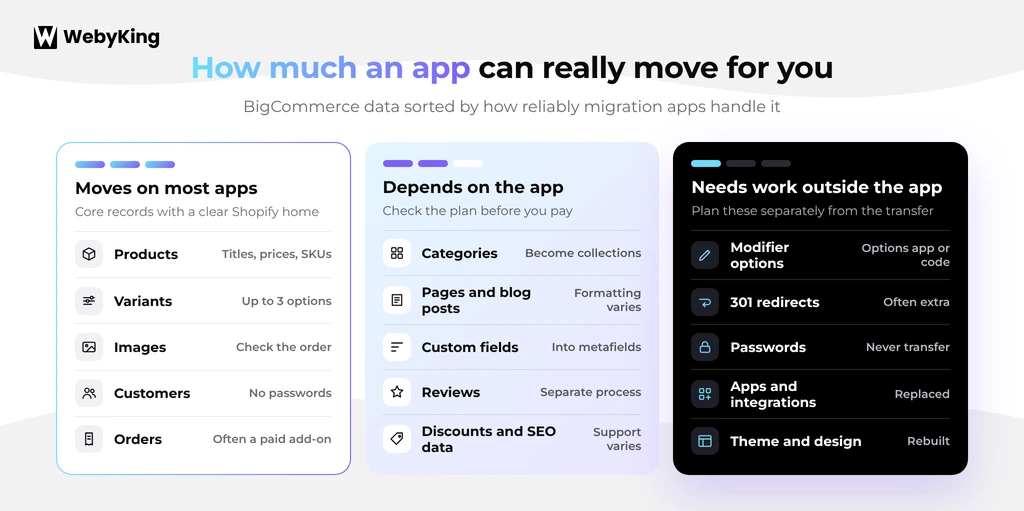
Don’t assume that every item listed above will transfer exactly as it exists in BigCommerce.
Before choosing an app, compare its supported entities with the actual data in your store.
What BigCommerce Data Doesn't Transfer Cleanly to Shopify?
This is where migration planning becomes important.
Some BigCommerce features don’t have a direct one-to-one Shopify equivalent.
| BigCommerce feature | Shopify solution | What to watch for |
|---|---|---|
| Variant options | Shopify variants | Shopify supports up to 2,048 variants but only three options per product. |
| Modifier options | Theme customization or product options apps | No direct native equivalent. |
| Custom fields | Shopify metafields | Data needs to be mapped correctly. |
| Nested categories | Collections and navigation | Shopify collections don’t use the same category hierarchy. |
| Brands | Vendor, collections, or custom structure | Brand pages may need to be rebuilt. |
| Customer groups | Customer tags, discounts, or B2B features | Exact pricing behavior may need rebuilding. |
| Customer passwords | Not transferable | Customers need account activation or password reset. |
| BigCommerce URLs | Shopify URL structure | Important old URLs need redirects. |
How Do BigCommerce Variant Options Work in Shopify?
Variant options are choices that create different product variants and typically affect inventory or SKUs.
For example:
T-Shirt → Small → Red
T-Shirt → Medium → Red
T-Shirt → Large → Red
These can generally be represented using Shopify’s variant structure.
However, Shopify still has a limit of three options per product.
So if a BigCommerce product uses:
Size + Color + Material + Finish
you cannot simply recreate those four variant dimensions as four Shopify options.
Before running the migration, decide whether you need to:
- Combine options
- Split the product into multiple products
- Convert one option into a custom product field
- Use another product configuration solution
This is one reason testing complex products first is more useful than testing 10 simple products
What Happens to BigCommerce Modifier Options in Shopify?
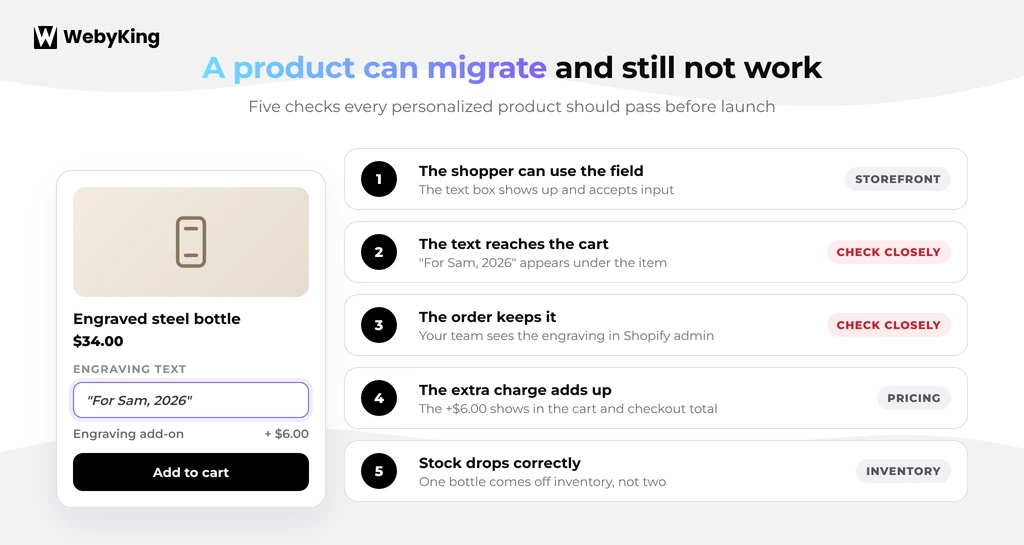
Modifier options are different from variants.
A BigCommerce modifier can allow customers to enter information such as:
- Engraving text
- Gift messages
- Custom measurements
- File uploads
- Checkboxes
- Additional selections
These options don’t necessarily create separate inventory-tracked variants.
Shopify doesn’t have a direct native equivalent for every BigCommerce modifier type.
Depending on the requirement, you may need theme customization, line item properties, a product options app, or another custom solution.
This is an important distinction because a migration app may transfer the product successfully while leaving the customer-facing customization unavailable.
If personalization is important to your business, test those products before committing to a full migration.
How Do BigCommerce Custom Fields Move to Shopify?
BigCommerce custom fields often contain information such as:
- Technical specifications
- Manufacturer information
- Compatibility details
- Materials
- Installation instructions
- Product-specific information
These fields may need to become Shopify metafields.
The migration process usually involves:
- Identifying the existing custom fields.
- Deciding where each field belongs in Shopify.
- Creating the appropriate metafield definitions.
- Mapping the BigCommerce data.
- Importing the data.
- Checking how it appears on the storefront.
Don’t judge the migration only by whether the data exists in Shopify admin. Make sure customers can actually see the information where it belongs on the product page.
What Happens to BigCommerce Categories and Brands?
BigCommerce categories can have a hierarchy that doesn’t directly match Shopify collections.
For example:
Men → Shoes → Running Shoes
Shopify doesn’t create collections in the same nested structure.
You may need to use collections and navigation menus to recreate the browsing experience.
Brands also need to be reviewed separately. Depending on your setup, brand information may use Shopify’s vendor field, collections, metafields, or custom templates.
If your category and brand pages receive organic traffic, include them in your redirect and SEO review.
What Should You Check After Using a BigCommerce to Shopify Migration App?
Never assume that a migration is complete simply because the app reports that the transfer finished successfully.
Compare the original BigCommerce store with the Shopify store.
| Data type | What to check |
|---|---|
| Products | Titles, descriptions, prices, SKUs, and product status. |
| Images | Image count, order, quality, and variant assignments. |
| Variants | Option names, values, combinations, and SKUs. |
| Inventory | Quantities and inventory locations. |
| Collections | Correct products and navigation. |
| Metafields | Custom data appears correctly on the storefront. |
| Customers | Contact details, addresses, tags, and consent information. |
| Orders | Line items, totals, dates, and customer relationships. |
| Pages and blogs | Formatting, images, links, and content. |
| SEO | Titles, descriptions, handles, canonical settings, and redirects. |
| App data | Reviews, loyalty data, subscriptions, and other platform-specific information. |
A successful import is not the same thing as a successful migration.
Which BigCommerce to Shopify Migration Apps Should You Compare?
There isn’t one migration app that is best for every BigCommerce store.
The right choice depends on your catalog, data complexity, budget, and how much control you want over the migration.
Is Cart2Cart Good for BigCommerce to Shopify Migration?
Cart2Cart provides an automated migration service for moving data between ecommerce platforms.
It offers a demo migration so you can preview how a sample of your store data transfers before completing the full migration.
It can be useful for stores that want an automated process without manually preparing every product record.
Good fit for: Stores with relatively standard data that want automated migration and a way to test the process first.
Is LitExtension Good for BigCommerce to Shopify Migration?
LitExtension provides an automated BigCommerce to Shopify migration process.
It supports common store data such as products, customers, and orders, with additional migration services available depending on your requirements.
Before choosing it, check how the current package handles your specific requirements, especially modifier options, custom fields, redirects, and integrations.
Good fit for: Merchants who want an automated migration and the option to get additional assistance.
Is Matrixify Good for BigCommerce to Shopify Migration?
Matrixify is a Shopify app designed around importing and exporting store data using spreadsheet-style files.
Its biggest advantage is control.
You can review, clean, organize, and modify your data before importing it into Shopify.
That can be especially useful when your BigCommerce data needs significant cleanup or restructuring.
The tradeoff is that you need to spend more time preparing the data and understanding Shopify’s import structure.
Good fit for: Larger or messy catalogs where data control is more important than a fully automated migration.
Can You Use Shopify's Built-In CSV Import Instead?
Yes, for simpler stores.
Shopify provides CSV import functionality for products and certain other data types.
This can work when you have:
- A small product catalog
- Standard variants
- Limited custom data
- Few integrations
- No complicated product personalization
However, CSV import doesn’t automatically solve your historical orders, modifier options, redirects, theme rebuild, or third-party integration requirements.
For a simple store, it can reduce migration software costs. For a complex store, the manual work can quickly become more expensive than using a dedicated migration app.
How Do You Choose the Right BigCommerce to Shopify Migration App?
Don’t choose an app based only on the number of records it claims to migrate.
Look at the structure of your store first.
What Does Your Product Catalog Look Like?
Count:
- Products
- Variants
- Products with custom fields
- Products with modifier options
- Products with more than three variant options
- Products with personalization
- Products with special pricing
A store with 500 highly customized products may require more work than a store with 5,000 simple products.
Why Should You Test Your Most Complicated Products First?
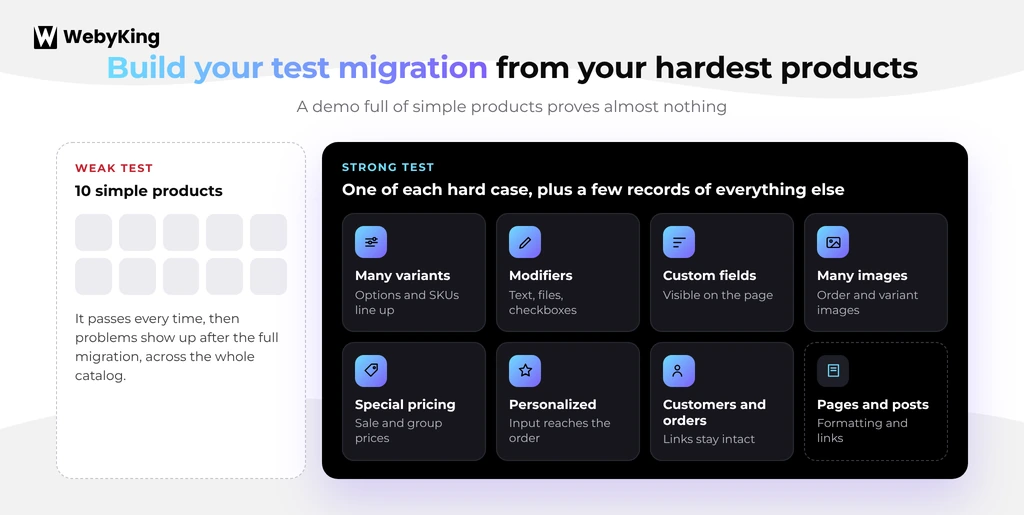
A test migration containing only simple products doesn’t tell you much.
Instead, choose products that represent the hardest parts of your catalog.
Include:
- Products with multiple variants
- Products with modifier options
- Products with custom fields
- Products with multiple images
- Products with special pricing
- Personalized products
If those products migrate correctly, you’ll have much more confidence in the full migration.
How Much Cleanup Will the Migration Require?
An app can move data quickly, but it cannot necessarily decide what your new Shopify store should look like.
You may need to clean:
- Duplicate products
- Old products
- Incorrect categories
- Missing images
- Inconsistent descriptions
- Unused custom fields
- Old customer records
Cleaning the catalog before migration can reduce both migration time and post-migration cleanup.
If you’re estimating the overall project rather than just the app cost, our website migration cost guide can help you account for development, cleanup, testing, and other work.
Who Will Handle Your URL Redirects?
Ask the migration provider exactly how redirects are handled.
Are they:
- Included?
- An additional service?
- Imported automatically?
- Created manually?
- Tested after launch?
This matters because moving from BigCommerce to Shopify can change your URL structure.
Don’t assume an app will automatically protect your organic traffic.
What Can BigCommerce to Shopify Migration Apps Not Handle?
Migration apps can automate data transfer, but they don’t eliminate the need for platform-specific work.
How Do You Handle SEO Redirects After Migration?
BigCommerce and Shopify use different URL structures.
For example:
BigCommerce:
/mens-shoes/leather-loafer/
Shopify:
/products/leather-loafer
Important old URLs should be redirected to the most relevant new Shopify URL.
Prioritize:
- Pages with organic traffic
- Pages with backlinks
- Important product pages
- Category pages
- Blog posts
- Previously indexed URLs
Don’t redirect everything to the homepage just because it is easier.
Build the redirect map before launch and test the most important URLs afterward.
For a broader migration process, see our guide on how to migrate a website without losing SEO.
How Do You Rebuild Your BigCommerce Store Design in Shopify?
Your BigCommerce theme doesn’t simply move into Shopify.
You need to choose whether to:
- Use an existing Shopify theme
- Customize a Shopify theme
- Build a custom Shopify storefront
The migration app handles data. It doesn’t recreate your entire storefront experience.
If you’re also planning a redesign, keep the design scope separate from the data migration so you can understand where the budget is going.
How Do You Replace BigCommerce Apps and Integrations?
Your BigCommerce apps don’t automatically become Shopify apps.
Create a list of every integration your store uses, including:
- ERP
- CRM
- Accounting
- Inventory
- Warehouse or 3PL
- Shipping
- Reviews
- Loyalty
- Subscriptions
- Email marketing
- Search and filtering
- Tax
Then identify the Shopify replacement for each one.
Some integrations may only require configuration. Others may need custom development or a completely different implementation.
What Happens to Customer Accounts?
Customer passwords cannot be transferred directly to Shopify.
Customers therefore need to activate their new accounts or reset their passwords.
Plan the account communication before launch.
A useful approach is to combine the account activation message with your launch announcement so customers understand why their login process has changed.
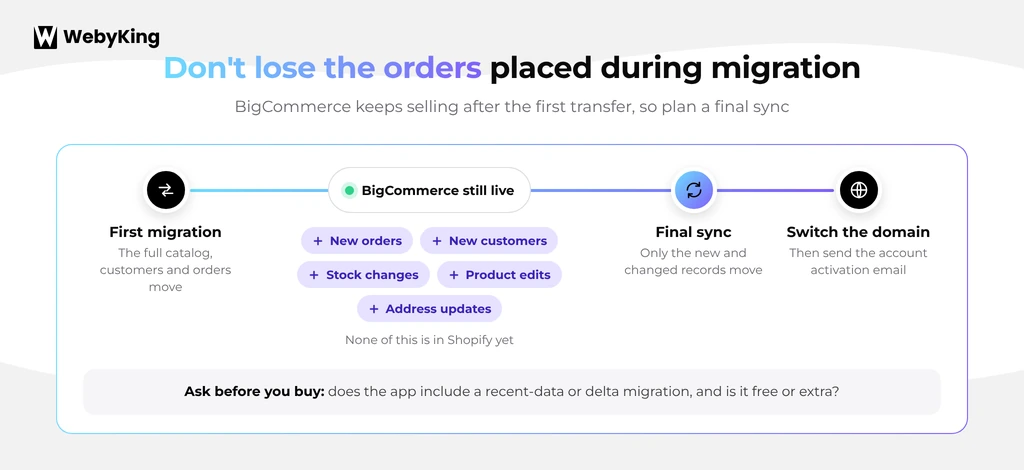
What Happens to Orders Placed During the Migration?
If your BigCommerce store continues accepting orders while the Shopify store is being prepared, new orders and customer changes can occur between your initial migration and launch.
That’s why you need a final synchronization plan.
Before switching the live store, determine how you’ll handle:
- New orders
- New customers
- Inventory changes
- Product changes
- Customer updates
Ask your migration provider whether it supports a final or recent-data migration before launch.
Should You Use Migration Apps or Hire a BigCommerce to Shopify Expert?
It depends on the complexity of your store.
| Store situation | Approach to consider |
|---|---|
| Small catalog with simple products | Shopify CSV import or migration apps |
| Large catalog with standard products | Automated migration apps |
| Personalized products | Migration apps plus product option work |
| Products with more than three variant options | Restructure products before migration |
| Large SEO footprint | Migration apps plus dedicated redirect planning |
| Multiple integrations | Professional migration planning |
| B2B or customer-specific pricing | Expert migration and Shopify B2B planning |
| Highly customized storefront | Migration plus Shopify development |
A DIY migration can work well when your store is simple and you have enough time for testing.
For a store with complex product logic, B2B pricing, integrations, or valuable organic traffic, the bigger risk isn’t whether the data can move.
It’s whether the new store will work correctly after it moves.
If you need help evaluating the scope, WebyKing’s website migration services can help identify what needs to be migrated, rebuilt, or replaced.
How Do You Test a BigCommerce to Shopify Migration Before Launch?
What Products Should You Include in a Test Migration?
Don’t choose only your easiest products.
Create a representative sample containing:
- Simple products
- Products with multiple variants
- Products with modifier options
- Products with custom fields
- Products with multiple images
- Personalized products
- Products with special pricing
Also include a small sample of customers, orders, pages, and blog posts.
How Do You Check Migrated Products and Data?
Open the same product in BigCommerce and Shopify.
Compare:
- Product title
- Description
- Price
- SKU
- Variants
- Images
- Inventory
- Custom fields
- Product options
- SEO information
Then check the product from a customer’s perspective.
Does everything appear correctly on the storefront?
How Do You Test Product Options and Personalization?
This is particularly important for BigCommerce stores that use modifiers.
Add the product to cart and complete the customization.
Check whether:
- The customer can select the option.
- The entered information reaches the cart.
- The information appears correctly in the order.
- Any additional price is calculated correctly.
- Inventory behaves correctly.
A product that looks correct in Shopify admin can still fail during the actual shopping experience.
How Do You Check Your URL Redirects?
Start with your most important BigCommerce URLs.
Test:
- High-traffic pages
- Top product pages
- Category pages
- Blog posts
- Pages with backlinks
Each old URL should reach the correct new Shopify page without unnecessary redirect chains or loops.
You can also review your website migration checklist before launch to make sure other technical checks aren’t missed.
How Do You Test Checkout, Payments, and Integrations?
Run real test scenarios before launch.
Check:
- Add to cart
- Product options
- Discounts
- Checkout
- Payment methods
- Shipping rates
- Taxes
- Order confirmation emails
- Inventory updates
- Fulfillment
- Analytics
- Third-party integrations
Don’t assume these work simply because the product data migrated correctly.
What Should You Monitor After Launch?
Keep your BigCommerce data available after launch rather than immediately shutting everything down.
During the first few weeks, monitor:
- 404 errors
- Redirects
- Search Console coverage
- Organic traffic
- Important landing pages
- Product indexing
- Checkout errors
- Orders
- Inventory synchronization
- Third-party integrations
If SEO is an important part of your store’s revenue, our Shopify SEO checklist can help with the post-launch review.
What Do BigCommerce to Shopify Migration Apps Cost?
Migration app pricing varies based on the number of products, customers, orders, and additional services you need.
Some tools offer relatively low-cost automated migrations, while larger migrations can cost considerably more when you add:
- Large data volumes
- Additional entities
- Custom fields
- Redirects
- Data cleanup
- Migration assistance
- Custom development
The important distinction is between app cost and total migration cost.
For example, an app might cost $200, but your team could spend dozens of hours cleaning data, checking products, fixing options, testing integrations, and setting up redirects.
So compare:
App cost + internal time + development + cleanup + testing
rather than looking at the app price alone.
How Can You Reduce Unnecessary Migration Costs?
You can reduce migration effort without skipping essential checks.
Clean up data first.
Remove obsolete products and content you no longer need, and fix inconsistent records before transferring them.
Use existing Shopify features where practical.
A suitable theme and available apps may reduce development compared with rebuilding every feature from scratch.
Test before migrating everything.
A small, representative test helps uncover mapping problems before they affect your entire catalog.
Avoid rebuilding unused features.
Review which features customers actually use and prioritize the ones your business needs.
Separate redesign from migration.
If the budget is limited, consider moving the core store first and scheduling nonessential design improvements separately.
Scope the work clearly. Make sure the quote identifies what the migration tool covers and what requires additional development or support.
Final Thoughts
The best BigCommerce to Shopify migration apps aren’t necessarily the ones that promise to move the most data.
The better question is whether the app can handle your store’s data structure.
Start by auditing your products, modifier options, custom fields, customer data, orders, integrations, and URLs. Then run a test migration using your most complicated products.
If the test works, you can move forward with much more confidence. If it doesn’t, you’ll discover the problem before it affects your entire catalog.
Most importantly, don’t treat migration as an export-and-import task. Data transfer, product restructuring, storefront development, integrations, redirects, testing, and launch preparation all form part of the actual migration.
If you’re planning a BigCommerce to Shopify migration and aren’t sure which parts can be automated, WebyKing’s website migration team can review your current setup and help define the migration scope before development begins.
What Are the Most Common Questions About BigCommerce to Shopify Migration Apps?
Which apps can migrate BigCommerce to Shopify?
Cart2Cart, LitExtension, and Matrixify are options to compare. Shopify CSV import may also work for simpler stores. The right choice depends on your data structure and migration requirements.
Can you migrate BigCommerce to Shopify without an app?
Yes. You can export supported data from BigCommerce and import it into Shopify using CSV files. Complex product options, historical orders, redirects, and integrations may need separate work.
Do migration apps transfer all BigCommerce data?
No. Coverage varies by tool and data structure. Custom fields, modifier options, reviews, loyalty data, and some integrations may require additional mapping or separate migration steps.
Will BigCommerce product options transfer to Shopify?
Standard variants can generally transfer when they fit Shopify’s structure. Products with more than three variant options need to be restructured or handled with another product configuration approach.
Can migration apps preserve SEO rankings?
No app can guarantee unchanged rankings. Mapping important URLs, implementing relevant 301 redirects, preserving valuable content, and monitoring Search Console can reduce migration risk.
How much do BigCommerce to Shopify migration apps cost?
Costs vary by tool, data volume, and service level. Check current pricing and account for cleanup, development, testing, and launch work when comparing the total budget.
How do you know if a migration app is right for your store?
Run a demo or test migration with your most complicated products. Check variants, modifier options, custom fields, images, URLs, and other important data before moving the full catalog.
I'm Ravi Makhija, Founder & CEO of WebyKing. I believe your website should be the hardest-working member of your team, building trust, generating leads, and creating opportunities 24/7. Through web design, development, SEO, and digital strategy, I help businesses build websites that become growth assets-not just digital brochures. Too many businesses invest in websites that look great but fail to deliver real business value.
Business owners deserve digital solutions that are simple, practical, and built around their goals, not unnecessary complexity. After all, your website shouldn't just represent your business; it should help grow it.

Get In Touch