Last Updated: October 28, 2026
Reading Time: 11 minutes
Post Views: 3
- How Much Does a BigCommerce to Shopify Migration Cost in 2026?
- What Are You Actually Paying For?
- What Makes BigCommerce to Shopify Migration More Expensive?
- BigCommerce to Shopify Migration Cost: Design vs. Data
- What About Apps and Integrations?
- A Cost Many Merchants Forget: Running Two Stores
- How Much Does a Migration Tool Cost?
- Three Realistic BigCommerce to Shopify Migration Scenarios
- How to Get an Accurate BigCommerce to Shopify Migration Price
- How to Reduce Your BigCommerce to Shopify Migration Cost
- Final Thoughts
- BigCommerce to Shopify Migration Cost FAQs
Quick Summary
- A basic BigCommerce to Shopify migration can cost a few thousand dollars.
- Larger or more customized stores can reach $15,000 to $40,000 or more.
- Data migration is only one part of the project.
- Custom product options, modifiers, B2B pricing, integrations, and design can increase the cost quickly.
- Migration tools can reduce manual work, but they do not replace testing or custom development.
- Shopify app subscriptions are usually ongoing costs, not one-time migration costs.
- SEO redirects should be planned as part of the migration, not after launch.
- The best way to compare quotes is to compare the same scope, not just the final price.
The BigCommerce to Shopify migration cost in 2026 can range from a few thousand dollars for a simple store to tens of thousands for a complex one.
But product count alone does not determine the price.
A store with 5,000 simple products may be easier to move than a store with 1,000 products that use custom fields, product modifiers, customer-specific pricing, and several integrations.
The real cost comes from what needs to be moved, rebuilt, cleaned up, tested, and connected on Shopify.
If you’re planning a BigCommerce to Shopify migration and asking what it will cost, this guide breaks down the major expenses so you can build a realistic budget before you start.
How Much Does a BigCommerce to Shopify Migration Cost in 2026?
There is no single price for every BigCommerce store.
Published 2026 estimates from Shopify agencies show a wide range. Simpler professional migrations often land around $2,000 to $6,000, while mid-sized projects commonly fall between $5,000 and $15,000. Larger stores with custom development, B2B requirements, or complex integrations can reach $15,000 to $50,000 or more.
A useful planning range looks like this:
| Store type | Approx. migration budget | What usually makes up the work |
|---|---|---|
| Simple | $2,000–$6,000 | Standard products, basic theme, and limited integrations. |
| Growing | $5,000–$15,000 | Larger catalog, custom design, apps, SEO, and integrations. |
| Complex | $15,000–$40,000+ | Custom functionality, large data sets, B2B, or multiple integrations. |
| Enterprise | $30,000–$100,000+ | Shopify Plus, ERP/OMS, multi-storefront, and custom development. |
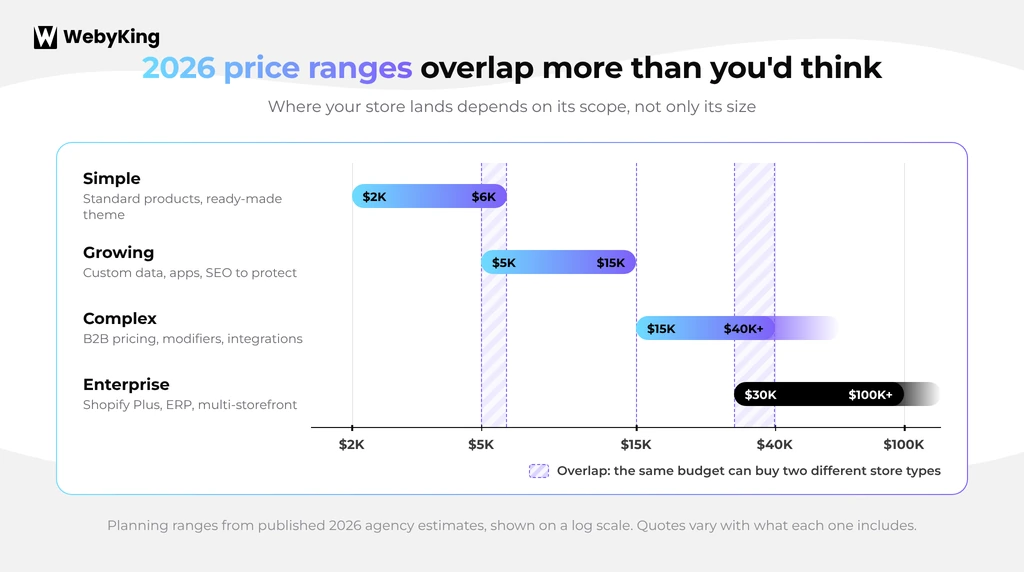
These are planning ranges, not fixed market prices. Different providers include different work in their quotes, which is one reason published pricing varies so much. Our broader guide on website migration cost explains why a small quote can grow quickly.
For example, one provider may quote $5,000 for data migration and basic setup, while another quotes $15,000 because the package also includes theme development, redirects, integration work, testing, and launch support.
So don’t compare the numbers until you compare what is included.
What Are You Actually Paying For?
A BigCommerce to Shopify migration is not just an export-and-import job.
Shopify’s own migration guidance recommends choosing a method based on the amount and complexity of your data. Options include manual migration, CSV imports, migration apps, Shopify Partners, and custom API-based solutions.
Your budget may include several separate workstreams:
| Work | What happens |
|---|---|
| Product migration | Products, SKUs, variants, images, descriptions, and other product data move to Shopify. |
| Customer migration | Customer records and addresses are transferred. |
| Order migration | Historical orders are imported when required. |
| Custom data | BigCommerce custom fields are mapped to Shopify metafields or another solution. |
| Store design | Your BigCommerce storefront is recreated or redesigned in Shopify. |
| Feature rebuild | BigCommerce-specific functionality is replaced. |
| Integrations | ERP, inventory, fulfillment, accounting, and other systems are connected. |
| SEO migration | URLs, redirects, and metadata are reviewed. |
| Testing | Products, checkout, payments, shipping, and integrations are checked. |
| Launch | Final data sync, domain switch, and post-launch checks are handled. |
This is why a quote based only on the number of products can be misleading.
What Makes BigCommerce to Shopify Migration More Expensive?
1. Your products have more than basic variants
This is one of the first areas to check before you request a quote.
A basic product might have:
T-Shirt → Small, Medium, Large
That is relatively straightforward. But a BigCommerce product might have:
Custom Size + Material + Engraving + Additional Component + Customer Text
Now the migration needs to account for how those options work on Shopify.
BigCommerce product options and modifiers do not always map directly to Shopify’s product and variant structure. Shopify’s migration guidance recommends auditing variants, options, custom fields, and metafields before the move.
Merchants have run into this in real migrations. In one merchant discussion on Reddit, a store moving about 5,000 products and variants found that images, SKUs, and prices transferred correctly, but BigCommerce custom fields did not map as expected and product settings needed manual attention.
What this means for your budget: Don’t ask only, “How many products do we have?” Ask, “How many products use custom fields, modifiers, unusual options, or special pricing?” That gives a much better idea of the actual migration effort.
2. You have a large order history
Historical orders can add work even when your current product catalog is simple.
Shopify supports importing historical orders, but that process needs to be planned separately from the product import. Shopify recommends importing products first, then customers, then historical orders, so the relationships between those records stay intact.
You should also decide how much history you actually need. Do you need:
- Every order from the last 10 years?
- Only fulfilled orders?
- Orders from the last 3 years?
- Customer records but not historical orders?
The answer can change the migration workload.
A useful cost-saving question: Before paying to migrate thousands of old records, ask, “Do we actually need all of this data inside Shopify?” You may need to keep historical information for reporting or compliance without every old record behaving like a new Shopify order.
3. Your BigCommerce store uses custom fields
Custom fields are easy to overlook during migration planning. Suppose your BigCommerce products contain:
- Technical specifications
- Manufacturer information
- Compatibility details
- Materials
- Installation instructions
- Related product SKUs
- Other product-specific information
These fields may not have a direct one-to-one destination in Shopify. They may need to become Shopify metafields or be handled through another structure.
That means someone needs to:
- Identify the fields.
- Decide where each field belongs in Shopify.
- Map the data.
- Import it.
- Check the results.
That work adds to the migration cost even if your product count is not very high.
4. You rely on BigCommerce features that Shopify handles differently
This is where a migration becomes more than a data-transfer project. You may currently use:
- Customer groups
- Price lists
- Wholesale pricing
- Product modifiers
- Advanced filtering
- Gift certificates (these become Shopify gift cards)
- Custom scripts
- Special checkout behavior
Some features have a Shopify equivalent. Others may require an app or custom Shopify development. Not sure which platform handles your features better? See our BigCommerce vs Shopify comparison.
Don’t assume that “it works on BigCommerce, so it will transfer to Shopify.” Instead, create a feature inventory before migration:
| Current BigCommerce feature | Shopify solution | Possible cost |
|---|---|---|
| Standard product variants | Shopify variants | Low |
| Custom product information | Metafields | Low–Medium |
| Complex product options | App or custom solution | Medium–High |
| Customer-specific pricing | Native Shopify B2B (3 catalogs on non-Plus plans), Shopify Plus, or an app | Low–High |
| Advanced filtering | Shopify Search & Discovery or another solution | Low–Medium |
| Custom scripts / checkout logic | Shopify Functions, theme code, or an app | Medium–High |
| ERP integration | Rebuild or reconfigure the integration | Medium–High |
A note on B2B pricing in 2026: Since April 2026, Shopify’s core B2B features are available on Basic, Grow, and Advanced plans, not only Shopify Plus. That includes company profiles, payment terms, volume pricing, and up to three B2B catalogs. If your BigCommerce store relies on dozens of customer-specific price lists, though, you’ll likely need Shopify Plus or a B2B app, and that should be in your budget.
A note on custom checkout logic: Shopify Scripts stopped running on June 30, 2026. Any custom discount, shipping, or payment logic you rebuild now needs Shopify Functions or a Functions-based app.
This feature-by-feature review is often more useful than simply counting products.
BigCommerce to Shopify Migration Cost: Design vs. Data
One of the biggest mistakes is treating the migration as a data project when the store also needs a design rebuild.
Your BigCommerce theme does not simply become a Shopify theme. You have three broad choices.
Option 1: Use an existing Shopify theme
This is usually the simplest approach. You move your content and products into Shopify and configure a suitable theme.
Development effort: Lower
Option 2: Customize a Shopify theme
You start with a Shopify theme and modify its layout, sections, styles, and functionality to match your brand.
Development effort: Moderate
Option 3: Rebuild the storefront
You recreate a highly customized BigCommerce experience or commission a custom Shopify website design during the migration.
Development effort: Higher
This is why two stores with the same number of products can see very different BigCommerce to Shopify migration pricing. One might need a simple theme setup. The other might need a complete storefront rebuild. For full build pricing, see our Shopify website development cost guide.
What About Apps and Integrations?
This is another cost area that surprises store owners. Your BigCommerce store may connect to:
- ERP
- CRM
- Accounting software
- Inventory management
- Warehouse or 3PL systems
- Email marketing
- Reviews
- Loyalty programs
- Search and filtering
- Subscription systems
- Shipping tools
BigCommerce apps don’t move to Shopify. You need to check each integration and find a compatible Shopify app or plan development work to connect it. Shopify recommends auditing integrations and other store functionality as part of migration planning.
The hidden cost is often not the app
The app itself might cost $20, $50, or $100 per month. The bigger question is how much work it takes to replace and configure the feature.
For example: existing BigCommerce integration → Shopify app → configuration → data migration → testing.
The recurring app fee is one cost. The implementation work is another. Keep those two costs separate when planning your budget.
The SEO Cost of Moving from BigCommerce to Shopify
This isn’t a full SEO guide, but SEO belongs in your migration budget because changing platforms changes your URLs and page structure.
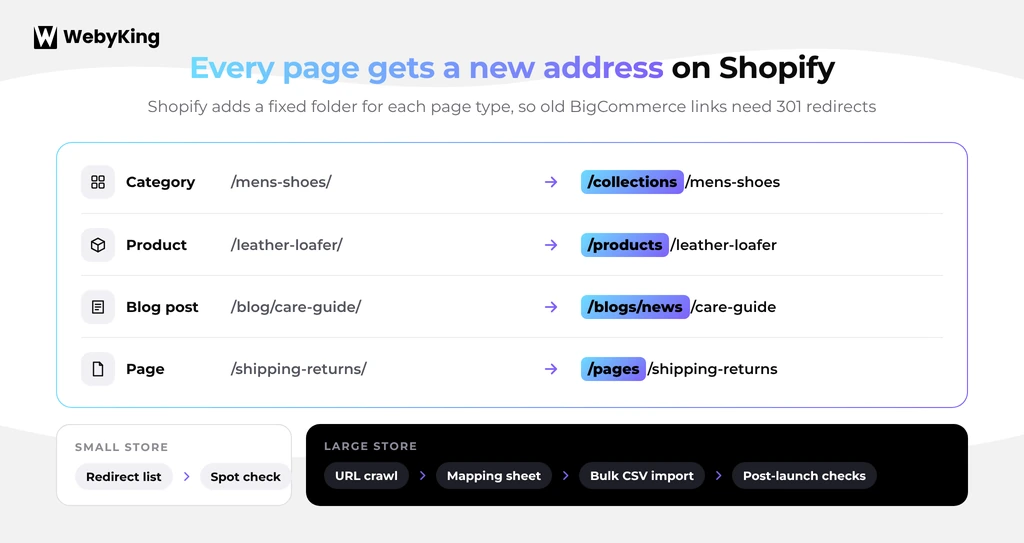
Shopify uses fixed URL structures for products, collections, blogs, and pages, and it recommends setting up redirects for important old URLs and checking them after launch. For example:
| Page type | Old BigCommerce URL | New Shopify URL |
|---|---|---|
| Category | /mens-shoes/ | /collections/mens-shoes |
| Product | /leather-loafer/ | /products/leather-loafer |
You need to map each old URL to the correct new page, including important product pages, blog posts, and other URLs. Our guide on how to migrate a website without losing SEO covers this process in detail.
What increases SEO migration work?
- Thousands of indexed URLs
- Large product catalogs
- Old URLs with unusual structures
- Multiple category levels
- Many blog posts
- Existing redirects from earlier changes
- Pages with strong organic traffic
- External backlinks pointing to old URLs
A small store may have a manageable redirect list. A large store may need a complete URL crawl, a mapping spreadsheet, a bulk import, and post-launch validation. That difference should be reflected in the quote, especially if you’ll need Shopify SEO services after launch.
A Cost Many Merchants Forget: Running Two Stores
A migration rarely happens overnight. On many projects, BigCommerce stays live while the Shopify store is built and tested, which creates a temporary overlap.
You may need to account for:
- Your BigCommerce subscription
- Your Shopify subscription (see current Shopify pricing plans)
- Development time
- App subscriptions on both platforms
- Integration costs
- Internal staff time
- Testing
- Final data synchronization
The longer the transition takes, the more this matters. In a recent discussion among BigCommerce merchants, teams pointed to the internal development time spent running two technology stacks while integrations were rebuilt and tested.
So when you calculate the cost to migrate from BigCommerce to Shopify, don’t look only at your developer’s invoice. Consider the total transition cost.
How Much Does a Migration Tool Cost?
A migration tool can be much cheaper than a full custom migration. Tool-assisted migrations typically cost from a few dozen dollars to several hundred or more, depending on record volume and add-ons.
But there is an important distinction: tool cost is not total migration cost.
A tool may transfer the data, but you may still need to:
- Clean the data
- Map custom fields
- Fix product options
- Configure Shopify
- Rebuild the theme
- Replace apps
- Set up redirects
- Test checkout
- Test integrations
- Fix import errors
A simple example
Imagine a migration tool costs $200. That does not mean your migration costs $200.
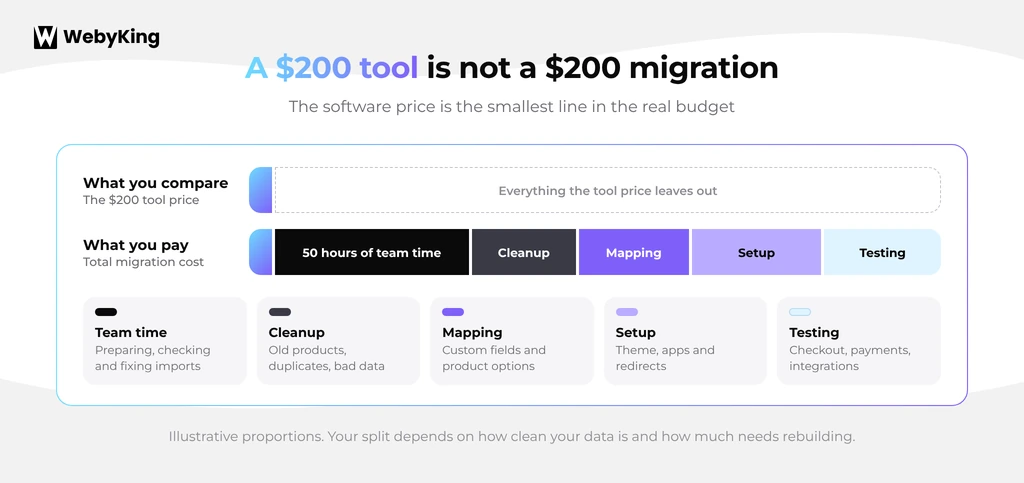
If your team spends 50 hours preparing, checking, and correcting the migration, those hours have a cost too. That’s why you should compare tool price + internal time + development + cleanup + testing, rather than comparing software prices alone.
Three Realistic BigCommerce to Shopify Migration Scenarios
Every store is different, so here’s how cost changes across three common setups.
Scenario 1: Small store with a simple catalog
- 200 products
- Standard variants
- Few integrations
- Minimal custom functionality
- An existing Shopify theme that meets your needs
You may be able to complete much of the migration with CSV files or a migration tool. The main work is data transfer, setup, validation, redirects, and launch testing.
Likely cost: Lower end of the market, around $2,000 to $6,000 with professional help.
Scenario 2: Growing store with custom data
- 2,000 products
- Multiple variants
- Custom product fields
- Several Shopify apps
- A customized storefront
- Thousands of historical orders
- SEO traffic that needs to be protected
Now the project involves more than importing products. You need data mapping, theme work, app configuration, redirect planning, and detailed testing.
Likely cost: Mid-range, around $5,000 to $15,000.
Scenario 3: Complex B2B store
- 10,000+ products
- Customer-specific pricing
- Product modifiers
- Multiple integrations
- An ERP or warehouse connection
- Large order history
- A custom storefront
- Multiple markets or storefronts
Here, the biggest cost may not be the catalog migration. It may be rebuilding the business logic around the catalog, including deciding whether native Shopify B2B covers your price lists or you need Shopify Plus.
Likely cost: $15,000 to $40,000+, with enterprise projects potentially much higher depending on the implementation.
How to Get an Accurate BigCommerce to Shopify Migration Price
Don’t ask a provider, “How much do you charge for BigCommerce to Shopify migration?” That question is too broad. Instead, give them a migration scope. Want a quick starting number first? Try our migration cost calculator.
Store information
- Number of products
- Number of variants
- Number of customers
- Number of historical orders
- Number of categories
- Number of pages and blog posts
Custom functionality
- Product modifiers
- Custom fields
- Customer groups
- Wholesale pricing
- Subscriptions
- Custom checkout requirements
Integrations
List every system connected to BigCommerce.
Design
Tell them whether you want:
- An existing Shopify theme
- A customized theme
- A like-for-like rebuild
- A new storefront design
SEO
- Number of important URLs
- Existing URL structure
- Redirect requirements
- Metadata
- Organic traffic priorities
Launch
Specify whether the quote includes:
- Testing
- Final data sync
- Domain switch
- Redirect testing
- Analytics checks
- Post-launch support
This makes quotes much easier to compare.
How to Reduce Your BigCommerce to Shopify Migration Cost
You don’t need to cut corners to reduce the budget. You need to cut unnecessary work.
Clean the catalog before migration
Remove products, customers, pages, and other data you no longer need.
Don't rebuild every old feature
Ask whether customers still use each feature before paying to recreate it.
Use a Shopify theme when possible
A suitable theme can reduce custom development.
Test a small product batch first
Before migrating thousands of products, test a representative sample. Include products with:
- Multiple variants
- Custom fields
- Images
- Special pricing
- Product options
This can reveal mapping problems before they affect the full catalog.
Separate migration from redesign
If budget is tight, you don’t need to redesign the entire store at the same time. You can migrate the core experience first and improve the storefront later.
Plan the redirect map before launch
Don’t leave SEO redirects until the last day. Shopify allows bulk URL redirect imports, which helps when you’re dealing with a large redirect list.
Final Thoughts
The BigCommerce to Shopify migration cost in 2026 isn’t set by one number.
A simple store may need only data migration, Shopify setup, and testing. A more complex store may need custom product mapping, feature replacements, integration work, theme development, and SEO migration.
The most important thing is to price the whole move, not just the data transfer.
Before choosing a migration approach, identify what you actually need to move, what needs to be rebuilt, and what can be left behind. Then compare quotes using the same scope. That gives you a realistic view of the cost to migrate from BigCommerce to Shopify and helps prevent surprise expenses after the project starts.
BigCommerce to Shopify Migration Cost FAQs
How much does it cost to migrate from BigCommerce to Shopify in 2026?
A simple migration can cost around $2,000–$6,000. Growing stores may cost $5,000–$15,000, while complex migrations can reach $15,000–$40,000+.
What makes BigCommerce to Shopify migration more expensive?
Custom fields, product modifiers, large order histories, integrations, custom designs, B2B pricing, and complex functionality can increase the cost.
Can I migrate BigCommerce to Shopify myself?
Yes. Simple stores can use CSV files or migration tools. Complex stores may need professional help for data mapping, integrations, design, and testing.
Are BigCommerce to Shopify migration apps cheaper than hiring a developer?
Usually, the tool costs less, but it does not cover everything. Data cleanup, mapping, setup, app configuration, testing, and fixing errors can still add to the total cost.
Do BigCommerce apps transfer to Shopify?
No. BigCommerce apps do not transfer directly. You need to replace them with Shopify apps, native features, or custom development.
Can I migrate BigCommerce custom fields and historical orders?
Yes, but they may require additional mapping or migration work. Custom fields may need to be converted to Shopify metafields, while large order histories can increase the workload.
What hidden costs should I budget for?
Common additional costs include Shopify and app subscriptions, integration work, data cleanup, SEO redirects, testing, and running both BigCommerce and Shopify during the transition.
I'm Ravi Makhija, Founder & CEO of WebyKing. I believe your website should be the hardest-working member of your team, building trust, generating leads, and creating opportunities 24/7. Through web design, development, SEO, and digital strategy, I help businesses build websites that become growth assets-not just digital brochures. Too many businesses invest in websites that look great but fail to deliver real business value.
Business owners deserve digital solutions that are simple, practical, and built around their goals, not unnecessary complexity. After all, your website shouldn't just represent your business; it should help grow it.

Get In Touch