Last Updated: August 21, 2026
Reading Time: 11 minutes
Post Views: 142
- What Actually Goes Into a WordPress Website Cost
- WordPress Website Cost by Who Builds It
- WordPress Website Cost by Business Size
- What Actually Increases WordPress Website Costs
- What's Included in a WordPress Website Price?
- How to Read a WordPress Quote (So You Don't Get Burned)
- Additional & Ongoing Costs to Consider
- Common Mistakes That Increase WordPress Website Costs
- Why Businesses Choose WebyKing for WordPress Websites
- Final Thoughts
- Frequently Asked Questions
Quick Summary
WordPress is free, but building a real and professional website on WordPress, you’re paying for hosting, theme, plugins, developer/agency, or your time, and maintenance. This guide will provide you with:
- A realistic breakdown of WordPress website design cost by project type – DIY, freelancer, and agency.
- What is really costing you more money (Custom Design, eCommerce, Integrations, Migrations)
- Most quotes simply don’t mention these hidden, recurring costs (renewal, maintenance, plugin subscriptions)
- A clear, honest answer to “what should I budget?” based on where your business actually stands
Here’s the trap most people fall into: they hear “WordPress is free” and assume the website will be too. Then three quotes land in their inbox – one for $800, one for $6,000, one for $28,000 – for what sounds like the same project, and they have no idea which one is honest.
The truth is, all three could be right. A real WordPress website costs anywhere from about $60 in its first year (bare-bones DIY) to $100,000+ for a complex, custom build – and the gap isn’t random. It comes down to exactly what you’re paying for: hosting tier, who writes the code, how many premium tools you need, and how much hand-holding you want after launch.
This guide breaks all of that down using real, current pricing – actual hosting plans, actual plugin costs, actual developer rates, not rounded-off guesses. By the end, you’ll know which bracket your project falls into, and how to spot a quote that’s either padded or missing something important.
What Actually Goes Into a WordPress Website Cost
Before comparing DIY vs. freelancer vs. agency pricing, here’s what you’re actually paying for, piece by piece, with real 2026 numbers instead of vague placeholders:
| Component | Real 2026 Pricing | Notes |
| Domain name | $10 – $40/year | Bluehost and similar registrars price standard .com domains in this range; premium or short domains cost more. |
| Shared hosting | $2 – $15/month intro, $10 – $18/month renewal | Hostinger and Bluehost advertise very low introductory pricing, while renewal costs are significantly higher. SiteGround generally has the highest renewal pricing. |
| Managed WordPress hosting | $25 – $115/month | Premium managed hosting providers like Kinsta offer predictable pricing, better performance, security, backups, and expert support. |
| SSL certificate | Free – $70/year | Most hosting providers now include a free SSL certificate. Paid SSL certificates are generally only needed for advanced validation requirements. |
| Theme (Premium) | $49 – $89/year | Popular premium themes such as Astra Pro and Divi typically fall within this price range. |
| Custom-designed theme | $1,500 – $10,000+ | One-time investment for a fully custom website design tailored specifically to your business. |
| Page Builder (Elementor Pro, etc.) | $59 – $399/year | Pricing depends on the number of websites included in your license. |
| SEO Plugin (Yoast Premium, Rank Math Pro) | Free – $358.80/year | Free versions work well for many websites, while premium plans include advanced SEO features like multiple focus keywords and internal linking suggestions. |
| Security Plugin (Wordfence Premium) | $119/year | The free version provides solid protection for many websites, while Premium adds real-time firewall rules and malware updates. |
| Form Builder (WPForms Pro) | $49.50/year | WPForms Lite is suitable for basic contact forms, while Pro includes payment forms, surveys, automation, and advanced integrations. |
| Website Maintenance | $50 – $500+/month | Maintenance plans typically include updates, backups, security monitoring, performance optimization, and technical support. DIY maintenance saves money but requires ongoing time and expertise. |
This is the foundation every WordPress site needs, no matter who builds it. Design and development fees, covered next, sit on top.
WordPress Website Cost by Who Builds It
Numbers change depending on who builds your site, as well as what you’re building. WordPress website cost splits into four common paths, each suited to a different kind of project.
DIY WordPress Site
Typical cost: Typical cost: $200 – $1,500 to launch, roughly $100 – $300/year to keep running
Best for: Solopreneurs, personal brands, early-stage side projects, or anyone testing an idea before investing in a full build.
| Pros | Cons |
| You’re simply paying for hosting, a domain, and perhaps a premium theme. | Steep learning curve if you’ve never touched WordPress before |
| Full control over timeline; no waiting on a developer’s schedule | Design usually looks template-driven, not custom |
| Good learning experience if you plan to manage the site yourself long-term | Time cost is real – expect 20–60+ hours to get a basic site launch-ready |
Freelancer
Typical cost:$1,000 – $6,000 to launch, roughly $300 – $1,000/year to keep running
Best for: Small businesses and startups that need a professional-looking site without agency-level overhead.
| Pros | Cons |
| More cost-effective and usually 40-60% cheaper than an agency for similar projects. | There is a lot of variation in quality – vetting is more important than with agencies. |
| Direct communication – you are typically communicating with the individual you are constructing your site for. | One person equals one point of failure – If one person has to miss a day at work, a side project, or they’re too busy to work, they fall behind. |
| Better for small projects as it can be closed quickly | Bandwidth limitations for strategy, SEO, or copywriting (if needed) unless you hire separately |
One of our clients initially hired a freelancer for a basic business website. As their business grew, they needed SEO improvements, custom integrations, and ongoing support – services that required transitioning to an agency to scale the site effectively.
WordPress Agency
Typical cost: $3,000 – $20,000 to launch, roughly $1,000 – $5,000/year to keep running
Best for: Growing businesses that need design, strategy, SEO, and development to be done as a single project – not as a website.
| Pros | Cons |
| Access to a full team of designers, developers, project managers, and sometimes also SEO and copywriting experts. | More expensive than DIY / freelance options |
| Formal process without time limits, revisions, and accountability | More time spent because of multi-person workflows and review cycles. |
| Better prepared to deal with ecommerce, integrations, and migrations without surprises. | May be excessive for a simple and low-stakes site. |
We recently redesigned a service-based company’s WordPress website, combining custom design, SEO optimization, and lead generation features into a single project. The result was a website that was easier to manage and built to support future business growth.
According to Stanford Web Credibility Research, the majority of users judge a company’s credibility based on its website design. That’s one reason many growing businesses invest in professional design, strategy, and ongoing support rather than focusing solely on the lowest upfront cost.
Enterprise Development
Typical cost: $25,000 – $100,000 to launch, $5,000 – $15,000+/year to keep running
Best for: Multi-location businesses, large ecommerce businesses, brands with many complex compliance, security, or integration requirements.
Common Requirements:
- Custom-built features developed specifically for your website, beyond the capabilities of standard plugins.
- Integrations with CRMs, ERPs, or internal business systems
- Many stakeholders sign off on legal/compliance and accessibility standards.
- Dedicated QA environments, staging environments, and phased rollouts.
- Continuous individual support services as opposed to single maintenance contracts.
For a national retail brand, we developed a custom WordPress solution with multiple third-party integrations and location-specific pages. Enterprise projects like this require detailed planning, QA testing, and stakeholder approvals, which naturally increase development time and cost.
DIY vs. Freelancer vs. Agency: Quick Comparison
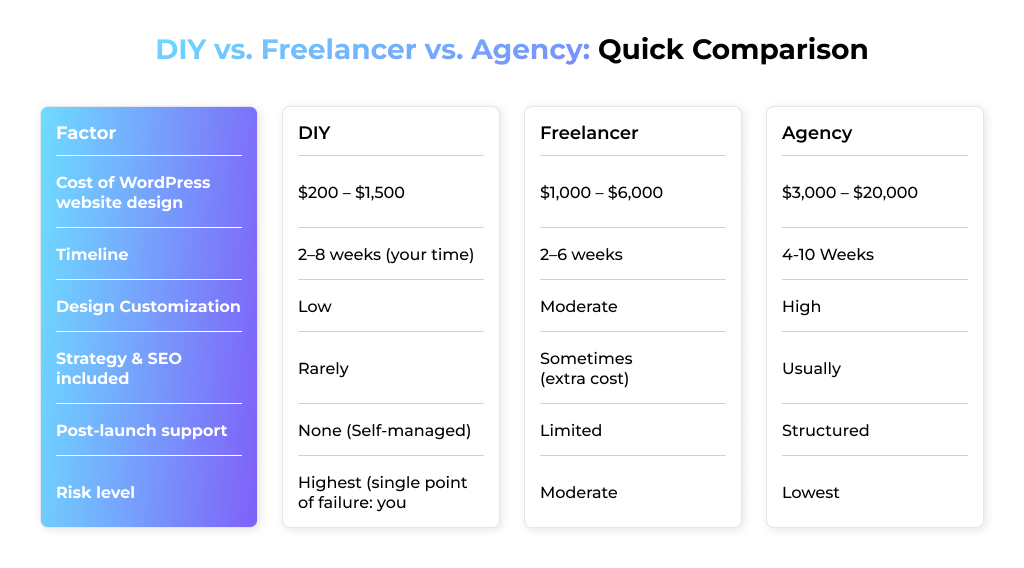
The pattern here is straightforward: as your budget goes up, so does the amount of risk someone else is absorbing for you.
- A DIY build puts everything – design decisions, technical troubleshooting, security – on your plate.
- An agency spreads that across a team and builds accountability into the process, which is exactly why the cost for WordPress website design climbs as the provider tier goes up.
Pro Tip: If you’re stuck between a freelancer and an agency, ask this one question: “What happens if my site breaks six months from now?” A freelancer’s answer tells you about their availability. An agency’s answer tells you about their process. Pick based on which answer actually makes you feel secure.
WordPress Website Cost by Business Size
A second way to sanity-check your number – by business size rather than project type:
| Business Type | Upfront Cost | Ongoing Annual Cost |
| Personal / Hobby Website | $75 – $500 | $100 – $300 |
| Small Business Website | $1,500 – $10,000 | $300 – $1,000 |
| Mid-Size Business Website | $7,500 – $35,000 | $1,000 – $5,000 |
| WooCommerce (eCommerce) Website | $5,000 – $55,000 | $1,000 – $3,000 |
| Enterprise / Multi-Location Website | $25,000 – $150,000+ | $5,000 – $15,000+ |
Where you land inside a bracket comes down to page count, plugin load, traffic, and whether you’re building in-house or hiring out.
What Actually Increases WordPress Website Costs
Ranges only mean something once you know what pushes a project toward the low end or the high end.
Project Scope
Scope is the first domino. While a five-page brochure site and a fifty-page resource hub with gated content are both “WordPress websites”, they require totally different levels of design, development, and content work.
One of the most frequent causes of overspending of the final invoices over the initial quote is scope creep, five times more than “just one more page.”
Website Redesign
Sometimes redesigns seem easier than new builds, but they don’t. It’s not just an audit of what you’re designing – it’s an audit of what you’ve already got, a decision on what to keep, and ensuring you don’t sink the rankings you’ve already earned.
That’s typically where WordPress SEO services enter the fray when designing, after all, keeping your established rankings intact takes as much work as the design itself.
Website Migration
You won’t just be copying and pasting pages, images, or URLs from Wix, Squarespace, or another CMS to WordPress; you’ll need a plan for a smooth website migration. If you get the redirects incorrect, you lose the SEO rankings you’ve worked so hard to achieve, making a “quick move” much more work.
Theme Replacement
Changing themes on a live site doesn’t happen in 5 minutes. If a web page is created with one layout, it will not fit if you try to use it in another layout, so it cannot simply be restyled; it must be rebuilt.
Features & Functionality
Booking tools, membership logins, quote calculators, and ecommerce checkouts each add development hours or licensing fees. This is typically the main contributing factor to the cost of a WordPress website design.
Third-Party Integrations
Integrating your site with a CRM, payment gateway, or booking system is called “just add a plugin,” but the process of getting two systems talking reliably can involve some custom configuration.
One of the primary factors behind the price increase for WordPress website design for eCommerce and service-based businesses.
Custom Functionality
The moment you need something WordPress doesn’t do out of the box – a custom quote calculator, a unique membership flow – you’ve moved from configuration to actual development.
This is where working with proper WordPress website design services pays off, as it takes more time to build, test, and maintain custom code than a plugin.
Animations & Interactive Features
Scroll animation, hover effects, and interactive elements make a website feel premium, but they’re added in pieces (and tested across devices). What looks like a small visual flourish on the homepage can quietly add real hours to the build.
You’ve seen the cost ranges, but ranges only make sense when you know what pushes a project toward the low end or the high end. These six factors, above all, constitute the true drivers of WordPress website design cost; understanding them is the key to guessing vs. planning a budget.
What's Included in a WordPress Website Price?
Every provider packages things differently, which is exactly why two quotes at the same dollar figure can represent wildly different amounts of actual work. Compare what’s inside before you compare the number on the page.
| Item | Usually Included | Often an Add-on |
| Theme Setup & Customization | Yes Included | Not Included |
| Homepage + Core inner pages (5-8) | Yes Included | Not Included |
| Mobile-responsive design | Yes Included | Not Included |
| Basic contact form | Yes Included | Not Included |
| SSL setup | Yes Included | Not Included |
| Copywriting/content creation | Not Included | Yes Included |
| Custom photography | Not Included | Yes Included |
| eCommerce / WooCommerce setup | Not Included | Yes Included |
| Advanced Integrations (CRM, Payment, Bookings) | Not Included | Yes Included |
| SEO strategy | Not Included | Yes Included |
| Ongoing maintenance & updates | Not Included | Yes Included |
| Premium plugin licenses | Not Included | Yes Included |
Some of these deserve special mention. When you are moving content from other websites, inquire about WordPress migration plugins that the provider is using – some are very good about handling redirects and SEO data properly, whereas others will leave you dealing with broken links for weeks afterward.
Or assume that “the site is done” implies “the site is taken care of” – most packages don’t offer WordPress maintenance services, so if you need them, you must pay extra and ask for them.
How to Read a WordPress Quote (So You Don't Get Burned)
Before you compare prices between vendors, compare what’s actually inside each quote. Two proposals at the same dollar figure can represent very different amounts of real work.
Ask every vendor these questions directly:
Before signing a proposal, ask these questions to understand exactly what’s included, compare quotes fairly, and avoid unexpected costs later.
- Website Type: Is this a template setup, a custom design, or fully custom development?
- Page Templates: Exactly how many page templates are included?
- Content: Who writes, formats, or migrates the content—you or the agency?
- SEO & Analytics: Are redirects, metadata, analytics, and technical SEO included or billed separately?
- Plugin Licenses: Which premium plugins are required, and who pays for renewals after the first year?
- WooCommerce Setup: If it’s an ecommerce website, are payment gateways, shipping, taxes, and product imports included?
- Accessibility: Will the website meet accessibility (WCAG) requirements?
- Performance: How will Core Web Vitals and website speed be tested before launch?
- Post-Launch Support: What happens after launch? Is there a support period included?
- Ownership: Who owns the website, source code, content, plugin licenses, and hosting account after the project is completed?
Additional & Ongoing Costs to Consider
Your initial design invoice is just chapter one. There are two costs associated with WordPress websites:
- One-time costs: (first-time design and development expenses, initial setup)
- And ongoing expenses (hosting, renewals, maintenance).
that keep showing up long after launch. Most budget surprises come from ignoring the second category entirely.
| Cost Type | Examples | Typical Range |
| One-time | Design & development, initial content, launch setup | Covered in your upfront cost of WordPress website design |
| Recurring | Hosting, domain renewal, security monitoring, maintenance | $50 -$500 +/ month |
A few line items to specifically budget for:
- Hosting – $3 – $100/month according to the traffic and type of hosting.
- Domain renewal – $10–$20/year
- Plugin & theme renewals – typically one per year, $50-300+per year (combination)
- The cost of maintaining and securing the site, if outsourced, varies from $50 to $200 per month.
- SEO & content updates – ongoing, dependent on goals, budget varies.
If your website relies on third-party tools like HubSpot, Salesforce, or Stripe, you may also need premium plugins or custom integrations to keep data synchronized. These tools often have their own subscription fees and may require occasional updates or developer support, adding to your ongoing website costs.
The design cost is like purchasing the house; the hosting, renewals, and maintenance costs are like the utility bills and upkeep of the house. Ignoring these, and even a perfectly designed site, can feel expensive in a year.
Common Mistakes That Increase WordPress Website Costs
Most budget overruns aren’t due to bad luck: it’s because of the same few common mistakes repeated again and again.
Scope changes mid-project. The extra pages add up quickly. Each addition following the project begins is a re-quote, re-schedule, and typically a bigger bill.
Content delays. No copy, no photo, no product data – work comes to a standstill, but the clock ticks (and so does the retainer). Late content is one of the stealthiest ways timelines and budgets both get off track.
Opting for the lowest price. A “cheap quote” which doesn’t set up SEO, security, or effective testing is a rebuild in waiting. Typically, you’ll end up paying twice.
Ignoring SEO. Even if a website isn’t designed with SEO in mind, it will still have to rank eventually. It’s more expensive to fix up after launch than it is to do it from the beginning.
Poor planning. With no scope, no features, and no budget locked, quotes tend to go out of the window. The better defined your needs are coming in, the closer (and lower) your final number remains.
Why Businesses Choose WebyKing for WordPress Websites
Choosing the right WordPress partner is about more than just price – it’s about building a website that supports your business today and grows with it tomorrow.
At WebyKing, we create custom WordPress websites tailored to your business goals, budget, and long-term vision. Whether you’re launching a new website, redesigning an existing one, or migrating from another platform, we focus on delivering websites that are fast, scalable, SEO-friendly, and built to perform.
Here’s what sets us apart:
- Custom WordPress designs tailored to your brand
- SEO-friendly development from day one
- Fast, responsive websites optimized for Core Web Vitals
- Expertise in WordPress migrations from Wix, Shopify, Squarespace, Drupal, and other CMS platforms
- Transparent pricing with no hidden costs
- Reliable maintenance and post-launch support
Whether you need a simple brochure website or a complex WooCommerce store, our team helps you understand exactly where your investment goes before development begins.
Ready to find out what your WordPress website will cost?
Our WordPress experts will review your requirements and provide a detailed, transparent estimate with clear recommendations—no sales pressure, no hidden surprises.
Final Thoughts
So, what is the cost of a WordPress website design? From a few hundred dollars to six figures, now you know! In the end, it depends on who’s building it, how complex your needs are, and whether you’re looking at ongoing costs or only the launch bill.
The real takeaway: don’t chase the lowest quote, chase the right fit for your scope. A DIY build works for a simple side project. An agency makes sense when your site needs to actually drive business. And no matter which route you pick, budget for what comes after launch – hosting, maintenance, and renewals are part of the real cost of WordPress website design, not optional extras.
Frequently Asked Questions
Is WordPress a good choice for growing businesses?
Yes. WordPress powers over 41.5% of all websites globally because it scales easily – you can start with a simple business site and add ecommerce, membership areas, or advanced integrations later without switching platforms entirely.
How much does a WordPress developer charge per hour?
Freelance WordPress developers typically charge $25 – $100 per hour, depending on experience and location. Final project cost depends on scope, not just the hourly rate.
Can I update my WordPress website myself after it's launched?
Yes. WordPress’s dashboard lets you edit text, images, and blog posts without coding knowledge. Structural changes, new features, or design updates typically still require a developer, depending on how the site was built.
How much does WordPress hosting cost separately?
WordPress hosting typically costs $3 – $25/month for shared hosting, $20–$100/month for managed WordPress hosting, and $100+/month for high-traffic or ecommerce sites needing dedicated resources. Hosting is billed separately from design and development.
Do I need to pay for premium WordPress plugins?
Not always. Many core features (forms, SEO, caching) have solid free plugin options.
Does migrating an existing website to WordPress cost extra?
Yes. Migration involves transferring content, preserving SEO rankings through proper redirects, and testing for broken links – a project depending on site size and complexity.
Can I add new features after my website is launched?
Yes. WordPress is built to be extended over time through plugins or custom development. Adding features post-launch is common and often more cost-effective than building everything up front before you know what you actually need.
I'm Ravi Makhija, Founder & CEO of WebyKing. I believe your website should be the hardest-working member of your team, building trust, generating leads, and creating opportunities 24/7. Through web design, development, SEO, and digital strategy, I help businesses build websites that become growth assets-not just digital brochures. Too many businesses invest in websites that look great but fail to deliver real business value.
Business owners deserve digital solutions that are simple, practical, and built around their goals, not unnecessary complexity. After all, your website shouldn't just represent your business; it should help grow it.


Get In Touch