Last Updated: August 21, 2026
Reading Time: 10 minutes
Post Views: 58
Table of Contents
- WooCommerce Development Cost at a Glance
- Why Do WooCommerce Prices Vary So Much?
- What Are You Actually Paying For?
- What Do You Get at Each WooCommerce Budget?
- What Actually Makes a WooCommerce Store More Expensive?
- What Are the Ongoing Costs of Running WooCommerce?
- What About Payment Processing Fees?
- What Does a Real WooCommerce Budget Look Like?
- Do You Really Need a $25,000 WooCommerce Website?
- Freelancer, Agency, or DIY: Which Makes Sense?
- How to Tell If a WooCommerce Quote Is Fair
- How to Keep Your WooCommerce Budget Under Control
- A Simple Way to Choose Your WooCommerce Budget
- Common Mistakes That Can Increase Your WooCommerce Costs
- Is a Custom WooCommerce Store Worth It?
- WooCommerce Development Pre-Hire Checklist
- How WebyKing Approaches WooCommerce Projects
- Planning a WooCommerce Store?
- What Should You Actually Budget for WooCommerce?
- WooCommerce Development FAQs
A WooCommerce store can cost $3,000 or $80,000+. So, where does your project fit?
The good news is that WooCommerce itself is free. The money goes into everything around it-design, development, hosting, plugins, integrations, product setup, and ongoing maintenance.
For most businesses, WooCommerce website development cost falls into three broad ranges:
- $3,000–$8,000 for a professional theme-based store
- $8,000–$25,000 for a semi-custom store
- $25,000–$80,000+ for a complex custom build
But those numbers don’t tell the whole story.
A store with 20 products and a standard checkout is relatively straightforward. A store with thousands of products, an ERP connection, B2B pricing, custom shipping rules, and automated workflows is a completely different project.
So the better question isn’t just “How much does WooCommerce cost?”
It’s:
“What should a store like mine actually cost?”
That’s what we’ll help you figure out below-without burying you in technical jargon or giving you one meaningless number.
WooCommerce Development Cost at a Glance
Here’s the quick version:
| Store type | Typical development cost | Best for |
| DIY / Starter | $500–$3,000 | Testing an idea or small catalog |
| Professional theme-based | $3,000–$8,000 | Small businesses |
| Semi-custom | $8,000–$25,000 | Growing ecommerce brands |
| Custom | $25,000–$80,000+ | Complex stores and integrations |
| Enterprise | $80,000+ | Large-scale ecommerce |
These are 2026 planning ranges, not fixed quotes. Your actual cost depends on what you want the store to do, how much data needs to be moved, how custom the design needs to be, and who builds it.
If you’re still comparing your options, it’s also worth looking at our guide on how much an ecommerce website costs for a broader picture.
Why Do WooCommerce Prices Vary So Much?
Here’s the part that often confuses buyers.
You can ask three developers to build a WooCommerce store and get three very different quotes.
That doesn’t automatically mean someone is overcharging.
WooCommerce is open-source and modular. You’re not buying a fixed website package. You’re deciding what goes into the store and every decision affects the final price.
Think about it like building a house.
A small two-bedroom home and a custom five-bedroom house are both houses. But nobody expects them to cost the same.
WooCommerce works the same way.
The platform is free. The store you build on top of it is where the cost comes from.
What Are You Actually Paying For?
A WooCommerce project usually has two types of costs.
One-time development costs
This is the work involved in getting your store built:
- Planning and requirements
- UX/UI and website design
- WordPress and WooCommerce setup
- Theme customization or custom development
- Product and category setup
- Payment and shipping configuration
- Integrations
- Testing
- Launch
If you’re comparing developers, our WooCommerce development services page can also help you understand the type of work involved in a professional build.
Ongoing costs
These keep the store running after launch:
- Hosting
- Domain renewal
- Premium plugins
- Security and backups
- Maintenance
- Payment processing
- Further development
This distinction matters.
A developer quoting $6,000 for the build and another quoting $10,000 may not actually be offering the same thing.
Always compare what’s included before comparing the numbers.
What Do You Get at Each WooCommerce Budget?
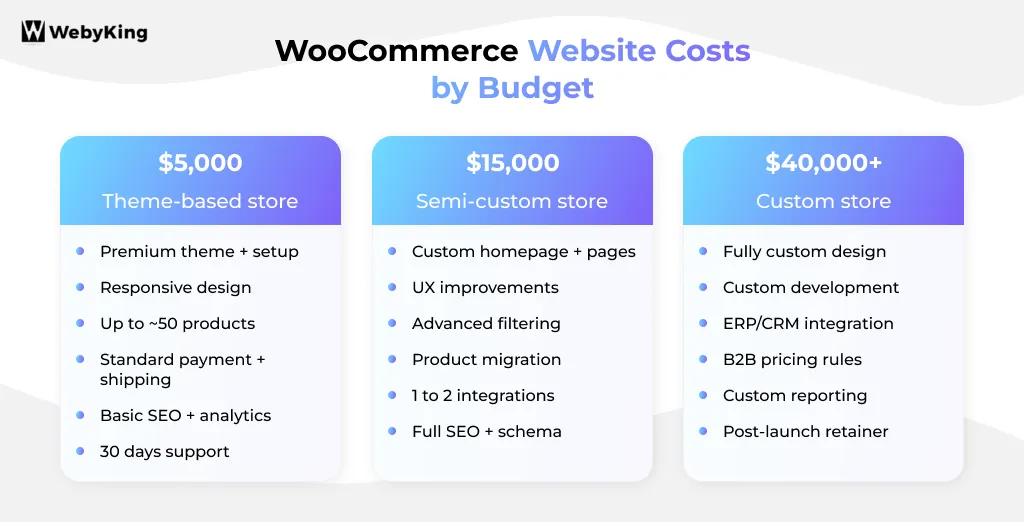
This is where the pricing starts to make more sense.
$3,000–$8,000: Professional Theme-Based Store
For many small businesses, this is the sweet spot.
You can get a professional-looking store without paying to custom-build every page.
A typical project may include:
- Premium theme setup and customization
- Responsive design
- WooCommerce configuration
- Homepage and product templates
- Product and category setup
- Standard payment gateway
- Standard shipping
- Basic on-page SEO
- Analytics
- Testing and launch support
This works particularly well for small business website design projects where the store has fairly standard requirements.
What’s probably included
Things such as,
- Fully custom design
- ERP integration
- Complex B2B pricing
- Product configurators
- Large-scale migration
- Custom plugins
If your business doesn’t need those things, that’s actually good news. You don’t need to pay for them.
$8,000–$25,000: Semi-Custom Store
This is where you can start making the store feel genuinely yours.
You might have:
- Custom homepage design
- Custom product and category layouts
- Better UX
- Advanced filtering
- Product migration
- One or two integrations
- Performance improvements
- More comprehensive SEO
- Custom checkout adjustments
This is often a good fit for a growing brand that has outgrown a basic template but doesn’t need a completely custom ecommerce application.
If you’re deciding between the two approaches, our guide to custom website vs. template can help.
$25,000–$80,000+: Custom WooCommerce Store
At this point, you’re no longer simply “setting up a website.”
You’re building software around your business.
This could involve:
- Fully custom UX/UI
- ERP or CRM integration
- Customer-specific pricing
- B2B functionality
- Subscription or membership systems
- Custom shipping logic
- Product configurators
- Custom checkout workflows
- Large-scale migration
- Custom plugins
- Advanced reporting
The price goes up because the development team is solving problems specific to your business, rather than configuring an existing solution.
And then there are enterprise projects
Large catalogs, multiple countries, multiple storefronts, high traffic, complex ERP/PIM systems, and advanced infrastructure can push projects beyond $80,000.
There’s no useful universal ceiling here.
At that point, the right approach is to define the requirements first and price the project around them.
What Actually Makes a WooCommerce Store More Expensive?
Four things tend to move the needle more than anything else.
1. Custom Design
A premium theme can save you a lot of time and money.
A completely custom design gives you more control, but you’re paying for the designer’s time and then the developer’s time to turn those designs into a working store.
Custom design makes more sense when:
- Your brand experience is a competitive advantage
- Your buying journey is unusual
- You need unique product/category experiences
- Conversion optimization is a major priority
If you already have a strong brand and need a completely bespoke experience, investing in ecommerce website design may make sense.
But don’t customize something just because you can.
If a good theme does the job, let it do the job.
2. Your Product Catalog
Twenty straightforward products are easy.
A thousand products with variations, attributes, images, categories, filters, and different pricing rules are not.
A larger catalog may require:
- Bulk imports
- Data cleanup
- Product variations
- Advanced filtering
- Faceted search
- Database optimization
- Category restructuring
If you’re moving an existing catalog, make sure product preparation and migration are actually included in your quote.
3. Integrations
This is where seemingly simple projects can get expensive.
Connecting WooCommerce to another system isn’t always a matter of installing a plugin.
You may need to connect:
- CRM
- ERP
- Shipping systems
- Accounting software
- Inventory systems
- Warehouse platforms
- Marketing tools
Rough planning ranges look like this:
| Integration | Typical cost |
| Standard payment gateway | Included–$800 |
| Shipping API | $800–$3,000 |
| Subscriptions | $500–$2,500 |
| Multi-currency/language | $1,500–$4,000 |
| B2B pricing | $1,500–$5,000 |
| CRM | $1,500–$6,000 |
| ERP/inventory | $3,000–$15,000+ |
| Warehouse/fulfillment | $3,000–$15,000+ |
| Product configurator | $3,000–$10,000+ |
These are broad planning ranges. The actual cost depends on the API, data mapping, business rules, and testing.
Treat every major integration as its own mini-project.
4. Custom Features
Maybe your customers need to build a product before buying it.
Maybe different customers see different prices.
Maybe orders need to follow a specific internal workflow.
That’s when custom development starts making sense.
Common examples include:
- Custom pricing
- Product configurators
- Custom checkout
- Memberships
- Special shipping rules
- Custom dashboards
- Business automation
Pro Tip: Before paying thousands for custom development, check whether a reliable WooCommerce extension already solves the problem. A plugin may cost $100–$300. Custom development may cost thousands. Use custom code when the plugin genuinely can’t handle your workflow-not simply because custom sounds better. |
What Are the Ongoing Costs of Running WooCommerce?
Getting the store live is only part of the investment.
WooCommerce itself is free, but a real store still has bills.
| Cost | Typical range |
| Domain | $10–$20/year |
| Shared hosting | $5–$25/month |
| Managed hosting | $30–$200/month |
| Premium theme | $50–$320 |
| Premium plugins | $200–$800+/year |
| Maintenance | $150–$1,500+/month |
| Payment processing | Depends on gateway |
A lean store may keep its basic running costs fairly low.
A growing store with premium hosting, several paid extensions, and managed support can spend considerably more.
Don’t forgot maintenance
WooCommerce runs on WordPress, and both WordPress and its plugins need regular updates.
Maintenance can include:
- Updates
- Backups
- Security monitoring
- Bug fixes
- Performance checks
- Plugin compatibility
- Technical support
You can handle some of this yourself.
Or you can pay someone else to handle it.
Either way, maintenance has a cost-it’s just a question of whether you spend money or your own time.
If you’re planning for post-launch support, see our website maintenance services.
What About Payment Processing Fees?
This is one cost that doesn’t show up in your development quote-but it matters once you’re selling.
WooCommerce itself doesn’t take a transaction fee.
Your payment provider does.
For many US businesses, common gateways are around:
- Stripe: ~2.9% + $0.30
- WooPayments: ~2.9% + $0.30
- Square: ~2.9% + $0.30
- PayPal: varies by transaction type
Rates can change, and international cards or currency conversion may add additional fees, so check the provider’s current pricing before budgeting.
The important point is simple:
Payment processing is an ongoing cost of selling online, not a WooCommerce development cost.
What Does a Real WooCommerce Budget Look Like?
Sometimes a real-world example is easier to understand than another pricing table.
A $5,000 store
Think of a small business with a straightforward catalog.
It might use a premium theme, have standard payments and shipping, basic SEO, analytics, and professional setup.
There’s no reason to pay for an ERP integration the business doesn’t need.
A $15,000 store
Now imagine a growing brand.
It wants a more distinctive design, better product filtering, product migration, one or two integrations, improved performance, and a more polished customer journey.
That’s where a semi-custom budget starts to make sense.
A $40,000+ store
Now we’re talking about a business with complex requirements.
Maybe it needs an ERP, CRM, B2B pricing, custom shipping, advanced reporting, and custom functionality.
At this point, you’re not really buying “a website.”
You’re investing in an ecommerce system.
Do You Really Need a $25,000 WooCommerce Website?
Maybe.
But probably not if you’re launching a relatively simple store.
You may be fine with a theme-based build if you have:
- A small product catalog
- Standard checkout
- Standard shipping
- Standard payment methods
- No complex integrations
- No unusual pricing rules
- No complicated product configuration
A larger investment makes more sense if you have:
- Hundreds or thousands of products
- B2B pricing
- ERP/CRM integration
- Multiple warehouses
- Subscriptions
- Complex product options
- Multiple currencies or countries
- A large migration
- High transaction volume
Here’s the rule I’d use:
Don’t pay for complexity until your business actually needs it.
Launching a lean store and improving it based on real customer behavior is often smarter than spending heavily on features nobody has asked for yet.
Freelancer, Agency, or DIY: Which Makes Sense?
There isn’t one right answer.
DIY
You save money, but you pay with your time.
It can work if you’re comfortable with WordPress and have a simple store.
The catch is that you’re responsible for setup, products, testing, updates, security, and troubleshooting.
Freelancer
A good freelancer can be a cost-effective choice for a straightforward project.
Typical rates may be lower than an agency, but you’re usually working with fewer people and less built-in redundancy.
Agency
An agency generally costs more, but you’re paying for a team that can cover strategy, design, development, QA, integrations, and support.
If you’re considering whether to hire a WooCommerce developer, don’t compare hourly rates alone.
Ask: Who is actually responsible for getting the entire store working?
How to Tell If a WooCommerce Quote Is Fair
This is where you should slow down.
A $4,000 quote isn’t automatically cheap.
A $20,000 quote isn’t automatically expensive.
Ask what you’re actually getting.
Check whether the quote includes:
- Design
- Development
- Product setup
- Migration
- Payment setup
- Shipping
- Integrations
- SEO
- Testing
- Hosting
- Premium plugins
- Training
- Post-launch support
Then look at the exclusions.
That’s often where the real difference between two quotes appears.
One more thing: own your accounts
Your:
- Domain
- Hosting
- Analytics
- Payment accounts
- Plugin licenses
should be under your business’s control.
If you ever change developers, you shouldn’t have to fight to get access to your own website.
Where Should You Spend More and Where Should You Save?
If your budget isn’t unlimited, that’s okay.
Spend more where it can affect the business.
Worth prioritizing
Fast checkout
Customers shouldn’t struggle to complete a purchase.
Mobile experience
A store that works beautifully on desktop but frustrates mobile users is still a bad store.
Product search and filtering
Especially important for large catalogs.
Useful integrations
If an integration saves your team hours every week, it can pay for itself.
Good hosting
Speed and reliability matter once real customers arrive.
Things you can often postpone
- Complex animations
- Decorative features
- Custom dashboards nobody needs yet
- Features that don’t affect sales or operations
A simple rule:
Spend on what helps customers buy, helps your team work, or helps the business scale.
How to Keep Your WooCommerce Budget Under Control
You don’t need to cut corners.
You need to make better decisions before development starts.
1. Separate must-haves from nice-to-haves
Know what the store absolutely needs to launch.
2. Prepare your product data
Clean product data makes setup and migration much easier.
3. Decide integrations early
Adding an ERP halfway through development can completely change the scope.
4. Don’t install plugins just because they’re available
Every plugin adds another license, update, and potential compatibility issue.
5. Launch in phases
Build Version 1 around what customers need today.
Then use real customer behavior to decide what deserves your next investment.
6. Get the scope in writing
A detailed quote protects both you and the development team.
A Simple Way to Choose Your WooCommerce Budget
Before asking a developer for a quote, answer these four questions:
1. What does the store needs to do?
Is it simply selling products, or does it need to connect to other business systems?
2. How custom does it need to be?
Would a good theme get you most of the way there?
Or does your brand genuinely need a unique experience?
3. How much data are you dealing with?
Twenty products and 20,000 products are very different projects.
4. Who will maintain it?
Are you comfortable handling updates and troubleshooting, or do you want someone else to manage the store?
Then use this as a starting point:
Simple requirements → $3,000–$8,000
Growing business + some custom work → $8,000–$25,000
Complex business processes → $25,000+
It’s not a quote.
It’s a starting point for a sensible conversation with a developer.
Common Mistakes That Can Increase Your WooCommerce Costs
Choosing the cheapest quote
A low quote can leave out design, testing, migration, or support.
Adding every feature at launch
You may end up paying for functionality your customers never use.
Ignoring hosting
Cheap hosting can become expensive when a slow or unreliable store starts affecting sales.
Forgetting maintenance
Updates and security don’t stop when the website launches.
Letting someone else own your accounts
Your developer can manage your website without owning your business assets.
Changing the scope halfway through
Can we also add this?” sounds small until ten small requests turn into a new project.
Is a Custom WooCommerce Store Worth It?
Sometimes it’s absolutely worth it.
Custom development makes sense when:
- Your buying experience is a competitive advantage
- Your business has complex workflows
- Existing plugins can’t handle your requirements
- You’re dealing with significant sales volume
- You need functionality competitors don’t have
But if you’re launching or testing an idea and a quality theme covers most of your needs, custom development may be unnecessary.
Don’t build custom because it sounds impressive. Build custom because your business has a reason for it.
If you’re considering a redesign rather than a completely new build, our website redesign service may be a more practical starting point.
WooCommerce Development Pre-Hire Checklist
Before you sign anything, make sure you know:
- What features are must-haves?
- What integrations are required?
- How many products need to be added or migrated?
- Is design included?
- Is SEO included?
- Is testing included?
- What’s excluded?
- Who owns the domain and hosting?
- Who owns the plugin licenses?
- What happens after launch?
- Who handles maintenance?
- What’s the payment processing cost?
- Are you comparing at least two or three quotes?
Most importantly:
Get the scope in writing.
How WebyKing Approaches WooCommerce Projects
We don’t think every business needs the same WooCommerce solution, so we start with your requirements, not a fixed package.
First we understand the store: your products and catalog size, your customers, payment and shipping needs, existing systems, and any migration. Then we separate must-haves from nice-to-haves, so you know what’s needed to launch and what can wait. From there we recommend the right level of development, whether that’s theme-based, semi-custom, or fully custom. If a proven theme does the job, we’ll say so.
Depending on the project, the work can include WooCommerce development, custom design, product migration, payment and shipping integrations, CRM or ERP integrations, custom functionality, performance work, and WooCommerce SEO. Before development starts, you’ll know what you’re getting, what you own, and what may cost extra. You can see the kind of work we do in our case studies.
Planning a WooCommerce Store?
Tell us what you’re selling, roughly how many products you have, and what systems you need to connect.
We’ll help you understand the likely scope and budget before development begins.
What Should You Actually Budget for WooCommerce?
A WooCommerce store can cost $3,000 or less for a simple project, $8,000 to $25,000 for a growing business, or $25,000 to $80,000+ for complex custom development. But the most useful question isn’t “How much does WooCommerce cost?” It’s “What does my business actually need, and what should I pay for it?”
Start with your products, customers, integrations, workflows, and must-have features. Then choose the approach that fits. A good WooCommerce project isn’t the one with the biggest budget. It’s the one where every part of the budget has a clear reason.
If you’d like a WooCommerce estimate built around your actual requirements, get in touch with WebyKing and we’ll map out the scope with you.
WooCommerce Development FAQs
Is WooCommerce really free?
Yes. The WooCommerce plugin is free and open source. But a real store still needs hosting, a domain, plugins, development, security, and maintenance.
How much does it cost to build a WooCommerce website?
A professional theme-based store generally costs $3,000–$8,000, a semi-custom store $8,000–$25,000, and a complex custom store $25,000–$80,000+. DIY projects can cost considerably less.
Is WooCommerce cheaper than Shopify?
It can be, particularly if you value control and want to avoid a mandatory platform subscription. But WooCommerce requires more hands-on management, so compare the total cost-not just the platform fee.
How much does WooCommerce maintenance cost?
Basic maintenance may start around $150–$500 per month, while stores needing more active support and development can cost significantly more.
How much does WooCommerce migration cost?
A simple migration may cost a few hundred dollars, while a complex migration involving products, customers, orders, subscriptions, integrations, and SEO redirects can run into several thousand dollars.
Is it worth paying more for a custom WooCommerce store?
Only when the custom functionality solves a real business problem. If a quality theme already handles most of your requirements, a semi-custom approach can give you a professional result without the cost of building everything from scratch.
I'm Ravi Makhija, Founder & CEO of WebyKing. I believe your website should be the hardest-working member of your team, building trust, generating leads, and creating opportunities 24/7. Through web design, development, SEO, and digital strategy, I help businesses build websites that become growth assets-not just digital brochures. Too many businesses invest in websites that look great but fail to deliver real business value.
Business owners deserve digital solutions that are simple, practical, and built around their goals, not unnecessary complexity. After all, your website shouldn't just represent your business; it should help grow it.

![How Much Does Medical Website Cost In 2026? [Real Pricing Breakdown]](https://www.webyking.com/wp-content/uploads/2026/07/how-much-does-a-medical-website-design-cost-complete-pricing-breakdown-1x.webp)
Get In Touch