Last Updated: November 6, 2026
Reading Time: 12 minutes
Post Views: 149
When you stop maintaining your website, small issues can go unnoticed until they start affecting your business. Outdated software can leave security gaps. Pages may load slowly, contact forms can stop working, and checkout errors can cost you sales. Technical problems can also reduce your search visibility over time.
Often, these issues only surface when enquiries dry up, a customer reports an error, or Google raises a warning. By then, resolving them may take much more work than keeping the site updated in the first place.
Perhaps your developer has gone quiet, your maintenance renewal is due, or a customer has just told you the contact form isn’t working. Whatever the reason, you’re trying to work out whether leaving your website alone is a risk worth taking.
For many customers, your website is their first interaction with your business. If a page takes too long to load, a link leads nowhere, or a form fails to submit, they may leave and choose a competitor instead. The site might still be online, but that doesn’t mean it’s working as intended.
This guide starts with a quick website self-check, then looks at the main risks of neglect, the warning signs owners often overlook, and the problems that can develop over time. We’ll also compare the cost of dealing with these issues against the cost of routine website maintenance services.
Does Your Website Need Regular Maintenance?
Your website can look perfectly fine and still be losing leads, running outdated software, or putting your business at risk of security problems. By the time you notice something is wrong, you could already have missed enquiries, lost sales, or a costly repair on your hands.
If your website generates leads, takes bookings, or processes payments, regular maintenance matters. WordPress sites and other websites that rely on plugins need updates, security checks, and backups. Even a simple Squarespace or Wix site needs someone to check that its forms work, its content stays accurate, and its tracking tools are recording the right information.
The problem is that many business owners treat a website as a one-off investment. They pay for the design, launch the site, and assume everything will keep working. But websites rely on software, hosting, domain registrations, and third-party tools that can change or fail over time. Without regular checks, a small issue can turn into a more serious problem. If you’re unsure what needs attention, here’s a guide to what website maintenance includes.
Before you assume your website is fine, answer these six questions:
- Do you know when your website’s software, theme, and plugins were last updated?
- Do you have a recent backup stored somewhere other than your web server, and has anyone tested whether it can actually be restored?
- Have you submitted your own contact form or placed a test order this month, and confirmed that the notification arrived?
- Do you know when your domain and security certificate expire, and are renewals set up correctly?
- Is Google Search Console set up, and has anyone checked it recently for security issues, indexing problems, or other warnings?
- Are your domain, hosting, and website accounts registered in your company’s name, rather than controlled by a former developer or agency?
If you answered “no” or “not sure” to two or more questions, check whether everything is working properly. You may have no reliable way to recover your website after a failure, no warning that enquiries have stopped coming through, or no easy access to the accounts your business depends on.
These problems may not be immediately noticeable. They can go unnoticed until a customer reports an error, an order fails, or your website goes offline. And the longer an issue goes unchecked, the more complicated the recovery can become.
Not sure which risks apply to your website? Contact our team to discuss what needs checking and what should be addressed first.
9 Key Risks of Not Maintaining Your Website
An unmaintained website can do more than affect the visitor experience. It can expose your business to security problems, drive away potential customers, and make it harder for people to find you on Google.
The difficult part is that these problems don’t always become apparent immediately. Your website might appear to work normally while a form silently fails, software develops a security vulnerability, or important pages disappear from search results. Here’s what can go wrong when you stop maintaining your website.
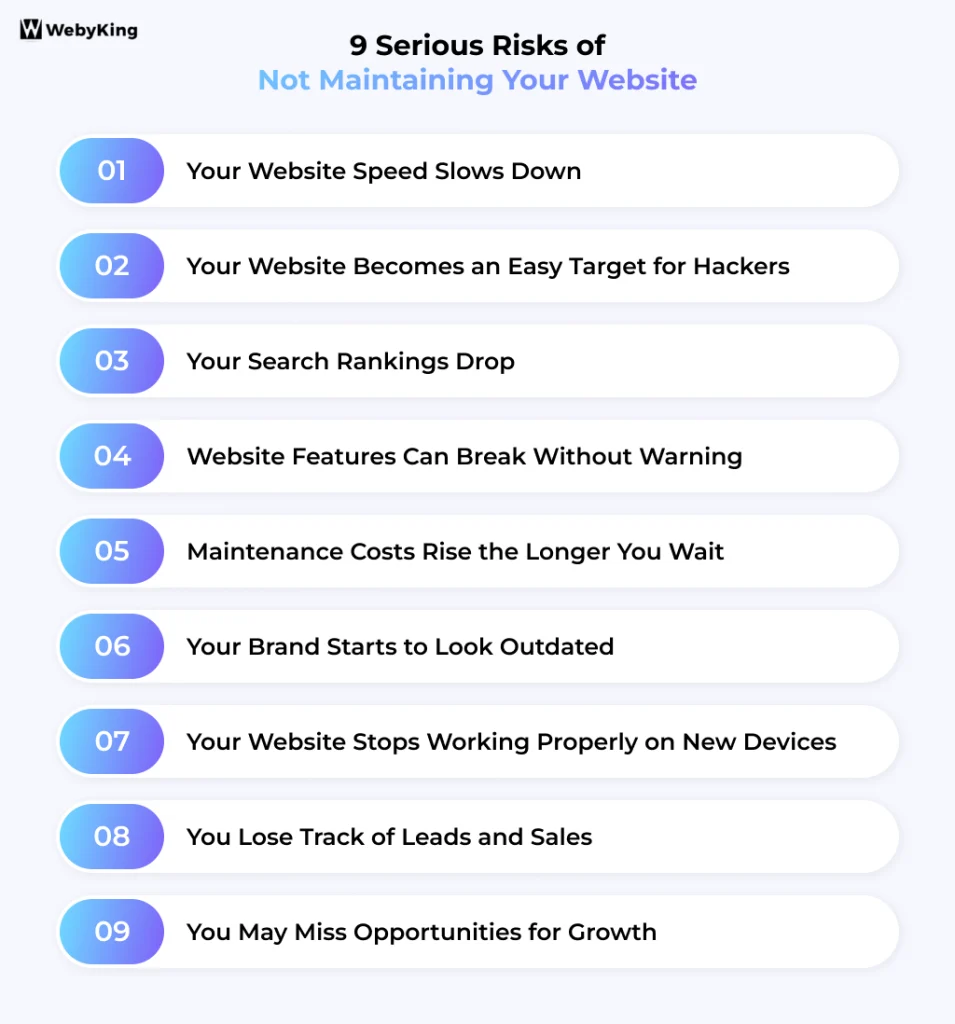
Your Website Speed Slows Down
Unoptimized images, unnecessary scripts, outdated components, and inefficient database queries can all affect website performance. If these issues go unchecked, pages may take longer to load, and visitors may leave before they find what they need.
Speed also matters for search performance. Google’s Core Web Vitals measure three aspects of user experience: loading performance, responsiveness to interactions, and visual stability as a page loads. When pages load slowly, or elements shift unexpectedly, visitors can struggle to navigate your site.
Regular maintenance helps you identify performance problems before they become a more significant problem. If your website already loads slowly, website optimization can help identify what’s slowing it down and what needs fixing.
Your Website Becomes an Easy Target for Hackers
Automated bots scan websites for known security vulnerabilities. They don’t care whether your business is a local bakery, a law firm, or an online store. If your content management system (CMS), theme, or plugins contain a vulnerability that attackers can exploit, your website could be at risk.
Patchstack’s State of WordPress Security report highlights several reasons WordPress site owners need to prioritise security:
- Researchers identified 11,334 new vulnerabilities in the WordPress ecosystem in 2025, a 42% increase over the previous year. Plugins accounted for 91% of the reported vulnerabilities.
- For the most frequently exploited vulnerabilities, attacks began a median of about five hours after public disclosure.
- Only four of the ten most-attacked vulnerabilities in 2025 were discovered that year. The others involved older vulnerabilities that attackers were still exploiting.
- Patchstack reported that 46% of vulnerabilities had no patch available at the time of disclosure. That makes monitoring and recovery planning important alongside software updates.
These figures highlight a problem that routine maintenance alone cannot solve with a single update. You also need to monitor for unusual activity, remove vulnerable components when necessary, and keep reliable backups that can be restored if your site is compromised.
If your website runs on WordPress, our WordPress maintenance service can help you manage updates, security checks, and backups.
Your Search Rankings Drop
Technical problems can make it harder for search engines to crawl, index, and serve your website’s pages. Broken internal links, inaccessible pages, and performance issues can all affect the experience people have when they visit your site. Over time, unresolved problems may also affect your search visibility.
That matters if you rely on organic traffic to bring in new customers. You could spend time and money creating useful content, only to find that technical issues are preventing some of your pages from reaching their intended audience. Keeping your website healthy is an important part of efforts to promote your website.
A hacked website can cause even additional problems. If Google detects hacked content or other security issues, it may display a warning in search results or flag affected pages. In some cases, those pages may be removed from search results. You can read more about Google’s process for dealing with hacked content.
Some infections are hard to detect during a routine visit. They may show spam to search engines, redirect certain visitors, or alter pages without making the problem obvious to the site owner. You might only discover the issue after a customer reports something suspicious, Google sends a security notification, or your organic traffic drops unexpectedly.
If your rankings have already declined and you can’t identify the cause, a technical SEO review can help uncover crawling issues, indexing problems, and other technical barriers.
Website Features Can Break Without Warning
The features customers rely on most, such as contact forms, booking tools, maps, product galleries, and payment systems, often depend on plugins or third-party services. When those tools change or stop working properly with your website, features that once worked perfectly may stop working correctly.
Imagine a potential customer trying to book a service or send an enquiry, only to run into an error. They may give up and contact a competitor instead. You could have a more serious concern without ever knowing why that person left.
The more difficult problem is a failure that goes unnoticed. Your contact form might still look normal but stop sending enquiries to your inbox. There may be no visible error, just fewer leads coming in. Testing important forms, booking tools, and checkout processes regularly helps you catch these issues before they affect your business.
Maintenance Costs Rise the Longer You Wait
Skipping website maintenance might seem like a way to reduce costs, but neglected problems can become more costly to repair. A hacked website or a major technical failure can lead to substantial recovery costs, not to mention the enquiries and sales you could lose while the site is unavailable.
Applying updates after years of neglect can also be complicated. Older software may no longer work with newer versions of your CMS, themes, or plugins. Updates may need to be applied carefully, with compatibility issues resolved and the site tested along the way. In some cases, rebuilding an outdated website can be more practical than repairing it.
Regular maintenance helps you identify problems earlier, keep software supported, and reduce the likelihood of unexpected repair costs. For a breakdown of typical plans and pricing, see our website maintenance cost guide.
Your Brand Starts to Look Outdated
Your website shapes how people perceive your business. If visitors find broken images, expired promotions, or announcements about events that happened years ago, they may question whether the information is reliable or whether your business is still active.
Outdated details can also cause practical problems. Incorrect opening hours, old prices, discontinued services, or a team page featuring former employees can confuse customers and result in lost opportunities. Someone might visit your business at the wrong time or enquire about a service you no longer offer.
Reviewing your website content every few months helps keep important information accurate and gives visitors confidence that your business is active. You don’t necessarily need a redesign; sometimes, updating a few key pages is enough to make your website more useful and trustworthy.
Your Website Stops Working Properly on New Devices
Phones, tablets, and browsers get updated regularly, and those changes can affect how your website works. A page that looked fine a year ago might now have text running off the screen, buttons that are difficult to tap, menus that fail to open, or pop-ups that visitors can’t close.
These problems can create difficulties for potential customers, especially if they’re trying to contact you, book an appointment, or make a purchase on their phone. If visitors can’t use your website properly, some will simply leave and look elsewhere.
A responsive, mobile-friendly design is one of the key features a website should have, but having a responsive design isn’t enough on its own. Someone needs to check how the site performs on current devices and browsers and fix problems when they appear.
You Lose Track of Leads and Sales
Google Analytics 4, Google Ads conversion tracking, and the Meta Pixel help you understand where visitors come from and which marketing campaigns generate leads or sales. But tracking can stop working properly after a theme change, a plugin update, or changes to your cookie consent settings.
The main concern is that your website may continue to look and work normally while the data becomes unreliable. You might see fewer conversions in your reports and assume your ads aren’t performing, when the real problem is that enquiries or purchases are no longer being tracked correctly.
Some older websites still rely on Google’s retired Universal Analytics, which stopped processing data in July 2023. If your site hasn’t been updated to use Google Analytics 4, you may be missing valuable insights into your website traffic and conversions.
If you are spending money on advertising, unreliable tracking can lead to incorrect decisions. You could cut a campaign that’s bringing in customers or keep spending on one that isn’t delivering results. Checking your analytics and conversion tracking after major website updates helps you catch these problems before they affect your marketing decisions.
You May Miss Opportunities for Growth
Website platforms and online tools change over time, bringing improvements to performance, booking systems, forms, integrations, and checkout processes. If your website isn’t maintained, you may miss useful improvements or find that the tools you already rely on no longer work as expected.
For example, connecting your website to a CRM could send new enquiries straight to your sales team instead of leaving someone to copy details from emails into a spreadsheet. An online booking system could let customers schedule appointments without calling your office, while a better checkout process could make it easier for people to complete their purchases.
These improvements don’t always require a complete website redesign. Sometimes, a software update or a suitable integration is enough. But without someone reviewing your website regularly, you may keep doing things manually that could be automated, while competitors make it easier for customers to do business with them.
What Happens to a Website Over Time Without Maintenance?
A website that goes without regular maintenance may continue to look fine while problems build behind the scenes. Outdated software can leave security gaps, features can stop working, and technical issues can become harder and more expensive to resolve. The timing varies from site to site, but here’s how neglect can affect a typical WordPress website.
| Time Without Maintenance | What Can Happen | Who May Notice |
|---|---|---|
| 1–3 months | Updates to WordPress, themes, and plugins accumulate. Some may include important security fixes, even though the website still appears to work normally. | Usually nobody, unless an update or vulnerability causes a visible issue. |
| 3–6 months | Known vulnerabilities may leave outdated plugins or themes exposed to attack. Contact forms, booking tools, or third-party integrations may also stop working as expected. | Customers may encounter errors; the site owner may not notice immediately. |
| 6–12 months | Compatibility issues can make updates more complicated. Unoptimized images, database growth, or outdated code may affect performance. Prices, service details, and analytics setups may also become outdated. | Visitors may experience problems, while the business may see changes in enquiries, conversions, or search performance. |
| 1–2 years | Server software, themes, or plugins may become unsupported or incompatible with newer versions. Updating the site may require further troubleshooting to avoid breaking features or layouts. | Often the site owner or developer, especially during an update or after a failure. |
| 2+ years | Restoring security, compatibility, and functionality may require considerable work. Depending on the site’s condition, rebuilding it may be more practical than repairing the existing setup. | The business owner, through repair costs, downtime, or a redesign decision. |
Website problems don’t follow a fixed schedule, and some can arise much sooner than these examples suggest. The longer maintenance is postponed, however, the more opportunity there is for small issues to accumulate. Addressing them early can help reduce downtime, avoid costly repairs, and keep the site working as expected.
If your website has become challenging to update or maintain, a website redesign may be a better investment than continuing to patch an outdated build.
Can You Maintain Your Website Yourself?
You can maintain your own website, especially if it’s small and straightforward and you’re comfortable working in the dashboard. But there’s a difference between keeping a website running and knowing it’s properly maintained. An update can appear successful while quietly breaking a feature, a backup can fail when needed, and a tracking error can go unnoticed while you make business decisions based on incomplete data.
DIY maintenance often leaves gaps in four key areas:
- Updating without knowing what might break. An update can affect your theme, plugins, or other features. Without testing, you may not discover the problem until a customer tries to use the site.
- Assuming your backups will save you. A backup is only useful if it’s complete, accessible, and can be restored. Finding out it’s unusable during an emergency is an inconvenient time to discover something went wrong.
- Missing problems that aren’t obvious. A form may stop delivering enquiries, a checkout process may fail, or analytics may stop recording conversions without an obvious warning. If nobody checks, these issues can continue unnoticed.
- Postponing maintenance. When customers, staff, and daily operations need your attention, website checks are often postponed. A few missed tasks can leave you unsure whether the site is still working as intended.
If you prefer to manage maintenance yourself, our website maintenance checklist explains what to check and how often. If you can’t consistently make time for those checks, a professional maintenance plan can help identify problems before they affect customers or disrupt your business.
Frequently Asked Questions
How often should I update and maintain my website?
Check for software and security updates at least once a month, and weekly if you run an online store or a high-traffic lead-generation site. Back up daily or weekly depending on how often your content changes, test forms and checkout monthly, and review your content every few months.
Why does my website need maintenance if it’s working fine?
Because most problems start before you can see them. Plugins and server software get security fixes all the time, and the gaps they close are often public, so bots look for sites that skipped them. Forms, tracking, and integrations can also break without any visible error. Maintenance catches these issues while they’re still small and less costly to fix.
Can an outdated website hurt my SEO?
Yes, which is why website maintenance matters for SEO. Slow pages, broken links, and mobile problems affect the user experience Google evaluates, and outdated content loses relevance over time. The bigger risk is security: if an outdated site gets hacked, Google may label it “This site may be hacked” or drop affected pages from search results until the site has been secured.
Why is my website loading slowly unexpectedly?
It could be outdated plugins, too many large images, broken code, or a hosting plan that no longer fits your traffic. Regular maintenance helps you spot and fix these issues before they slow things down.
How does a lack of website maintenance affect user experience?
When your site isn’t maintained, things break, like forms, buttons, or images. Pages load slowly, and outdated information confuses visitors. The site may appear unreliable, and that may cause visitors to leave.
Will not updating plugins or themes break my website?
Eventually, yes. Outdated plugins or themes can stop working, conflict with newer software, or even crash your site. Updates work like tune-ups: they prevent more serious problems later.
Do Shopify, Wix, or Squarespace websites need maintenance?
Yes, but less than WordPress sites. These platforms handle hosting, core software updates, and much of the security for you. You’re still responsible for apps and integrations, theme changes, content, forms, tracking codes, and renewing your domain. A monthly or quarterly review usually covers it.
How long can a website go without maintenance?
There’s no safe number. Security holes in popular plugins can be attacked within hours of being made public, so a WordPress site that goes even a few months without updates is likely running known vulnerabilities. After a year or two, updating everything can cost more than rebuilding.
How do I know if my website has been hacked?
Common signs include a “This site may be hacked” label in Google results, a browser warning, unfamiliar pages appearing when you search site:yourdomain.com, unexpected redirects (especially on phones), admin users you didn’t create, or a sudden drop in traffic. Some malware hides from site owners, so also check the Security Issues report in Google Search Console.
What happens if my SSL certificate expires?
Visitors see a full-page browser warning saying the connection isn’t private, and many visitors may leave immediately. Forms and checkout may stop working too. Certificates now expire more often than they used to, so automatic renewal and monitoring are essential.
What is a website maintenance plan, and why do I need one?
A website maintenance plan is an ongoing service that keeps your site updated, backed up, secure, and working for a set monthly fee. You need one if your website brings in leads or sales and nobody on your team has the time or skills to handle that work every month. Learn more about what website maintenance includes.
Is website maintenance important for a small business?
For most websites that bring in leads or sales, yes. Compare a year of maintenance with what a week of downtime, an emergency cleanup, or a drop in search rankings would cost your business. If you have a simple site with no forms or store, a quarterly DIY checklist may be enough.
How much does it cost to maintain a website?
It depends on your platform, how large and complex your site is, and how much support you need. A simple site on a hosted builder costs less to maintain than a WordPress site with many plugins or an online store. Our website maintenance cost guide breaks down typical price ranges and what each level of plan includes.
I'm Ravi Makhija, Founder & CEO of WebyKing. I believe your website should be the hardest-working member of your team, building trust, generating leads, and creating opportunities 24/7. Through web design, development, SEO, and digital strategy, I help businesses build websites that become growth assets-not just digital brochures. Too many businesses invest in websites that look great but fail to deliver real business value.
Business owners deserve digital solutions that are simple, practical, and built around their goals, not unnecessary complexity. After all, your website shouldn't just represent your business; it should help grow it.



Need Help With Website Maintenance?